How can I get the correct ttf font size based on simulator.json?

I'm trying to match the datafield label font in my DF (based on DataField class) For older devices (i.e fenix6) it used to work, because in simulator.json there are things like:

{
  "layouts": [
    {
      "datafields": {
        "datafields": [
          {
            "label": {
              "font": "xtiny"
            }
          }
        ]
      }
    }
  ]
}

So I use FONT_XTINY.

(For the sake of this post I'm looking at the "ww" variants)

But on newer devices (i.e fr965) no it uses ttf:

{
  "fonts": [
    {
      "fonts": [
        {
          "filename": "Roboto-Regular",
          "name": "simExtNumber2",
          "size": 5.4424,
          "type": "ttf"
        }
      ]
    }
  ]
  "layouts": [
    {
      "datafields": {
        "datafields": [
          {
            "label": {
              "font": "simExtNumber2"
            }
          }
        ]
      }
    }
  ]
}

However when I use RobotoRegular (BTW: IMHO there's a bug in simulator.json, and the filename probably should not contain the '-', but that's another issue) with size: 5.4424 then it is way to small:

var labelFont = Graphics.getVectorFont({:face => "RobotoRegular", :size => 5.4424});
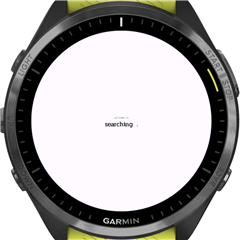
(Note the datafield label is above "searching .")

Interestingly when I look here: https://developer.garmin.com/connect-iq/device-reference/fr965/ then there are different numbers from what is in simulator.json. i.e:

xtiny: simulator.json: 6.9542, device-reference: 37

Does anyone know how to "translate" the size in simulator.json to a number that when used in getVectorFont, will look like the real label?

  • I've been wondering the same, as I'm making some build tooling that I plan to open-source. In my observation, ratios are inconsistent between device families (e.g. Edge devices seem to render the sizes quite differently).

    From other forum discussions I've wondered if it's worth seeking an answer, given that the simulator.json files's sizes might not actually match the real device's sizes.

    I've concluded that one should use vector fonts and Dc.drawScaledBitmap where available, and if necessary fall back to providing pre-scaled bitmaps to match the CFT fonts (which are also potentially not matching, but Fingers crossed).

  • TTF fonts are vector fonts. For my use case I do want to use the built in ttf fonts because I am trying to create a DataField with similar label as the built-in fields (but with dynamic text in the label, before someone pints to SimpleDataField)

  • I've been through a similar struggle recently; I hit a snag after realising (partly through the forum) that certain layouts present ambiguous decisions on whether to position the label above or below, but also that the positions in the simulator.json files aren't altogether consistent. I've now decided that for what I'm building, I won't actually use a label at all Sweat smile

    I see what you mean now actually; I can only assume there's some magic knowledge in the simulator binaries that scale these size parameters, whether to the screen dimensions or some other constant. At first I thought I had discovered that the scale factor is something like 6.2 or so (it's hard to tell because there's rounding), but then I tried on the Edge simulator and it was way off.

  • Hey, I've just been taking a fresh look at this in order to solve an issue in my new data field. IIUC it should be size * ppi / 72. The ppi figure is available in the simulator.json file. If that screenshot above is of a fenix8, then the ppi = 326 and the pixel height should be ~31px, give or take for ascent/descent shenanigans.

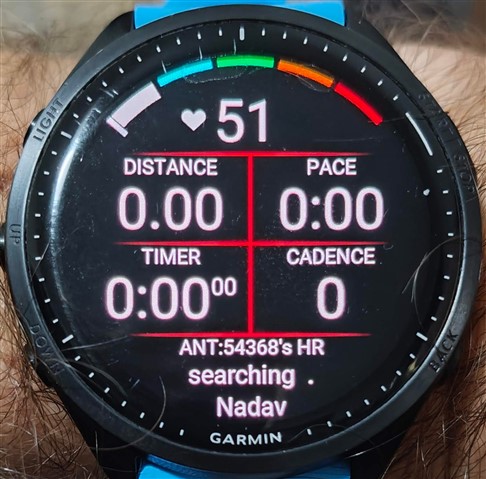
  • Where did you get the 72 from? In the simulator it looks good, but on a real fr965 it looks too small compared to the labels of other fields in the layout. See the bottom field's label: "ANT:54368's HR" should be the same size as "TIMER"

    I use the following truetype font options:

    {:face => "RobotoRegular", :size => 24.64197777777778 /* 5.4424 * 326 / 72 */}

    based on what's in the simulator.json in the "6 Fields" datafield layout:
    the label uses "simExtNumber2" font, which if you look at the fonts in simulator.json in the ww fontSet gives:

    {
      "filename": "Roboto-Regular",
      "name": "simExtNumber2",
      "size": "5.4424",
      "type": "ttf"
    }
    and ppi is 326, so 5.4424 * 326 / 72 = 24.64197
    However, when I look at https://developer.garmin.com/connect-iq/device-reference/fr965/ then I see that xtiny has a font size of 37, which explains why on the screenshot the 24.6 size font looks much smaller.
    Actually if I look at the xtiny, tiny, etc, in simulator.json, then 60 gives an almost perfect match
  • https://en.wikipedia.org/wiki/Point_(typography) - assuming the "size" is in points, then [points] * [pixels per inch] / [points per inch] = [pixels].

    These "size" values are specific to the simulator then, I guess, and perhaps that device-reference document is the authoritative source when it comes to the physical devices. Can you confirm that the values in this document work correctly on your device?

  • I did something else, based on your equation: in the simulator.json of fr965 you have all the fonts defined as ttf. Even xtiny, tiny, ... aux2. And for those we also have the "size" in the json, and the "Font Size" in https://developer.garmin.com/connect-iq/device-reference/fr965/ . So I "solved" your equation for the "divisor":

    general: ppi * ttf size / device-reference Font Size = divisor

    xtiny: 326 * 6.9542 / 37 = 61.27
    tiny: 326 * 8.7683 / 47 = 60.81
    small: 326 * 9.9777 / 53 = 61.37
    ...
    thaiHot: 326 * 33.259 / 176 = 60.60

    And when using 61 as divisor, then:

    simExtNumber2: 326 * 5.4424 / 61 => Font Size: 29.08

    29.08 is still smaller than xtiny, but maybe that's the point, otherwise they would've used xtiny as label, right?
    And it looks better than 24.64 (that is the result of your calculation, using 72 as divisor, and seen in the image in my previous comment)

    divisor: 72:

    divisor: 60: