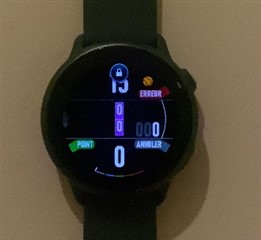
Prevent Touch Screen Lock during Activity Recording

Hi!
I'm developing an app to log tennis scores during the game while also recording activity using ActivityRecording.createSession(). 
Since this makes the app an activity my Vivo Active 6 automatically locks the touch screen after a few seconds and I need to unlock it with the padlock sliding motion. 

Is there a way to prevent the touch screen lock programatically from my app?
Or alternatively from a system level somewhere?

  • I'd also like to know this. Isn't there anybody that can help out?

  • Bump. I'm looking for some solutions. My apps allow users to keep track of score during Padel/Tennis sessions. Users are able to enter Fault/Score and then assing if the shot was a Unforced/Forced error, winner etc. Input is based on buttons and the touch but on Vivoactive 6 screen gets automatically locked and each time user would like to input the score he has to unlock the screen which is very annoying (lock icon shows up):

     \

    - Two buttons at the right side of vivoactive6 are not enough to handle inputs.
    - It does not matter if touch is enabled in system settings (the lock still shows up). 

  • Not sure if this will help but these instructions worked for me with a Vivoactive 6. 

    1. Click the top right button. 

    2. Scroll down and click "Settings"

    3. Click "Display and Brightness"

    4. Toggle "Touch Lock" to off

  • Thanks, I will share that tip with users

  • For activity-specific, e.g running, you can edit in the activity:

    - Run -> Run Settings -> Touch Lock -> Off

  • Hi,

    Has someone luck fixing this?

    I have bought the Forerunner 170 to test this.
    The Touch Lock is off in general settings, but it instantly happens when starting my app.

    Currently the user can choose between activity type generic or indoor running.
    I have set the touch-lock off for the Run activity via the connect app, but still my app has touch-lock active.

    It is quite annoying that only for the garmin activities it is possible to set touch-lock on/off.
    Or maybe I am missing something?

  • I have found the solution if someone is facing the same problem:
    This works for the Garmin Forerunner 170:

    Hold up (middle left button)
    Go to Watch settings
    Go to Focus Modes
    Go to Activity
    Go to Touch Lock (all the way at the bottom)
    Turn it off

    Now all the activities (except the Garmin ones) uses these settings, it is not possible to change it per app.