Hi all,
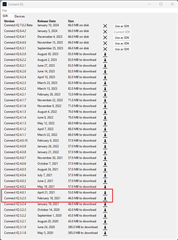
I am experiencing a run time error when calling `var transform = new Gfx.AffineTransform ()`.Here is the run time error.
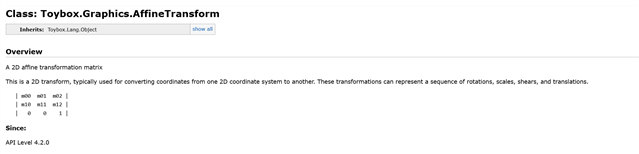
I have gone through all the reference material for the `Toybox.Graphics.AffineTransform` at the link below.
https://developer.garmin.com/connect-iq/api-docs/Toybox/Graphics/AffineTransform.html
For the life of me, I can't see what I am doing wrong.
Any ideas?
```errorError: Symbol Not Found Error
Details: Could not find symbol 'AffineTransform'
Stack:
- onUpdate() at X:\Projects\garmin\applications\Test1\source\PageTwo.mc:74 0x10000425
```
And for reference, here is the full class source file.
```mcusing Toybox.Application;
using Toybox.Timer;using Toybox.WatchUi as Ui;using Toybox.Graphics as Gfx;using Toybox.Lang as Lang;using Toybox.System as Sys;class PageTwo extends Ui.View{ var image; var angle = 0; var timer; // Constructor. function initialize () { Ui.View.initialize (); // Load image resource. image = Ui.loadResource ( Rez.Drawables.ImageHela ); // Initialise timer. timer = new Timer.Timer (); timer.start ( method ( :timerCallback ), 1000, true ); } // Called when the view is about to be displayed. function onShow () { // Code to display the image. } // Timer callback to update rotation. function timerCallback () as Void { if ( Constant.CONSTANT_CONSOLE_ENABLED ) { System.println ( Constant.CONSTANT_CONSOLE_TIMER + "Angle update." ); } // Uopdate angle. angle += 1; // Request a redraw of the view. WatchUi.requestUpdate(); } // Drawing the image on the screen. function onUpdate ( dc ) { // Initialise geometry. var width = dc.getWidth(); var height = dc.getHeight(); var imageWidth = image.getWidth(); var imageHeight = image.getHeight(); // Center image vertically and horizontaly. var x = ( width - imageWidth ) / 2; var y = ( height - imageHeight ) / 2; var xc = width / 2; var yc = height / 2; // Drawing the image. var transform = new Gfx.AffineTransform (); transform.rotate ( angle ); var parameters = { :bitmapX => x, :bitmapY => y, :bitmapWidth => imageWidth, :bitmapHeight => imageHeight, //:tintColor => null, //:filterMode => null, :transform => transform }; dc.clear (); dc.drawBitmap2 ( xc, yc, image, parameters ); } // Handling the back button press to return to the main menu. function onKeyBack () { // Switch back to the previous view (main menu). Ui.popView ( WatchUi.SLIDE_LEFT ); // Indicates that the key event was handled. return true; }}
```