TEMPE Battery Level

It is a shame that Garmin doesn't profile ANT+ profiles for HR Straps and TEMPE sensors.

My TEMPE sensor arrives today. I'm adding code to grab temp data to my data field for this device.

I'd also love to grab the battery level. But "THIS IS ANT" also doesn't document this sensor's pages.

The generic Env Profile doc doesn't explain where battery data might be in the set of pages this thing sends.

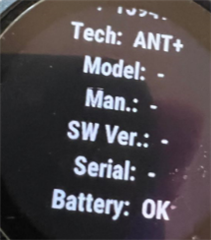
Has anyone deciphered the pages and found if/where it sends battery level?

Thanks!

  • I checked a couple of watches where I have the tempe paired natively, and none of them show battery level on the Tempe.  The Tempe is kind of different when it comes to sensors.  For one thing, it transmits 24/7, unlike things that only transmit when being worn/used.  The temperature data gets updated once a minute.  Because of the 24/7, I'm guessing the transmissions are probably lower power.

    That said, with a tempe, the battery for me lasts about a a year

  • Thanks Jim! Good idea to check the sensor stats using Garmin Connect Mobile... I forgot about that feature. Great way to see if sensor battery data is available. Interesting that it stays alive 24/7. A year is great.

  • Curiously after over 30 mins, I actually did get a Battery Reading. But all the other stats are null. Weird.

  • Has anyone deciphered the pages and found if/where it sends battery level?

    Data page 82 contains the battery status which is documented in the ANT "Common_Data_Pages_Rev_3.1" document. You can check how to retrieve the Tempe battery status in the "Tempe Field" data field source code: https://github.com/maca88/TempeField/blob/master/source/TempeSensor.mc#L90

  •   I'm looking at the code and trying to understand how does it work when you have multiple sensors. I see that the ANT id is saved in properties and in an array, but I can't understand if anything other than that is done. I was expecting to see something like it cycles over the 3 ANT ID-s periodically to read the messages from each, to calculate the average, min, max temperature, store battery status per sensor. Am I missing something? Can you explain how this works?

  • I'm looking at the code and trying to understand how does it work when you have multiple sensors.
    I was expecting to see something like it cycles over the 3 ANT ID-s periodically to read the messages from each

    According to both the readme and the code, the 2nd and 3rd sensor ANT IDs are fallbacks. The app isn't meant to connect all of them simultaneously, but only one sensor at a time.

    If the connection to the 1st ANT ID fails, then the app attempts to connect to the 2nd ANT ID. If that fails, the 3rd ID is tried. After that, the 1st ID is tried again, and so on.

    https://github.com/maca88/TempeField/blob/c1421efbe6d785d2fe4962d3f0b542187918c116/source/TempeSensor.mc#L95-L103

    https://github.com/maca88/TempeField/blob/c1421efbe6d785d2fe4962d3f0b542187918c116/source/TempeSensor.mc#L145-L157 

    https://github.com/maca88/TempeField/ 

    Pair multiple Tempe sensors

    By default only one Tempe will be paired in order to prevent pairing Tempe sensors from other people when our is off. To pair an additional Tempe sensors:

    1. Update Second Tempe device number app settings value from -1 to 0
    2. Make sure that the Tempe sensor that was already paired is far away from Garmin Edge
    3. Wait until the battery level is displayed (this can take up to one minute)

    I think point 2 implies that only one sensor would be used at once. I kinda get where the confusion arises tho: "pair" could be interpreted as "connect".

  • I think point 2 implies that only one sensor would be used at once. I kinda get where the confusion arises tho: "pair" could be interpreted as "connect".

    No. Point 2 is saying the other one being near-by might cause the paring to fail.  The "By default..." line explains that.

    This is talking about pairing multiple sensors (not replacing one with another).

    Still, since it seems that the Tempe is intended for general local temperature, it make sense that the data from only one of them would be used.

    Having multiple sensors makes some sense (maybe, you have them attached to multiple bikes). Wanting data from more than one at at time seems a bit odd to me.

  • According to both the readme and the code, the 2nd and 3rd sensor ANT IDs are fallbacks. The app isn't meant to connect all of them simultaneously, but only one sensor at a time.

    If the connection to the 1st ANT ID fails, then the app attempts to connect to the 2nd ANT ID. If that fails, the 3rd ID is tried. After that, the 1st ID is tried again, and so on.

    That is exactly how the Tempe field works.

    The Tempe field uses only one ANT connection at a time to connect to a single Tempe sensor. Once the connection is established, it is kept alive until the data field is stopped by the system.

    If you want to read data from multiple Tempe sensors, you could close the connection after receiving data from the first sensor and then reopen the connection using the device ID of the next Tempe sensor.

  • No. Point 2 is saying the other one being near-by might cause the paring to fail.  The "By default..." line explains that.

    Yeah I understand that.

    The reason pairing would "fail" in this case is that actually, the app won't even attempt to connect to or pair with another sensor if it is currently connected to a sensor.

    This is talking about pairing multiple sensors (not replacing one with another).

    I never said it was about replacing one sensor with another. I said that only one of the 3 sensor IDs would be used at a time, contrary to the assumption by flocsy that all 3 of them would be used simultaneously. I attempted to support this by referring to the instructions for the pairing process, although to be fair, the fact that the app will only pair with one sensor at a time doesn't necessarily mean that it will only connect to one sensor at a time.

    I will also say that there's nothing in the README or the store description which explicitly says that multiple sensors would be used at the same time, although I guess some ppl might guess that from the fact that multiple sensors could be specified in config / paired.

    To be clear, when I said only one sensor would be "used" at once, I meant the app would only connect to one sensor. 

    Anyway I'll just let the dev (and code) speak for themselves. Literally all the behaviour is right there in the code, so it isn't too hard to see how the app actually works. And barring any bugs, it isn't too hard to see how it's *supposed* to work, as well.

    Having multiple sensors makes some sense (maybe, you have them attached to multiple bikes). Wanting data from more than one at at time seems a bit odd to me.

    I don't even think it's a question of "wanting" data from more than one sensor. It's more like "this app pairs with multiple sensors but I don't understand how multiple sensors are used????"

    But it's no different in principle from natively pairing multiple heart rate monitors to your Garmin watch. I don't think anyone really expects their watch to connect to multiple hrms and multiplex / average the data from each of them.

    (inb4 but there are ciq apps which connect to multiple hrms so users can compare their chest strap hr data with their wrist hr data. that is an exceptional case and clearly not what I am talking about. I guess it could be something along the lines of what flocsy was looking for though. Maybe to use the data field to compare data from different temperature sensors? I guess you could run multiple "clones" of the data field, in that case.)

    You can also pair multiple set of earbuds to your watch, but again, the watch only connects to one set at a time.