


I have built my first datafield for Edge devices.
On my Edge it runs flawlessly.
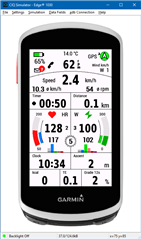
The layout meets my needs - but now I want to make it available to the general public.
For myself, I have also set the rear gear index display - but for mechanical derailleurs.
To be able to display electric ANT+ rear derailleurs as well, I have put together the following code with the help of posts in this forum and with the help of the explanations at Toybox. Unfortunately I can't check the code because I don't have an electric derailleur and I can't find a way to check it in the simulator (VS Code).
So may I ask that you take a look at the code and tell me if it will work this way?
SHIFTING.MC
using Toybox.AntPlus;


var frontGearIndex = 66;
var rearGearIndex = 99;


	class myShiftingListener extends AntPlus.ShiftingListener {

		function initialize() {
			AntPlus.ShiftingListener.initialize();
			System.println("I was here 1");
		}

		function onShiftingUpdate(data) {
		System.println("I was here 2");
			if (data != null) {
				if (data.frontDerailleur != null) {
					frontGearIndex = data.frontDerailleur.gearIndex;
				}
				if (data.rearDerailleur != null) {
					rearGearIndex = data.rearDerailleur.gearIndex;
				}
			} else {
				frontGearIndex = 0;
				rearGearIndex = 0;
			}
		}

		function getFrontGearIndex() {
			return frontGearIndex;
		}

		function getRearGearIndex() {
			return rearGearIndex;
		}


	}
TESTAVIEW.MC
import Toybox.Activity;
import Toybox.Graphics;
import Toybox.WatchUi;
import Toybox.AntPlus;


class TestAView extends WatchUi.DataField {

    var listener;
    var curGear = 0;
    var shifting;

    function initialize() {
        DataField.initialize();

        listener = new myShiftingListener();
	    shifting = new AntPlus.Shifting(listener);
    }

    // The given info object contains all the current workout information:
    function compute(info as Activity.Info) as Void {

        //SRAM Index rear:
        curGear = myShiftingListener.getRearGearIndex();
        System.println("curGear = " + curGear);

    }   // END Compute

    // Display the value you computed:
    function onUpdate(dc as Dc) as Void {

        dc.setColor(Graphics.COLOR_BLACK, Graphics.COLOR_WHITE);
        dc.drawText(140, 10, Graphics.FONT_NUMBER_MEDIUM, curGear, Graphics.TEXT_JUSTIFY_CENTER);

    }
}
I am also attaching the complete project of the snippet here.
Thank you for your help!


