UserActivityHistoryIterator - Unexpected Type Error - Failed invoking <symbol>

Hi just wondering if there is anyone out there that can prevent me from pulling any more hair out

I have put together a widget which uses the Class: Toybox.UserProfile.UserActivityHistoryIterator to collect data and totalize diatances etc. All has been working fine and I have released the widget on connect IQ and it is running fine on my device (FR 245).

I came back to the code today to make some minor updates and I found that when running up the simulator I get now see and error "Encountered app crash"

Error: Unexpected Type Error
Details: Failed invoking <symbol>
Stack:
- getDataSet() at C:\Users\gbjocoo3\Desktop\My Infomraiton\App Support\eclipse-workspace\Weekly Goal Widget - Run\source\WeeklyGoalRunGetData.mc:34 0x10000752
- onStart() at C:\Users\gbjocoo3\Desktop\My Infomraiton\App Support\eclipse-workspace\Weekly Goal Widget - Run\source\WeeklyGoalRunApp.mc:12 0x1000127b

Encountered app crash.

All the all roads seem to lead to line 34 of an area of code that collects the data

using Toybox.Graphics as Gfx;
using Toybox.Application as App;
using Toybox.Time.Gregorian as Calendar;
using Toybox.Time;
using Toybox.System as Sys;
using Toybox.UserProfile;

33        var userActivityIterator = UserProfile.getUserActivityHistory();
34       var sample = userActivityIterator.next();
It is really strange as the simulator was running OK and the only change, I believe has happened has been a driver update on my laptop and a windows update. I am running SDK 4.1.5 on a windows 10 machine,
Having uninstalled Visual Studio Code and all SDKs and even replicating the test on a spare laptop which displayed the same error I am really struggling to know what has happened. The error is consistent across all 3 off my widgets using the UserActivityHistoryIterator and no changes have been made to 2
I was wondering if there was an issue with missing history data on the simulator causing a null value, but I am at a loss where the data would reside
If anyone can suggest a course of action it would be really appreciated
Thanks
John
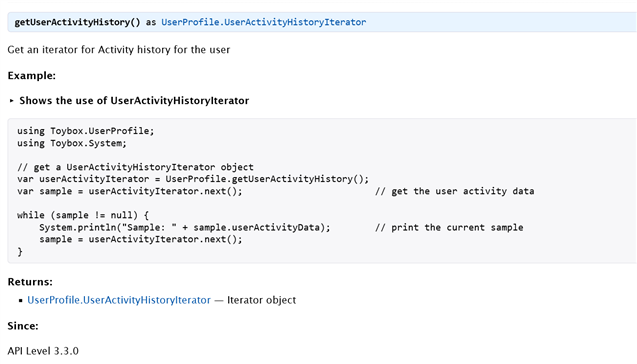
  • according to the docs of UserProfile.getUserActivityHistory():

    Since: API Level 3.3.0


    but that's strange, because then you should get the error in line 33. But I guess that's what happening, and the line numbers are inconsistent for some reason.

  • This is only available for simulated devices running CIQ 3.3.x or 4.1.x ("System 5" devices).  What device are you seeing this on?

    You may want to have a "has" for UserActivityHistoryIterator  before you try to use it.

  • Hi thanks for the replies. I am using devices capable of API 3.3 and have installed the SDK at the latest version 4.1.3. If I build with the FR245 or Fenix 7s the results now are the same. The strange thing is that I had tested all of these prior to the release on the IQ store. And for some reason all of the widgets using the iterator are now failing on multiple laptops. Could you expand a little on the "has". Do I include this in the definition of the class ?

    class HistoryData has UserActivityHistoryIterator
    I changed the API version to 4.0. and run the simulator as Fenix 7s and the app still crashed
    Error: Unexpected Type Error
    Details: Failed invoking <symbol>
    Stack:
    - getDataSet() at ......\App Support\eclipse-workspace\Weekly Goal Widget - Run\source\WeeklyGoalRunGetData.mc:34 0x10000752
    - onStart() at ......\App Support\eclipse-workspace\Weekly Goal Widget - Run\source\WeeklyGoalRunApp.mc:12 0x1000127b
    Extract from WeeklyGoalRunApp
       // onStart() is called on application start up
        function onStart(state) {
            WidgetProperties.getProperties();
            HistoryData.getDataSet();
        }
  • OK so I have spotted that there were no FIT files available in the Simulator directory

    C:\Users\XXXXXX\AppData\Local\Temp\com.garmin.connectiq\GARMIN\Activities

    I have popped some examples in from those stored in my FR245 snd the Simulator has come back to life.

    Hopefully this has been the reason and I may not be losing my mind after all

    I will check to see the response of the watch if I clear the History but this looks to have been the issue

  • Use the 4.1.5 SDK  4.1.3 is from May.  And make sure you have the newest device files.

  • You want to handle the case where there are no fit files.  Say someone just got the watch and has not recorded a fit, or they did a factory reset on the device.

  • Do you have any recommendations I was hoping checking for the null using  while (sample != null )  would catch it but I was not expecting the iterator to fail. 

  • Just a guess, but try checking the result of UserProfile.getUserActivityHistory();

    for null.

  • Thanks for all the help. It is really appreciated Thumbsup

  • I was able to reproduce this with the sim and confirm what was said above:

    - If there are no activity FIT files in the simulator's activities folder, getUserActivityHistory() returns null, otherwise it works as expected (returns a UserActivityHistoryIterator)

    This brings up a couple of points:

    - The docs have the following type information and example for getUserActivityHistory(), which suggest that it shouldn't ever return null:

    developer.garmin.com/.../UserProfile.html

    The 4.1.5 SDK also has the same type information (line 101 of api.mir):

    [@file = "api\UserProfile.mb"; @line = 192; minSdk = "3.3.0"; ]
    function getUserActivityHistory() as $.Toybox.UserProfile.UserActivityHistoryIterator {}

    The question is whether real devices behave the same way:

    - If real devices also return null, then the documentation, sample code and SDK type information are wrong, and should be fixed

    - If real devices don't return null, then the simulator is wrong and needs to be fixed