Problem with partial upd .. function, please help.

Hello.

I'm sorry to start another thread for OnPartialUpdate.

I know there is a lot on the forum, but I have not found a solution and an example that would solve my problem.

I will try to describe here what I need to call regularly via this function.

I have five slashes that I created in the font maker.

These slashes appear to me instead of seconds, ie 1 slash = first second.

It is like
"Knight Rider Car" reads slashes from left to right in seconds. Wink

The problem is that when I do dc.setClip at the bottom of the screen for slash size, width, height, I get to total time fast.


I would ask someone who could help me with this feature.

The best example of how to proceed.


Here's what I'm trying to do in OnPartialUpdate.

I do dcClearClip in OnUpdate...

Thank you
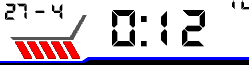
function onPartialUpdate(dc){
		sleepMode = true;


		dc.setClip(20, 175, 25, 20);
        dc.setColor(Graphics.COLOR_BLUE, Graphics.COLOR_TRANSPARENT);
        dc.drawText(20, 175, $.fontIcon_seconds, $.ICON_SECONDS, Gfx.TEXT_JUSTIFY_CENTER);


        }
         }

  • The slash loading code works beautifully.

    Thank you

    BTW:

    I still wanted to ask if I want to add normal seconds so that they also run in OPU mode, so should I do it via another clip?

    function DrawSlash(dc, sec)
          {              
                     if(sec % 6)    
                     {
                        dc.setColor(mColors[(sec / 6) % 2], -1);
                        sec = (sec  % 12)  - 1;
                        dc.setClip(mDrawX[sec ], 160, 25, 30);
                        dc.drawText(mDrawX[sec ], 175, $.fontIconSeconds, $.ICON_SECONDS,6);
                        dc.clearClip();
                     }
           
           dc.drawText(130, 30, 12, sec.format("%02d"),6);
           }
    
        function onPartialUpdate(dc)
          {
    
          DrawSlash(dc, Sys.getClockTime().sec);
           dc.drawText(130, 30, 12, sec.format("%02d"),6);
          }
            }

    my functions for the seconds themselves:

    function drawSeconds(dc) {
             
              var x = 227, y = 128;
              
              var Time = Sys.getClockTime();
              var timeSecString = Lang.format("$1$", [Time.sec.format("%.2d")]);
               
              dc.setColor(Gfx.COLOR_BLACK, Gfx.COLOR_WHITE);
              dc.drawText(x, y, $.fontSeconds, timeSecString, Gfx.TEXT_JUSTIFY_LEFT);  
           
           }

  • you have to add setClip in any drawing in OPU and corresponding clearClip or new setClip

    but if you want to add seconds you should

    - not draw it on DrawSlash but on OU/OPU

    - remove clearClip form DrawSlash

    - in OPU

    -- add setClip(area for only second)

    -- draw seconds

    --clearClip

    in OU

    -- add setClip(area for all screen)

    -- draw seconds

    -- you dont have to call clearClip

    you can optimise something e.g. arrays has duplicate values (the code is creating quickly and I feel it can be more elegant)

    BTW test scenariio:

    - run app in sim, after few OU

    - choose low power mode from settings menu

    - check if slashes are drawn well (no jump in slash colors)

    - change to high power

    - check if slashes are drawn well (no jump in slash colors)

    slashes should be drawn "in correct order"

  • Now I've tried it in both modes and you're right, if I change the mode at once, it will skip the color of the slash.

  • look for solution,  you have to find good values for

    - 10 in loop for(var j=0; j<10; j++)

    - and coreponding 59 in sec  = SYS.getClockTime().sec +59

    you can also resign from lopp in OU but than for some cases you can see empty places for the first few drawing but they will fill after max 12 seconds

  • This is what she was doing now:

  • it is a bit difficult to synchronise drawing

    but in my opinion this code should run well

    var sec_now  = SYS.getClockTime().sec +51;
                    for(i=0;i<10;i++)
                    {
                    
                            DrawSlash(dc, sec_now + i);
                    
                    }

    or

    var sec_now  = SYS.getClockTime().sec +50;
                    for(i=0;i<11;i++)
                    {
                    
                            DrawSlash(dc, sec_now + i);
                    
                    }

    you have to find solution yourself or simple remove loop and only use the same code like in OPU

    DrawSlash(dc, SYS.getClockTime().sec);

  • yes you are right this code is working properly. You're really good, hat down...

    btw:

    You've spent a lot of time with me and you've helped me a lot.

    I do not know how much to thank you, you have my admiration.

    I can't put seconds of "digits" into the code yet.

  • but if you want to add seconds you should

    - not draw it on DrawSlash but on OU/OPU

    - remove clearClip form DrawSlash

    - in OPU

    -- add setClip(area for only second)

    -- draw seconds

    --clearClip

    in OU

    -- add setClip(area for all screen)

    -- draw seconds

    -- you dont have to call clearClip

  • I understand that, I just don't know how to include another area for seconds in the code. I have seconds in OU, but I can't call them in OPU mode.

    dcSetClip()???

    function drawSeconds(dc) {

    var x = 227, y = 128;

    var Time = Sys.getClockTime();
    var timeSecString = Lang.format("$1$", [Time.sec.format("%.2d")]);

    dc.setColor(Gfx.COLOR_BLACK, Gfx.COLOR_WHITE);
    dc.drawText(x, y, $.fontSeconds, timeSecString, Gfx.TEXT_JUSTIFY_LEFT);

    }

  • function drawSeconds(dc, sec)
    {
    dc.setColor(0, 0xffffff);
    dc.drawText(227, 128, $.fontSeconds, sec.format("%02d"), 2);
    }

    function DrawSlash(dc, sec)
        {              
                 if(sec % 6)    
                 {
                    ...
                    //dc.clearClip(); unnecessary
                 }
        }
        
    function onPartialUpdate(dc)
    {
        var sec = SYS.getClockTime().sec;
        DrawSlash(dc, sec);
        dc.setClip(220,120,14,16);//adjust vaulues
        drawSeconds(dc, sec);
        dc.clearClip();
    }    

    function onUpdate(dc)
    {
        var sec = SYS.getClockTime().sec,
        sec_now = sec + 51;
          for(i=0;i<10;i++)
                    {
                    
                            DrawSlash(dc, sec_now + i);
                    
                    }
        dc.setClip(0,0,dc.getWidth(),dc.getHeight());
        drawSeconds(dc, sec);
    }