Problem with partial upd .. function, please help.

Hello.

I'm sorry to start another thread for OnPartialUpdate.

I know there is a lot on the forum, but I have not found a solution and an example that would solve my problem.

I will try to describe here what I need to call regularly via this function.

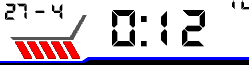
I have five slashes that I created in the font maker.

These slashes appear to me instead of seconds, ie 1 slash = first second.

It is like
"Knight Rider Car" reads slashes from left to right in seconds. Wink

The problem is that when I do dc.setClip at the bottom of the screen for slash size, width, height, I get to total time fast.


I would ask someone who could help me with this feature.

The best example of how to proceed.


Here's what I'm trying to do in OnPartialUpdate.

I do dcClearClip in OnUpdate...

Thank you
function onPartialUpdate(dc){
		sleepMode = true;


		dc.setClip(20, 175, 25, 20);
        dc.setColor(Graphics.COLOR_BLUE, Graphics.COLOR_TRANSPARENT);
        dc.drawText(20, 175, $.fontIcon_seconds, $.ICON_SECONDS, Gfx.TEXT_JUSTIFY_CENTER);


        }
         }

  • function onPartialUpdate(dc)
      {

       var

        sec  = Sys.getClockTime().sec,
        pos = (sec  % 6)  - 1;

     if(sec % 6)    {

        //drawing only for 1..5 second

      ....


  • I'm getting another error on the line:

     dc.setClip(mPositionTextX_ClipX[pos][1], 175, 26, 20);

    as a constant for dc.setClip I use what you did:

    const mPositionTextX_ClipX = [
    //fill it drawX, clipX
    [10,20],

    ];

  • I can't develop instead of you. I've though you know programming craftsmanship...
    Maybe you should use more standard programming method.
    You have debugger, errors description etc..

    What return (sec  % 6)  - 1 => pos? 0,1,2,3,4 (5 not because it's inside if(sec %6))

    What return mPositionTextX_ClipX[pos][1]? pos row 1 column

    put in mPositionTextX_ClipX 5 elements not 1!!!

    const mPositionTextX_ClipX = [
    //fill it drawX, clipX
    [10,20], /// drawX=mPositionTextX_ClipX[0][0] = 10 clipX =mPositionTextX_ClipX[0][1] = 20

    [30,40], /// mPositionTextX_ClipX[1][0] = 30 mPositionTextX_ClipX[1][1] = 40

    ....

    ];

    It's last help for today because I have other plan for evening.

  • Good day,

    I appreciate your help and especially the time you devote to me, for which I also awarded you as a reward for helping with VoteUp.

    As for my programming in connect IQ, I am a student and I needed to see this feature as an example.

    There are a lot of tutorials on this forum, but so far no one has done a sample project - source code such as drawing and OnPartialUpdate mode from left to right...

    I have an F6 watch and I don't know if it will continue to work on this programming platform.

    I just wanted a simple constant that would tell me more about how I can extend the OnPartialUpdate function more, and I think drawing from right to left is a good example and will help others who will be dealing with something similar in the future, whether they are studying or starting with programming.

    I'm sorry to burden you.
    I was only looking for help on this forum, as other users and sometimes experienced programmers do.

    Because there is always something to learn and room for improvement is important.

    I didn't want you to do all the code for me - WatchFace, which they would boast, but I just wanted some working source, test code that I could modify according to my criteria and understand the meaning.

  • Have you already had running code drawing slashes from left to right (from pseudo code)?

  • If you mean your code, it doesn't work for me.

    It contains some errors when importing into my project...

  • this code runs well (but it is not beautiful just to show you running example), put it in onUpdate and run for any 260x260 device and you will see execution

    you have to add only a proper clip if you want to use it onPartial

    it can be dc.setClip(mDrawX[pos] - 10, ....

    	var
    				sec  = SYS.getClockTime().sec,
        			pos = (sec  % 12)  - 1,
        			mColors = 
    				[	
    					GRA.COLOR_BLUE,	
    					GRA.COLOR_RED, 
    					GRA.COLOR_BLUE,	
    					GRA.COLOR_RED,
    					GRA.COLOR_BLUE,	
    					GRA.COLOR_RED,
    				],
    				mDrawX = 
    				[
    					10,
    					40,
    					70,
    					100,
    					130,
    					null,
    					130,
    					100,
    					70,
    					40,
    					10
    				];
    
    				dc.setColor(
            				mColors[(sec / 6) % 2],
            				0);
     				if(sec % 6)    
     				{ 
     					
            			dc.drawText(mDrawX[pos], 130, 12, "/",6);
            			
     				}
            		dc.drawText(130, 30, 12, sec.format("%02d"),5);

  • Great, thank you very much. Now I know how to proceed and I have a better understanding of drawing in the OnPartialUpdate function.

    I have one last question. you said that if the device has memory, it is better to use a font - icon to draw. While testing, I noticed that empty pixels were drawn in my font unnecessarily. Wouldn't it be better if I replaced the font with dc.fillPolygon (x, y)?

  • write 2 version of function and run profiler for both and you will see which is faster

  • do you mean Profiler -> Average time?