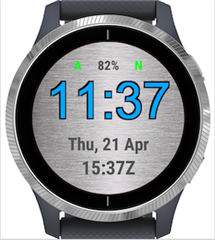
Hello,
I am trying to add the ability to switch between background images on a watch face (A cool graphic for my Venu, with the option of a blank/simple background). I found this thread on the boards: https://forums.garmin.com/developer/connect-iq/f/discussion/1150/watch-face---multiple-background-images
The thread is 7 years old and I now have some follow up questions.
The post has the code:
function checkLoadedImage() {
if ( isDaytime && !daytimeImageLoaded ) {
pic = null; // This is included to show that memory is being cleared. You don't actually need it.
pic = Ui.loadResource(Rez.Drawables.day_image);
- On the last line here, is "day_image" the actual file name ("my_image.png") or is it the "id" as defined in the layout.xml? (Yes, I am using layout.xml).
- How do I remove the background image if I just want to replace it with a solid color?
- Also, the first line checkLoadedImage()...I cannot find the source for this in the Toybox. Does it still exist? What does it do?
Thanks!
This is where I am at on my first Garmin watch face (I've done a couple on Fitbit).
A is for an alarm set. N is for active Notifications. The Zulu time can be switched to steps. Battery power display can be turned on or off. It is the gray shaded background I want an option on.