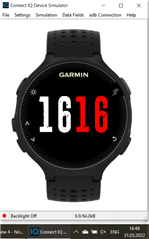
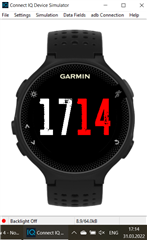
Class 'MOONView' does not initialize its super class, 'WatchFace'

Hi everyone! I start meet with Connect IQ and need your advices

Based on Peter's project: www.youtube.com/watch

Some points clarified here forums.garmin.com/.../

As a result, I have:

- one error: WARNING: fr235: D:\FILES\Garmin\Project\MOON\MOON\source\MOONView.mc:6: Class 'MOONView' does not initialize its super class, 'WatchFace'

- Wrong time

- Wrong size\position\font

Could you help me pls?

import Toybox.Graphics;
import Toybox.Lang;
import Toybox.System;
import Toybox.WatchUi;

class MOONView extends WatchUi.WatchFace {
  
    var customFont = null;

    function onLayout(dc) {

        customFont = Graphics.FONT_NUMBER_MILD;    
    }

    function onUpdate(dc) {
        dc.setColor(Graphics.COLOR_BLACK, Graphics.COLOR_BLACK);
        dc.clear();
        var clockTime = System.getClockTime();
        var hour = clockTime.hour;
        if (!System.getDeviceSettings().is24Hour) {
            hour = hour % 24;
            if (hour == 0) {
                hour = 12;
            }
        }
        dc.setColor(Graphics.COLOR_WHITE, Graphics.COLOR_BLACK);
        dc.drawText(dc.getWidth()/2, 22, customFont, hour.toString(), Graphics.TEXT_JUSTIFY_RIGHT);
        dc.setColor(Graphics.COLOR_RED, Graphics.COLOR_BLACK);
        dc.drawText(dc.getWidth()/2, 22, customFont, hour.toString(), Graphics.TEXT_JUSTIFY_LEFT);
    }

    function onShow() {
    }

    function onHide() {
    }

    function onExitSleep() {
    }

    function onEnterSleep() {
    }
 

}
  • The code you started with is about 7 years old (I recall when Petr first did the video) and here's what you do:

    add an initialize() function in your class

        function initialize() {
            WatchFace.initialize();
        }

    The warning shouldn't hurt anything, but this is how to get rid of the warning.

  • Thanks a lot! It works.

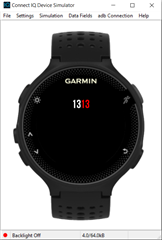
    Now I fixed the position of clock to center with dc.drawText(dc.getWidth()/2, 75

    But I have no fixed wrong time\size\font have you any advices?

  • In the video, it shows how to create and add a custom font after you have the basics running.  Right now you are using FONT_NUMBER_MILD - a native number font - a small one.

  • Thank you for fast reply! you pointed my brain in the right direction!

    Just one problem now with wrong time. Is this issue with old functions from 2016?

    import Toybox.Graphics;
    import Toybox.Lang;
    import Toybox.System;
    import Toybox.WatchUi;
    
    class MOONView extends WatchUi.WatchFace {
        function initialize() {
            WatchFace.initialize();
        }
      
        var customFont = null;
    
        function onLayout(dc) {
    
            customFont = WatchUi.loadResource(Rez.Fonts.customFont);    
        }
    
        function onUpdate(dc) {
            dc.setColor(Graphics.COLOR_BLACK, Graphics.COLOR_BLACK);
            dc.clear();
            var clockTime = System.getClockTime();
            var hour = clockTime.hour;
            if (!System.getDeviceSettings().is24Hour) {
                hour = hour % 24;
                if (hour == 0) {
                    hour = 12;
                }
            }
            dc.setColor(Graphics.COLOR_WHITE, Graphics.COLOR_BLACK);
            dc.drawText(dc.getWidth()/2, 20, customFont, hour.toString(), Graphics.TEXT_JUSTIFY_RIGHT);
            dc.setColor(Graphics.COLOR_RED, Graphics.COLOR_BLACK);
            dc.drawText(dc.getWidth()/2, 20, customFont, hour.toString(), Graphics.TEXT_JUSTIFY_LEFT);
        }
    
        function onShow() {
        }
    
        function onHide() {
        }
    
        function onExitSleep() {
        }
    
        function onEnterSleep() {
        }
     
    
    }

  • You are using hour.toString() on lines 30 and 32.  On line 32, you want to use clockTime.min.format("%02d") instead.

    you are displaying the hour twice instead of HH MM

  • Oh, I see. After many attempts I missed obvious..

    Thank you Jim! The issue was solved!

    dc.drawText(dc.getWidth()/2, 20, customFont, clockTime.min.format("%02d"), Graphics.TEXT_JUSTIFY_LEFT);