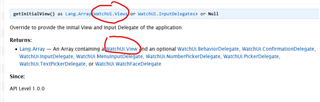
Meaning of "as" in the documentation

I am confused by the documentation. Let’s take this example

* I want to add a WatchUi.Menu to the initial View
* Application.AppBase has as method getInitialView()
* Docs state: Returns Lang.Array — An Array containing a WatchUi.View
* WatchUi.Menu 
does not subclass WatchUi.View … so it is not accepted in the Array

BUT

* Docs also state: getInitialView() as Lang.Array<WatchUi.Views …
* typedef Views as WatchUi.View or WatchUi.Menu or …

What is the meaning of that as statement?
Can I put a WatchUi.Menu into the Array?
And is there a documentation describing the documentation?

Thanks in advance :)

  • If your array contains WatchUi.Views that means that the 1st element can be WatchUi.Menu, the second element can be WatchUi.View, etc.
    You can't pass this array to a method that expects an array of WatchUi.View-s, because some of the elements can be something else, that the method is not capable of dealing with.

  • Using a class that extends Menu2 is one of the ways to do on device settings in getSettingsView.

    You still return at most, one view and one delegate.

    Once a main view is started (getInitialView), if you want a menu to show, you then use WatchUi.pushView().  You couldd do this based on onMenu() in the main view's delegate.

  • Thanks, I appreciate your answers but it is not quite what I was asking.

    The documentation for getInitialView() has two entries which both seem to refer to the return type of the functions (Returns … and as …). But both are contradictory. I am trying to understand what they mean. Or maybe it is error in the documentation?

  • as Lang.Array <> or Null

    Means it could be an array or null

    <WatchUi.Views or WatchUi.InputDelegates>

    means a view or a delegate.

    viewS, and inputdelegatesS because there are different kinds of views (WatchUi.DataField/WatchUi.WatchFace) and delegates (WatchUi.BehaviorDelegate/WatchUi.InputDelegate)

    The way I understand what the "Views" and "InputDelegates" refer to.

  • The documentation for getInitialView() has two entries which both seem to refer to the return type of the functions (Returns … and as …). But both are contradictory. I am trying to understand what they mean. Or maybe it is error in the documentation?

    The "as" part (in the function signature) is a formal definition of the return type, using the relatively new monkey types system. You can imagine that the actual system library code is written this way:

    getInitialView() as Lang.Array<WatchUi.Views or WatchUi.InputDelegates> or Null

    The "returns" part is the human-readable description of the return type (which predates monkey types).

    <WatchUi.Views or WatchUi.InputDelegates>

    means a view or a delegate.

    I think his point is that WatchUi.View and WatchUi.Views are not the same thing (although the former is in the return type documentation, and the latter is in the function signature documentation).

    If you click on the documentation link for WatchUi.Views, you'll see it's a superset of WatchUi.View and some other types which do not inherit from WatchUi.View, as you said:

    typedef Views as WatchUi.View or WatchUi.Menu or WatchUi.TextPicker or WatchUi.ProgressBar or WatchUi.Confirmation or WatchUi.NumberPicker

    But both are contradictory. I am trying to understand what they mean. Or maybe it is error in the documentation?

    Yes, they are contradictory, and yes, I think it is an error in the documentation. IMO, the return type description should:

    - Make it clear that the array returned by getInitialView() should have 1-2 elements

    - The first element should be WatchUi.Views (not View) (I think *)

    - The second element (which is optional), should be WatchUi.InputDelegates

    (*) If you click on the documentation for WatchUi.Menu, WatchUi.TextPicker, etc., each of these classes is described as a "special View" even though they don't inherit from WatchUi.View. I'm sure there's some boring technical reason for this apparent discrepancy >_>.

    If you want to confirm what I said, you can always try it. I'm sure an app that's nothing but a progress bar or confirmation view would not be very useful, but an app whose initial view is a Menu is plausible (although most devs would probably want to use Menu2, which actually does inherit View, because it has a lot more features and looks nicer.)

  • Yes, it was failing with a type error for Menu which matched the Returns documentation. But then, according to docs, there was no path enabling usage of Menu at all, so I started wondering if as is some black magic I do not understand. Switching from type=widget to type=watch-app fixed it for me. Now the as statement is correct and the Returns is wrong.

  • Yes, it was failing with a type error for Menu which matched the Returns documentation. But then, according to docs, there was no path enabling usage of Menu at all, so I started wondering if as is some black magic I do not understand. Switching from type=widget to type=watch-app fixed it for me. Now the as statement is correct and the Returns is wrong.

    Yeah, the thing is that the as clause can't capture all nuances of the expected return type of getInitialView(), such as the fact that it should return an array of either 1 or 2 elements. It's constrained by the limits of the monkey c type checking system.

    You can think of the as clause this way: the types it excludes are definitely invalid (for example it's not allowed to return a non-array), but the types it includes are not always valid, because of cases like this where the valid args/return type is constrained by other factors, like the app type (widget vs device/watch app). IOW, in general, having your code conform to the as clause is a necessary, but not sufficient, condition for getting your code to run properly.

    Switching from type=widget to type=watch-app fixed it for me.

    You've stumbled across a limitation that isn't documented in getInitialView() - the initial view of a widget can't be a menu (because the initial view of a widget isn't allowed to accept any user input other than the START key or a tap for touchscreen devices, due to the way widgets work in non-glance mode, where the full initial view is displayed in the "widget carousel", and UP/DOWN/BACK are used to navigate through the carousel.). I'm guessing none of the "special views" will work for a widget -- you would probably have to use a literal WatchUi.View as the initial view for a widget.

    I'll just say the dev docs have a lot of room for improvement, IMO.

  • They are okish but considering the first time I tried to build an App with them is 6 years ago this whole connectiq thing feels very half-hearted.