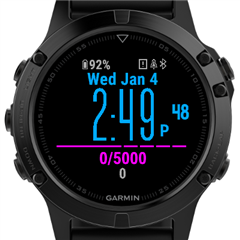
Manifest languages vs Regional Limits

What is the difference between setting the languages (manifest.application.languages) in the manifest and setting "Regional Limits" in the App Details in the Connect IQ Store?

I recently got a Russian review, that said that the face is not working, which is understandable because the used font does not support cyrillic. The manifest therefore does _not_ allow Russian (or other languages with non existing characters) - still the user managed to install it somehow. How to effectively block users with certain languages for their own good?

Update for clarification what I did:

I filtered the font with the filter "0123456789:.'abcdefghijklmnopqrstuvwxyzABCDEFGHIJKLMNOPQRSTUVWXYZ éûäúáíç" for performance reasons. I was aware of the issue with missing characters (bein shown as []) so I extracted all the special characters in month abbreviations from yale university:
https://web.library.yale.edu/cataloging/months

I only allowed those languages (from the same list) in the manifest.application.languages: bul, hrv, ces, dan, dut, deu, gre, eng, est, fre, hun, ind, ita, lav, lit, nob, pol, por, ron, slo, slv, spa, swe, tur

  • AFAIK,manifest.application.language means the watch system language. Regional Limits means limits for the connect account registered region. If your users' watches displayed in Russian, which  your app doesn't have  it included in manifest.application.languages, the users won't see the app in ciq store. I just wonder how can they install the app? Are they using English as system language.

  • That's exactly what I thought, but if the user would use English as a system language he/she would not have the issue since the language decides the i18n in the month (which has the missing character issues). So it seems that he/she managed to install it with the manifest restrictions in place...

  • AFAIK, only two ways to install the app,one is from ciq store and another is sideloading. Maybe she/he sideloaded the app

  • Regional limits and languages are not related. (I can set Russian if I live in Iowa).  It's all about the characters available in a custom font and the font needs to include all possible characters for all languages (a very complex task!).  If you use a native font you'll be fine.

    With custom fonts, I map things like month and day of week to English.

    So instead of using

    var clockTime = Time.Gregorian.info(now, Time.FORMAT_MEDIUM);

    use

    var clockTime = Time.Gregorian.info(now, Time.FORMAT_SHORT);

    and then,

    days[clockTime.day_of_week]

    to get the english text with an array

    var days=["","Sun","Mon","Tue","Wed","Thu","Fri","Sat"];

  • To "include all possible characters for all languages" is not only complex but virtually impossible. Thinking of all the CJK fonts (cyrillic, chinese(s), japanese, korean etc.). On the other hand simply not to i18n at all (mapping to eng or ger) is also not a pretty solution. I could "guard" it with an exception if a char is not existing... still not pretty.

    I guess blocking the installation (maybe trying to render all months) if the locale is not supported would be ok?! Is there any event to execute code on install?

  • You can't block installing an app based on the language a device is set to. The device could be set to English when the app is installed and then changes to French , for example.

    There is no exception thrown if you try to use a character that's not in a custom font.

    You can avoid the issue if you use a native font instead of a custom font.  In the case of something like month, you can use the number instead of a string  - Instead of "Mar 1", allow 3-1 or 1-3 (user selectable)

  • There is no exception thrown if you try to use a character that's not in a custom font.

    My reply was ment as in I could guard it (in my code) and maybe show an error if a language is used that does not work. Either by the systems locale or by requesting all month strings and matching the string against my filter.

    Thanks for the info that the language can be changed - this might have been what happend to my user having the issue..

    Native/System font is not an option, neither changing it to letters. The face is all about the simple style given by the font. 

  • You can use a custom font for the time and a native font for the date.  Here's one I did in 2015 that does that, and I've done others like it. It's "Simple Big"

    And as I said, there's nothing that prevents a user with a device set to Italian from using an english only watch face.

  • This would be a guard (as discussed with @jim_m_58 below) that kills the app before the error can occur.

            var deviceSettings = System.getDeviceSettings();
    
            var languages = [
                System.LANGUAGE_BUL,
                System.LANGUAGE_HRV,
                System.LANGUAGE_CES,
                System.LANGUAGE_DAN,
                System.LANGUAGE_DUT,
                System.LANGUAGE_DEU,
                System.LANGUAGE_GRE,
                System.LANGUAGE_ENG,
                System.LANGUAGE_EST,
                System.LANGUAGE_FRE,
                System.LANGUAGE_HUN,
                System.LANGUAGE_IND,
                System.LANGUAGE_ITA,
                System.LANGUAGE_LAV,
                System.LANGUAGE_LIT,
                System.LANGUAGE_NOB,
                System.LANGUAGE_POL,
                System.LANGUAGE_POR,
                System.LANGUAGE_RON,
                System.LANGUAGE_SLO,
                System.LANGUAGE_SLV,
                System.LANGUAGE_SPA,
                System.LANGUAGE_SWE,
                System.LANGUAGE_TUR
                ];
            
            
            if(deviceSettings has :systemLanguage && languages.indexOf(deviceSettings.systemLanguage) == -1){
                throw new InvalidValueException("Language not supported or unknown!");
            }

    Any comments/suggestions/ideas on that?

  • The error is just that characters that aren't in your font don't display or display as boxes.  I'm not sure that crashing your app is a good solution, and that's what would happen with when you throw an exception.  And it would only show in the ciq_log file and not be visible to the user.  They would just see an "IQ!" on the screen.