Newlines not interpreted when read from getProperty in Lang.format ?

Hi, I can't get newline characters to be interpreted when the format string for Lang.format is stored in an app property

If I put the format string directly in the Lang.Format function like such, it works:

_message = Lang.format("$1$\n\nTemp : $2$ C\nVit vent : $3$ KMH\nDir vent : $4$\nRafale : $5$ KMH", [title, field1, field2, field3, field4]);

When it's printed on the screen with dc.drawText, the line is broken in multiple lines according to the '\n' characters as such

Maison

Temp : -3 C
Vit vent : 17 KMH
Dir vent : N
Rafale : 22 KMH

But when the same line is stored in an app property and read like this:

_message = Lang.format(Application.getApp().getProperty("display"), [title, field1, field2, field3, field4]);

I get

Maison\n\nTemp : -3 C\nVit vent : 17 KMH\nDir vent : N\nRafale : 22 KMH

on screen instead as seen below
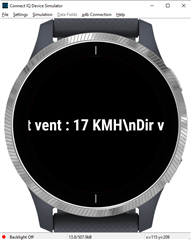
Printing this line with System.println does output it correctly (like the first one above).

'display' is defined like this the the properties.xml

    <property id="display" type="string"></property>

And its value is "$1$\n\nTemp : $2$ C\nVit vent : $3$ KMH\nDir vent : $4$\nRafale : $5$ KMH"

I tried replacing \n with \r, same result except its \r that is written instead of \n

Not sure what I'm doing wrong here :-(

Thanks

  • I worked a bit more on this and converted the strings to array that I printed. The first one is the one that works and the second one is the one that doesn't work:

    Works

    'M' : 77
    'a' : 97
    'i' : 105
    's' : 115
    'o' : 111
    'n' : 110
    '
    ' : 10
    '
    ' : 10
    'T' : 84
    'e' : 101
    'm' : 109
    'p' : 112
    ' ' : 32
    ':' : 58
    ' ' : 32
    '-' : 45
    '5' : 53
    ' ' : 32
    'C' : 67
    '
    ' : 10
    'V' : 86
    'i' : 105
    't' : 116
    ' ' : 32
    'v' : 118
    'e' : 101
    'n' : 110
    't' : 116
    ' ' : 32
    ':' : 58
    ' ' : 32
    '1' : 49
    '6' : 54
    ' ' : 32
    'K' : 75
    'M' : 77
    'H' : 72
    '
    ' : 10
    'D' : 68
    'i' : 105
    'r' : 114
    ' ' : 32
    'v' : 118
    'e' : 101
    'n' : 110
    't' : 116
    ' ' : 32
    ':' : 58
    ' ' : 32
    'N' : 78
    '
    ' : 10
    'R' : 82
    'a' : 97
    'f' : 102
    'a' : 97
    'l' : 108
    'e' : 101
    ' ' : 32
    ':' : 58
    ' ' : 32
    '2' : 50
    '2' : 50
    ' ' : 32
    'K' : 75
    'M' : 77
    'H' : 72

    Doesn't work

    'M' : 77
    'a' : 97
    'i' : 105
    's' : 115
    'o' : 111
    'n' : 110
    '\' : 92
    'n' : 110
    '\' : 92
    'n' : 110
    'T' : 84
    'e' : 101
    'm' : 109
    'p' : 112
    ' ' : 32
    ':' : 58
    ' ' : 32
    '-' : 45
    '5' : 53
    ' ' : 32
    'C' : 67
    '\' : 92
    'n' : 110
    'V' : 86
    'i' : 105
    't' : 116
    ' ' : 32
    'v' : 118
    'e' : 101
    'n' : 110
    't' : 116
    ' ' : 32
    ':' : 58
    ' ' : 32
    '1' : 49
    '6' : 54
    ' ' : 32
    'K' : 75
    'M' : 77
    'H' : 72
    '\' : 92
    'n' : 110
    'D' : 68
    'i' : 105
    'r' : 114
    ' ' : 32
    'v' : 118
    'e' : 101
    'n' : 110
    't' : 116
    ' ' : 32
    ':' : 58
    ' ' : 32

    So it's because the \n aren't interpreted when read as a parameter :-( I guess I'll have to find a way to replace by coding the \n to 0x0a.

  • That was painful for no good reason. Ended up fixing it like this. If someone has a better idea, by all means...

    var _formatStr = Application.getApp().getProperty("display");
    var array = _formatStr.toCharArray();
    for (var i = 0; i < _formatStr.length(); i++) {
        if (array[i] == '\\' && array[i + 1] == 'n' ) {
            array[i] = 13.toChar();
            array[i + 1] = 10.toChar();
        }
    }
    _formatStr = StringUtil.charArrayToString(array);