Adding legacy support

Friends, 

Now my watchface got up and running on initial target devices, came the time to expand support for legacy devices.

In order to make an API 3.1.0 watch become 1.4.0 enabled, i am facing several problems, and i wish i could discuss them here while they pop up.

1. I got an JSON RESOURCES NOT SUPPORTED ERROR. Already maneuvered out json for all but one custom font, which is a png background created via tilemapper.py. The image consists mainly of texts, numbers, symbols and bars. but i would need to create some other custom fonts for that. which brings more problems:

1.a I will need same font for other text fields. do ai need to create a custom font for ever size i plan to use? or there is a way to scale the size?
1.b The font i plan to use has some italic style, and i realized upper right part of taller characters is being cut off. i tried increasing char's width parameter within .fnt but no go. anyone?

2. I got some BACKGROUND ANNOTATION NOT SUPPORTED. IGNORING... and i wonder how that will impact background http requests...

3. By temporally avoiding previous problems i compiled but at runtime got error upon the getService Delegate method, wwhich is:

    function getServiceDelegate() {
        if (debug) {System.println("App.getServiceDelegate");}
        return [ new MyServiceDelegate() ];
    }

at this point i got lost, and got myself wondering if it is worth to dodge every obstacle without prior checking if there is any dead end further.


hope you guys has some ideas on that, and probable other obstacles i will find.

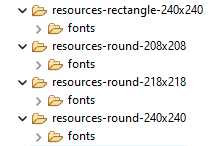
  • 1a - No way to scale a custom font.  You need the proper size for each device.  You can use resource overrides to handle this. For example:


    1b - sound like you may need to make the font shorter, or in bm font under font settings, make them less that 100 % in height and actually make them a greater pixel height..

    2.  That means the device doesn't support a background service (no CIQ 1 devices do), and you can't do makeWebRequests.

    3.  What is the error you see?  Are you trying to manually run the background service from the sim? That will not happen on a real device.

  • If your watch face requires a background service, you should just skip all the devices with CIQ 1.

    But there is a new device with CIQ you may want to look into - the Instinct2/2s.  It's much less straight forward than other devices, as it's small, black and white, and there is the subscreen (see WatchUi.getSubscreen()),

    You got the same thing with sizing custom fonts and the resource overrides there are

    resources-semioctagon-163x156

    resources-semioctagon-176x176

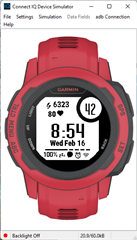
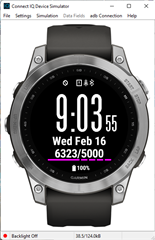
    but things can be adapted.  Here's on of my watch faces I wrote many years ago on the Instinct2s and fenix7 for example.:

  • i think i understand it. mostly:
    1a. thx. saw that structure on an example of yours before. but, i was referring to same font on same device but for different sizes. guess i must make copy of the fnt, change size, and import and instace it as another font, so that the same png may be used for both.

    1b. gonna try that.

    2. my watchface collects json data from webservice via httprequest. what would be the way around to do this on i.e. fenix3 (CIQ 1)?

    3.Filed to invoke symbol on return line. i did run the 3.1.4 watchface on a 1.4.0 sim device and finger crossed. pretty sure it happened coz there were no background instace runnning. we should better ignore that for now.

  • 1a - if you want two different size fonts for a single device you specify them both in <fonts> in the ,xml for the device

        <fonts>
        	<font id="big" antialias="true" filename="sf140b.fnt"/>
        	<font id="norm" antialias="true" filename="sf60b.fnt"/>
        </fonts>

    It's more than just changing the .fnt file.  You want to use bmfont to generate the .fnt and .png files for the two sizes.

    Here's the pngs for the two I mentioned above:

    sf140b_0,png

    sf60b_0.png

    changing the height in the fnt file just says how much of the png to use.

    2.  You can do a widget or device app and do your makeWebRequest calls in the main app and not a background service