unit test for getFontHeight

Hello,

I would like to conduct unit tests to determine whether a certain font will work better for my UI.  I need to access the dc variable, but isn't that not static?  I need to access, for instance, dc.getFontHeight function.  It is going to save me a lot of time if I can use unit tests, instead of having to load and test each case manually.  Is it possible to access the device context (dc) when conducting unit tests?

Thanks

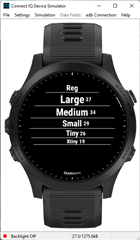
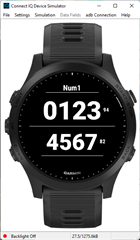
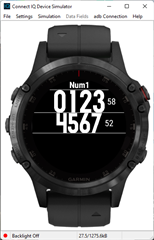
  • I just have a test app that shows me the heights and can run it on any target.  The little numbers are the height, while the lines show any white space above or below.

    the FONT_NUMBER_* fonts are the ones where the white space varies the most between devices.
    945:

    f5+:

    Note, these two targets are both 240x240.

  • This would be somewhat useful, but still time consuming.  I could theoretically just run my already-existing app on each watch platform and get the similar results - I'm just testing one font face.  Except it takes between 30 seconds to a minute to run each time using my simulator/app, hence I'm looking at 30+ mins minimum if I want to test different UIs exhaustively, to make sure each one works.

    Does anyone have any already-existing reference listing for the font heights on different watches?  Having the font size numbers would help, but if I have to run an app on the simulator on each platform in order to obtain these figures, it would still be costly timewise.

    Thanks

  • This type of data used to be in the UX guide with earlier SDKS, along with the characters available, specifically for number fonts.  Both the characters available as well as the white space above/below is important when choosing a specific font.

    You can of course use custiom fonts that takes out some of the guesswork. If you're doing a watch face, you can just use the same fomt for all 240x240 devices, for example.

    With my test app, it's got multiple screens with a bunch of different things, and it only takes a minute to run for each target.

    To can do somethings in the app itself.  Let's say you have a data field, and based on the data screen layout you know you want a font <"x" pixels high.  You got 5 alpha fonts to test for "best fit", but then you may also consider the text width. 

  • In most cases, if you need a Graphics.Dc instance to do a query for something like the font size, you can create a Graphics.BufferedBitmap and then use the Dc from that.