BatteryInDays - function

Hi,

where can I find the sample code for proper batteryInDays function?

I would need to display battery life in days.

Thank you

  • So I did the following:

    I created the 4.1.0-beta1 SDK.

    New test WatchFace for device venu2system5preview (because for F6 it is not released yet.

    I also copied the code provided by peterdedecker, Thank you.

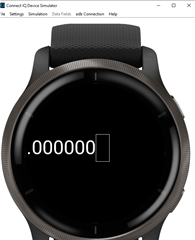
    And the result is a picture name - Test.

    What is Toybox.pro batteryInDays?

    Test

  • If you are using a System 5 preview device and that doesn't work

    It works for me in the sim, with either the Fenix 6 System 5 Preview or the Venu 2 System 5 Preview.

    I created a simple datafield with:

    function compute(info as Activity.Info) as Numeric or Duration or String or Null {
      return System.getSystemStats().batteryInDays;
    }

    it is likely that the function isn't working yet even in the sim

    That seems like it would be a bug in that case (i.e. if "System.getSystemStats() has :batteryInDays" returns false when using the 4.1.0 beta and a System 5 preview device.)

    But it isn't the case.

  • It looks like your battery drawable is positioned partially offscreen (or part of the text is offscreen because you have so many decimals)

    When I call System.getSystemStats().batteryInDays in the sim, I get 5.00. In your case, it seems that the 5 is offscreen.

    The reason you're getting a box instead of "d" is because your drawable must be using a numerical font (in which case "d" is unavailable). If you want to print "d", you'll have to use a smaller, non-numerical font.

    I would just insert some System.println() statements in your code so you can satisfy yourself that the correct code is being called, then you can work on the positioning/font/cosmetic issues separately.

  • The reason you have so many decimals in your output is because of this suggested code elsewhere in the thread:

     var batteryViewString = Math.round(myBattery).toString();

    If you just want an integer number of days, you can use something like this:

    (with truncation / round down)

     var batteryViewString = myBattery.toNumber().toString();

    (with rounding to the nearest integer)

     var batteryViewString = Math.round(myBattery).toNumber().toString();

    Or you could adjust the code to just print 2 decimals, if that's what you want. e.g.

     var batteryViewString = myBattery.format("%.2f");

  • Hi, could anyone provide me a code that calculates battery discharge in days and is compatible with CIQ  3.2 ?

    I can't wait that long until the last SDK is ready to support it ...

    Thank you

  • Days would be the integer part, and hours, the converted decimal part.

    ex:

    1.5 = 1 day, 12 hours (.5x24)

    3.33=3 days, 8 hours (.33x24)