BatteryInDays - function

Hi,

where can I find the sample code for proper batteryInDays function?

I would need to display battery life in days.

Thank you

  • This will be available for System 5 devices and you can see it in the 4.1.0-beta 1 SDK with the System 5 preview devices.  I've not tried it.:

    System.getSystemStats().batteryInDays

    var batteryInDays as Lang.Float

    The remaining battery life in days.

    Since:

    API Level 3.3.0

    Returns:


  • I have a Garmin F6.

    Is it possible to simulate this function and test it in the simulator?

    Thank

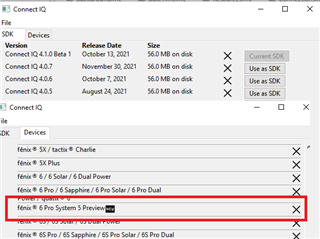
  • There is a f6pro system 5 preview device that can be used with the 4.1.0-beta1 SDK in the sim. 

  • So I downloaded 4.1.0-beta1 SDK, the possibility of battery life in the days there is, but this does not work.

    System.getSystemStats (). batteryInDays

    Does anyone type how to write the correct function?

    I think there will be something like:

    var time = Lang.format ("$ 1 $: $ 2 $", [hours, clockTime.min.format ("% 02d")]);?

    Thank you

  • System.getSystemStats().batteryInDays is the correct way, but as Jim mentioned you have to use the "Fenix 6 System 5 Preview" device 

    the batteryIndays value is a float, so you will have to do a round yourself

    (also you would best do a has check if the batteryInDays value is actually available for the current device you're working on)

  • Hello,

    F6 devices support displaying battery life in days. I also installed the 4.1.0-beta1 SDK.

    I need to know how to write the code correctly so that the battery is not displayed in%, but in days.

    //battery %
    		var myBattery = Sys.getSystemStats().battery;
    		var batteryViewString = Lang.format("$1$", [myBattery.format("%02d")]);
    		var batteryView = View.findDrawableById("BatteryLabel");
    		batteryView.setText(batteryViewString + "%");

  • F6 devices support displaying battery life in days

    It's not because native watch faces show this that your device is capable.

    Connect iq watch faces will only be able to display it once the device has connect iq 3.3

    I need to know how to write the code correctly so that the battery is not displayed in%, but in days.

    I haven't tested the below code, but if you write something like this and it'll show up as days once your device is capable:

    var batteryView = View.findDrawableById("BatteryLabel");
    if (System.getSystemStats() has :batteryInDays) {
        var myBattery = Sys.getSystemStats().batteryInDays;
        var batteryViewString = Math.round(myBattery).toString();
        batteryView.setText(batteryViewString + "d");
    } else {
        var myBattery = Sys.getSystemStats().battery;
        var batteryViewString = Lang.format("$1$", [myBattery.format("%02d")]);
        batteryView.setText(batteryViewString + "%");
    }


  • Hi, thanks for the sample code. The code has no errors, but only the% battery is displayed in the simulator.

    What do you mean:
    Connect iq watch faces will only be able to display it once the device has connect iq 3.3?

    Is this an API version?

    Link: 

    My configuration SDK for ConnectIQ (screen)

    Thank You

  • Hi, thanks for the sample code. The code has no errors, but only the% battery is displayed in the simulator.

    You would need to run the app on one of the System 5 Preview devices, in the sim.

    What do you mean:
    Connect iq watch faces will only be able to display it once the device has connect iq 3.3?

    Is this an API version?

    Yes. Specifically, the device firmware needs to updated.

    The docs are not clear on this at all, but batteryInDays is apparently a "System 5 feature", which means:

    - Devices which are currently on CIQ 3.2.x will have to be upgraded to 3.3 to get support

    - Devices which are currently on CIQ 4.0.x (e.g. Venu 2) will have to be upgraded to 4.1 to get support

    Any device which does not get 3.3 or 4.1 will not have support for this feature.

    No real devices have either of those versions yet, which is why the two System 5 Preview devices exist - so you can test your code in the sim.

  • If you are using a System 5 preview device and that doesn't work, it is likely that the function isn't working yet even in the sim.  This is the 1st beta for 4.0.1, and in the past there have been up to three betas before a release like this.  Keep your code and try it again on the next beta or the release.