


Intro
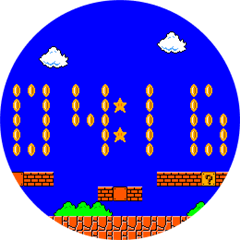
Hi, I'm working on this Mario themed watch face that should eventually look something like this:
Problem 1
What I want to do is be able to define an element that I can then refer to in other drawables. So I have this coin  -->
and I would like to use it to make numbers like this -->
Right now I have just the outline of the coin defined as a drawable-list like this:
<drawable-list id="coin">
    <shape type="polygon" color = "0xFFAA00" points = "[[3, 0],[5, 0],[5, 1],[6, 1],[6, 2],[7, 2],[7, 4],[8, 4],[8, 10],[7, 10],[7, 12],[6, 12],[6, 13],[5, 13],[5, 14],[3, 14],[3,13],[2,13],[2,12],[1,12],[1,10],[0,10],[0,4],[1,4],[1,2],[2,2],[2,1],[3,1]]" />
</drawable-list>
But I'm not sure where to go from here other than to use a layout but I don't know if I can set/unset a layout during runtime when I'm updating the time? Idk, the SDK is confusing and really lacks examples to say the least and I am not a software engineer.
Problem 2 (Since you're here)
I am trying to place they coin drawable at a custom spot on the screen during runtime but struggling to get it to work. This is how I have it at the moment (which is where I gave up the last time I was working on it):
/*
coin.xml contains:
<drawable-list id="coin">
    <shape type="polygon" color = "0xFFAA00" points = "[[3, 0],[5, 0],[5, 1],[6, 1],[6, 2],[7, 2],[7, 4],[8, 4],[8, 10],[7, 10],[7, 12],[6, 12],[6, 13],[5, 13],[5, 14],[3, 14],[3,13],[2,13],[2,12],[1,12],[1,10],[0,10],[0,4],[1,4],[1,2],[2,2],[2,1],[3,1]]" />
</drawable-list>
*/

using Toybox.WatchUi;
using Toybox.Graphics;
using Toybox.System;
using Toybox.Lang;

class MarioView extends WatchUi.WatchFace {

	var test;

    function initialize() {
        WatchFace.initialize();
        //test = new Rez.Drawables.coin();
        test = new WatchUi.Drawable({:identifier=> Rez.Drawables.coin,:locx=> 130,:loxy=> 130,:width=>8,:height=>14});
    }

    // Load your resources here
    function onLayout(dc) {
    }

    // Update the view
    function onUpdate(dc) {
        test.draw(dc);

    }

}
Which gives me a completely blank screen.
If I add the x and y position to the coin XML and change the way I'm calling it to this:
/*
coin.xml contains:
<drawable-list id="coin">
    <shape type="polygon" x="130" y="130" color = "0xFFAA00" points = "[[3, 0],[5, 0],[5, 1],[6, 1],[6, 2],[7, 2],[7, 4],[8, 4],[8, 10],[7, 10],[7, 12],[6, 12],[6, 13],[5, 13],[5, 14],[3, 14],[3,13],[2,13],[2,12],[1,12],[1,10],[0,10],[0,4],[1,4],[1,2],[2,2],[2,1],[3,1]]" />
</drawable-list>
*/

using Toybox.WatchUi;
using Toybox.Graphics;
using Toybox.System;
using Toybox.Lang;

class MarioView extends WatchUi.WatchFace {

	var test;

    function initialize() {
        WatchFace.initialize();
        test = new Rez.Drawables.coin();
        //test = new WatchUi.Drawable({:identifier=> Rez.Drawables.coin,:locx=> 130,:loxy=> 130,:width=>8,:height=>14});
    }

    // Load your resources here
    function onLayout(dc) {
    }

    // Update the view
    function onUpdate(dc) {
        test.draw(dc);

    }

}
Then I get the coin on the screen like this (which is what I want to see when running the other implementation):
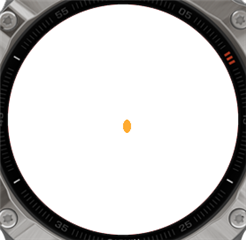
So I'm not sure how to position the drawable where I want when I want to.
Questions
1. How could I reference the "coin" drawable in another XML or in my monkeyC so that I only have to define the coin positions on each number once?
2. How can I call said numbers in my watch face code so that I can place them where they need to go on the screen during runtime?
