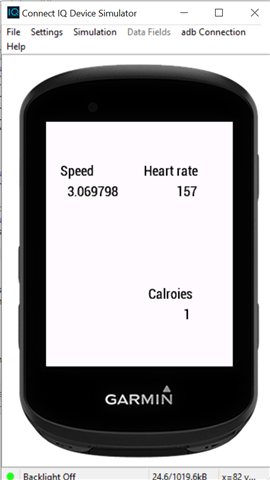
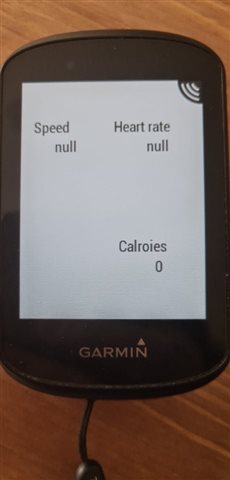
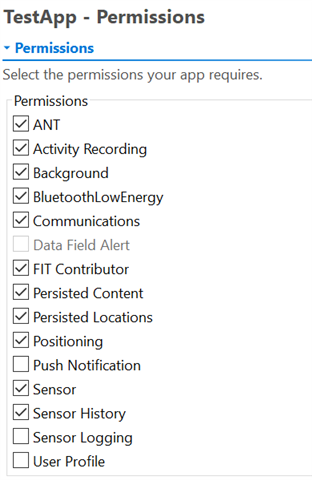
I have managed to create a simple WatchApp that uses ActivityRecording and Activity to access sensors such as heart rate, speed, and calories. My app works fine in simulation but when I take it outside to test the speed and heart rate data displays as null and calories is a consistent 0. My code is as follows:
using Toybox.Graphics;
using Toybox.WatchUi;
import Toybox.Activity;
import Toybox.Timer;
import Toybox.Lang;
using Toybox.ActivityMonitor;
using Toybox.System;
using Toybox.ActivityRecording;
import Toybox.Sensor;
class TestAppActivityTracker extends WatchUi.View {
var currentSpeed = 0;
var caloriesBurned = 0;
var heartRate = 0;
var _session as Session?; // set up session variable
function initialize() {
var i;
Sensor.setEnabledSensors([Sensor.SENSOR_HEARTRATE,Sensor.SENSOR_BIKESPEED]);
View.initialize();
//for(i = 0; i<100; i++){
// View.onUpdate();
//}
}
//! Stop the recording if necessary
public function stopRecording() as Void {
if ((Toybox has :ActivityRecording) && isSessionRecording()) {
_session.stop();
_session.save();
_session = null;
WatchUi.requestUpdate();
}
}
public function isSessionRecording() as Boolean {
return (_session != null) && _session.isRecording();
}
//! Start recording a session
public function startRecording() as Void {
_session = ActivityRecording.createSession({ // set up recording session
:name=>"Biking", // set session name
:sport=>ActivityRecording.SPORT_GENERIC, // set sport type
:subSport=>ActivityRecording.SUB_SPORT_GENERIC // set sub sport type
});
_session.start();
WatchUi.requestUpdate();
}
function onTimer() {
WatchUi.requestUpdate();
}
function onShow(){
var timer = new Timer.Timer();
timer.start( method(:onTimer), 1000, true );
if (Toybox has :ActivityRecording) {
if (!isSessionRecording()) {
startRecording();
}
}
}
function onHide(){
if (Toybox has :ActivityRecording) {
if (isSessionRecording()) {
stopRecording();
}
}
}
function onUpdate(dc as Dc) as Void {
dc.clear();
dc.setColor(Graphics.COLOR_WHITE, Graphics.COLOR_TRANSPARENT);
dc.fillRectangle(0, 0, dc.getWidth(), dc.getHeight());
var activeInfo = Activity.getActivityInfo();
heartRate = activeInfo.currentHeartRate;
currentSpeed = activeInfo.currentSpeed;
caloriesBurned = activeInfo.calories;
dc.setColor(Graphics.COLOR_BLACK, Graphics.COLOR_TRANSPARENT);
dc.drawText(
dc.getWidth() / 6, // gets the width of the device and divides by 2
dc.getHeight() / 6, // gets the height of the device and divides by 2
Graphics.FONT_SMALL, // sets the font size
"Speed", // the String to display
Graphics.TEXT_JUSTIFY_CENTER // sets the justification for the text
);
dc.drawText(
dc.getWidth() / 4, // gets the width of the device and divides by 2
dc.getHeight() / 4, // gets the height of the device and divides by 2
Graphics.FONT_SMALL, // sets the font size
currentSpeed, // the String to display
Graphics.TEXT_JUSTIFY_CENTER // sets the justification for the text
);
dc.setColor(Graphics.COLOR_BLACK, Graphics.COLOR_TRANSPARENT);
dc.drawText(
dc.getWidth() - dc.getWidth() / 3, // gets the width of the device and divides by 2
dc.getHeight() / 6, // gets the height of the device and divides by 2
Graphics.FONT_SMALL, // sets the font size
"Heart rate", // the String to display
Graphics.TEXT_JUSTIFY_CENTER // sets the justification for the text
);
dc.drawText(
dc.getWidth() - dc.getWidth() / 4, // gets the width of the device and divides by 2
dc.getHeight() / 4, // gets the height of the device and divides by 2
Graphics.FONT_SMALL, // sets the font size
heartRate, // the String to display
Graphics.TEXT_JUSTIFY_CENTER // sets the justification for the text
);
dc.setColor(Graphics.COLOR_BLACK, Graphics.COLOR_TRANSPARENT);
dc.drawText(
dc.getWidth() - dc.getWidth() / 3, // gets the width of the device and divides by 2
dc.getHeight() - dc.getHeight() / 3, // gets the height of the device and divides by 2
Graphics.FONT_SMALL, // sets the font size
"Calroies", // the String to display
Graphics.TEXT_JUSTIFY_CENTER // sets the justification for the text
);
dc.drawText(
dc.getWidth() - dc.getWidth() / 4, // gets the width of the device and divides by 2
dc.getHeight() - dc.getHeight() / 4, // gets the height of the device and divides by 2
Graphics.FONT_SMALL, // sets the font size
caloriesBurned, // the String to display
Graphics.TEXT_JUSTIFY_CENTER // sets the justification for the text
);
}
}