Problems for my watch face for vivoactive 3, fenix 6 pro and FR245 only

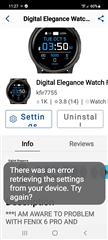
Hi, I have a watch face in the Garmin connect IQ shop : https://apps.garmin.com/en-US/apps/5e1ebcab-39e4-4686-966c-a8ed6a8ca42c and I get some report from  vivoactive 3, fenix 6 pro and FR245 users for problems. The Vivoactive 3 users say things like "Settings in the app is a blank white page, and it jams up the watch (the buttons and touch screen becomes non-responsive, and the backlight will not turn itself off, draining the battery). Only way to regain function is to do a forced restart and change to another watch face". The Fenix 6 users write that there's an error message appeared in Garmin Connect Android app stating "cannot communicate with watch" and for the FR245 they can't use the settings. All of those problems are not seen in the ERA page and they don't have any CIQ_LOG files in their devices after using it so I can't even get a hint for what causing the problem.

Everything works fine in the Eclipse simulator so it is super weird for me. I couldn't find any errors in my code that will cause problems. Also I can't understand exactly why there are problems with the Vivoactive 3 and fenix 6 pro. There is a floor indicator that I might messed up and caused the problem with the FR245 (that doesn't have floors indicator in it).

I add the full code for the watch face since I believe it might help https://drive.google.com/drive/folders/1kDoljrg9i3dGrfCX_tPcCf-jXLZCL9HV?usp=sharing

I am posting it here since I am clueless. Last time you helped me with the ERA errors but now the errors aren't in ERA at all and I don't have any of these devices to test.

Please help me understand what caused/may cause the problem.

Thank you in advance everyone.

  • Update: apparently  it's all of the fenix 6 devices and not only pro

  • Take a look in your .iq file (it's a .zip)and for the part numbers, and check the settings.json for those part numbers,  When you use settings on a phone or GE, the app needs to provide that info.

    The "can not communicate could be a ble issue between the device and the phone, so make sure the two remain close to eachother.

  • Hey Jim. thank you for answering. I have a WinRAR to zip file but I can't open the watch file .iq file. It says that I need a new application to open the file. Also my resources are by the shape and the screen pixels size length, so shouldn't it mean that if there's a problem with the resources of the round-240x240 devices, the problem will occur in every round-240x240 and not just in Vivoactive 3 only for example?

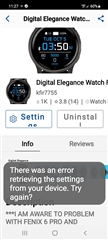
  • Vivoactive 3 user sent me this and said that after the device crashed he couldn't even restart or remove the app from the connect IQ. I have no idea about what can cause this. The code is not even complicated and everything worked fine in the simulator


  • Vivoactive 3 user sent me this and said that after the device crashed he couldn't even restart or remove the app from the connect IQ. I have no idea about what can cause this. The code is not even complicated and everything worked fine in the simulator


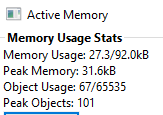
  • When testing in the sim, when you test app Settings, how high is peak memory and how close to the max for the devices involved?  Changing settings while an app is running will result in the peak going higher.

  • Here's the peak memory after I changed background color, text color, indicators and most of the stuff. 

    It's still not close to the limit.

    Also I forgot to mention, the problem was after I added floors indicator by using the following code:

    dc.setColor(G, Graphics.COLOR_TRANSPARENT);
    if (info has :floorsClimbed) {dc.drawText(dc.getWidth() * 0.8125, dc.getHeight() * 0.66106, indicatorFont, floors, Graphics.TEXT_JUSTIFY_CENTER);}
    else {dc.drawText(dc.getWidth() * 0.8125, dc.getHeight() * 0.66106, indicatorFont, "--", Graphics.TEXT_JUSTIFY_CENTER);}
    dc.setColor(SelectedColor, Graphics.COLOR_TRANSPARENT);
    dc.drawText(dc.getWidth() * 0.8053, dc.getHeight() * 0.7669, wordsFont, "FLRS", Graphics.TEXT_JUSTIFY_CENTER);
    And adding active calories indicator by using this code: 
    var profile = UserProfile.getProfile();
    var age = today.year - profile.birthYear;
    var weight = profile.weight / 1000.0;
    
    if (profile.gender == UserProfile.GENDER_MALE) {
    restCalories = 5.2 - 6.116*age + 7.628*profile.height + 12.2*weight;
    } else {// female
    restCalories = -197.6 - 6.116*age + 7.628*profile.height + 12.2*weight;}
    restCalories   = Math.round((today.hour*60+today.min) * restCalories / 1440 ).toNumber();
    activeCalories = calories - restCalories;

    I thought the problem with the FR245 was because of the floors indicator but since there are problem with other devices I am not sure this is what causing the problem.

  • What device are you showing the memory view for?  Use a va3, 245, or f6.  A venu2 has  the graphics pool.

  • This is the result for va3 but I got the very same results for the 245 and f6. Those are the only devices with users reports for my watch face. 

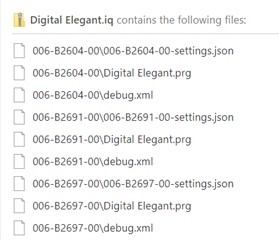
    BTW I've managed to open to iq file and I found out that there's a huge list of settings.json, prg and debug.xml files (I guess that for every device). There's a way to figure out what are the characters for va3, fr245 and f6 so I can check those files only? 

    I am adding an image to show what I mean.

    I mean if there's a way to find the characters like 006-B2604-00 for those devices

    EDIT: I SAW THERE'S A WAY TO FIND IT IN REFERENCE GUIDE. I'M CHECKING OUT THOSE DEVICES SETTINGS AND WILL UPLOAD THOSE HERE

  • Here's the files of each one:

    006-B3076–00 is FR245

    006-B3290–00 is F6

    006-B2700–00 is VA3

    https://filebin.net/fqdsjqlwa6bvsb0k

    I couldn't find anything that may cause the difference. Maybe you can.

    Again Jim thanks a lot for the help, the bug here is something that I don't know how to deal with.