which is also on the Graphics object. Once you've done that you need to format the current date using Time.now() and use today.day_of_week, which is in the example on
Thank you very much for your help. I just thought they would draw it to me all the days of the week and it would be specific in the red rectangle. I can't do this yet. some idea?
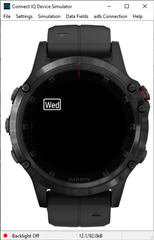
Here's a simple example. where I size the box based on the size of the text and the fount used, with the upper left being at 30,50
var f=Graphics.FONT_XTINY;
var str=clockTime.day_of_week.substring(0,3);
var rX=30;
var rY=50;
var rW=dc.getTextWidthInPixels(str, f)+6;
var rH=dc.getFontHeight(f)+2;

dc.setPenWidth(2);
dc.drawRoundedRectangle(rX, rY, rW, rH, 3);
dc.drawText(rX+rW/2,rY+rH/2,f,str,Graphics.TEXT_JUSTIFY_CENTER|Graphics.TEXT_JUSTIFY_VCENTER);
,
And this is how it looks in the sim (ignore the stuff below the DayOfWeek.)
You can also use a fixed size box, and use the came code to center the text in the box.
Hi Jim, please send me the whole code with the Toybox import. It doesn't work for me after copying. How do I edit your code so that watchFace displays all days and the current day in an ellipse?
Error Sim: Symbol Not Found Error Details: Could not find symbol 'day_of_week'
I can't create a code that would show all the days of the week and the current day would be underlined. Will you help me to create it please.
Thank you very much.