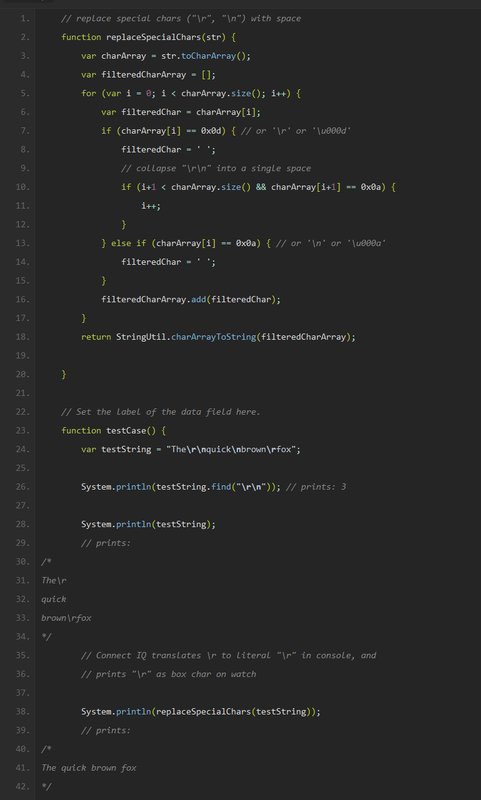
Hello,
My app processes a text input that the user inputs into the settings. Because users will sometimes copy and paste their parameters into the settings from a webmail apps, the text may include some &NewLine (0x0d0a) characters. They appear to be NewLine characters, because when I go to display them in the function drawText(), they show a new line in the middle of the text. And I copied the text from my web email app to notepad+ hex editor and sure enough they appear as new lines (0x0d0a) character sequence. It even prints out a new line when I print that same output to the debug output using System.println(), I see new lines on the log file where I suspect new lines are in the text!
I want to remove any and all of those characters from the setting string, but using String.Find() does not appear to work:
function RemoveNewLines(textInput) {
		var newLine = (0x0D0A).toString();
		//var newLine = "/n"; // this does not work either
		var textOutput = textInput;

		System.print("RemoveNewLines: ");
		while (true) {
			var index = textOutput.find(newLine);
			if (index != null) {
				System.print("found newline at " + index + ",");
				textOutput = textOutput.substring(0, index) + textOutput.substring(index + 2, textOutput.length());
			} else {
				System.println(" that's all.");
				return textOutput;
			}
		}
		return null;
	}
This always seems to produce "RemoveNewLines: that's all." which indicates the find() function did not find any new lines in the textInput.
(This is slightly more difficult to test, since to do so you need to side load an app to your watch and use garmin connect app to update the settings. The simulator settings editor does not accept newlines, but my Android app does) I am certain that new lines from textual settings input is getting into the data, because when my app does drawText() using some of that text, on my watch it unusually appears with a new line smack dab in the middle of the text!
Is it possible to search for a new line using the Find() function?
I've also tried the following, but it doesn't seem to remove the newline.. maybe I'll try output = textInput.substring(2,textInput.length()); removing two chars instead of one...
	// target the newline which appears at the beginning of the textInput
	var output;
	if (textInput.substring(0,1).equals("\n")) { // THIS CONDITION IS FOUND TRUE
		System.println("Removed Newline before point data");
		output = textInput.substring(1,textInput.length()); // hmm
	}