Hi,
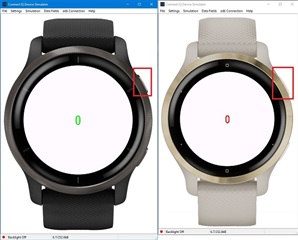
Trying to test some datafields and cannot work out where to click to make them start the activity?
Anybody?
G
Huh.
I've managed it with keyboard using the Enter key, but I really don't see that as an option for the device in the wild!
Touch the screen (click on the screen, not on buttons)
I tried that first - I thought it would be like Venu - but didn't work for me.
The top-right button (at the 2 o'clock position) is the start/stop button.
Would be easier after simulator update that shows a watch image! Which seems due now that Venu2/2s are public. ;)
Have you used the SDK Manager to get the Venu2/Venu2s and use those targets? I see the images Travis posted.
I think you should be able to click the O icon on the smallwearable2021 configuration. If you can't find where to click you can always use the DataField > Timer menu.