FIT File

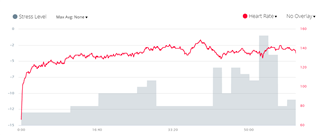
I've developed a pretty cool approach to measuring cardio stress during a ride with power and HR data. I write the value to the FIT file every two minutes if the data meets certain criteria. The Garmin Connect view connects the FIT data points with a straight line... which is reasonable. But during times when power or HR are fluctuating too much to generate a valid stress score, I'd like to show a gap in the graph (no data). A stress score of 0 is normal... negative values are good, positive values indicate dehydration, fatigue, overtraining, heat exhaustion, glycogen depletion, etc. So writing a ZERO doesn't help. I could write like -100, but then the auto zoom makes the legit data harder to read. Can I write NULL to create a gap in the data? What is the best practice for dealing with "no valid data" for something like this?
  • I posted a thread about this years ago, but the last time I checked, calling setData(null) causes a crash, so you can't have a gap in FIT data (except at the beginning.) And as I said in that thread, gaps at the beginning of FIT data aren't even displayed properly (depending on whether they come from a CIQ field / native activity and depending on whether you view the data in GC web or GC mobile.)

    It's too bad because it's certainly possible for native Garmin code to have gaps in FIT data at any point (e.g. when sensors disconnect / drop out).

    You could try setData(null) yourself. I'd be interested to hear if anything's changed (I'm guessing it hasn't).

    https://forums.garmin.com/developer/connect-iq/f/discussion/7509/fitcontributor-field-setdata-should-accept-null-as-a-value

    FitContributor::Field::SetData should accept null as a value

    And gaps in both native and CIQ activity FIT records are not displayed correctly by Garmin Connect.

    ...


    Oh, and I tested the scenario where a CIQ app doesn't write data at the beginning of the activity (e.g. recording HR while not wearing watch)-- this is displayed properly in the Garmin Connect mobile app but not the website. The website acts as though the first available value existed all the way to the beginning (even if you waited for a few minutes to start recording.) The native field has the opposite problem: Garmin Connect mobile shows a bad graph for the native HR, but the website shows the correct graph.