The function equals has bug when operand contains non-ASCII?

https://youtu.be/xzEiET8Z-UY

As the video. I have two menu items, Count(计数) & Time(计时).

In English mode, I can select Count to choose from 100 to upper and select Time to choose from 1 to upper.

However, when I switch language to Chinese, the two items are the same(the pickers are both Time pickers). Why?

I don't own a physical device that supports Chinese, so I have no idea about the actual running status.

  • Yep, that appears to be a bug. But the real question (as I mentioned before), is who is actually comparing strings here?

    1) Is it your code in the input delegate?

    2) Or is it Garmin firmware which implements Menu2?

    1) seems more likely to me, but I'm not 100% sure. (I'm guessing it's not 2), because otherwise you wouldn't be able to have menu items with duplicate labels.)

    i.e. Does your Menu2 input delegate code actually compare the *text* of the selected item with the *text* of the resource strings that were used to populate the whole menu? If that's the case, you can fix it by assigning a numerical ID (or symbol, or whatever) to each menu item, and using the ID to decide what page to open.

  • You should file this in the Bug Reports forum. But to fix your app, like I said, if it's actually your code that's comparing strings, you should be able to do it a different way (compare IDs).

  • It is the demo implementation of custom menu2. Comparing a non-ASCII label of menu2 item will cause it.

  • Yeah but comparing labels isn't the best way to do things, even if the demo code does it.

  • I used another English label to solve this problem already. lol

  • I think so.The purpose of a text label and a unique ID are different. One of them is for the user and the other is for code.

    What if your menu has two labels with the same text? What if some of your menu items have a custom draw function (i.e no text label)?

    What if you have hardcoded (non-resource) labels (for whatever reason), and you want to change the label without changing other code that refers to the menu item?

    When I look at the SDK Menu2Sample, I see this:

    class Menu2TestMenu2Delegate extends WatchUi.Menu2InputDelegate {
        function initialize() {
            Menu2InputDelegate.initialize();
        }
    
        function onSelect(item) {
            if( item.getId().equals("toggle") ) {


    Not sure which demo code you see that's comparing menu item labels. (I believe you, but I don't know which sample you're talking about.)

  • Also, this is why I asked for a code snippet before. I was fairly sure that the problem is caused by comparing menu item labels, since that's the only way that changing the language could cause your app to break.

    It's def a problem with the simulator (who knows if it's also a problem on a real device), but it can be worked around by comparing IDs (and not using IDs with non-ASCII chars).

    However, someone may wish to use a non-ASCII string as an ID (nothing wrong with that) and they would still see this problem.

  • The selected file is not allowed due to file quota restrictions. What's this? when writing a bug report, It prompted

  • I have to post my content here. Later I will commit to bug report.


    How did I find it?

    using Toybox.WatchUi;
    using Toybox.Graphics;
    
    function pushImagesCustom() {
    var customMenu = new ImagesMenu(80,Graphics.COLOR_BLACK,{});
    customMenu.addItem(new CustomImagesItem(:time, "计时", WatchUi.loadResource(Rez.Drawables.bear)));
    customMenu.addItem(new CustomImagesItem(:number, "计数", WatchUi.loadResource(Rez.Drawables.dog)));
    WatchUi.pushView(customMenu, new ImagesCustomDelegate(), WatchUi.SLIDE_UP );
    }
    
    class ImagesMenu extends WatchUi.CustomMenu {
    function initialize(itemHeight, backgroundColor, options) {
    CustomMenu.initialize(itemHeight, backgroundColor, options);
    }
    
    function drawTitle(dc) {
    if( Toybox.WatchUi.CustomMenu has :isTitleSelected ) {
    if( isTitleSelected() ) {
    dc.setColor(Graphics.COLOR_BLUE, Graphics.COLOR_BLUE);
    dc.clear();
    }
    }
    dc.setColor(Graphics.COLOR_DK_GRAY, Graphics.COLOR_DK_GRAY);
    dc.setPenWidth(3);
    dc.drawLine(0,dc.getHeight()-2,dc.getWidth(),dc.getHeight()-2);
    dc.setPenWidth(1);
    dc.setColor(Graphics.COLOR_WHITE, Graphics.COLOR_TRANSPARENT);
    dc.drawText(dc.getWidth()/2, dc.getHeight()/2, Graphics.FONT_LARGE, "Images", Graphics.TEXT_JUSTIFY_CENTER | Graphics.TEXT_JUSTIFY_VCENTER);
    }
    }
    
    //This is the menu input delegate shared by all the basic sub-menus in the application
    class ImagesCustomDelegate extends WatchUi.Menu2InputDelegate {
    function initialize() {
    Menu2InputDelegate.initialize();
    }
    
    function onSelect(item) {
    //If I select an item above, the function doSomthingA will run forever. Why?????
    if(item.label.equals("计时")){
    doSomthingA();
    }else if(item.label.equals("计数")){
    doSomthingB();
    }
    WatchUi.requestUpdate();
    }
    
    function onBack() {
    WatchUi.popView(WatchUi.SLIDE_DOWN);
    }
    }
    
    // This is the custom item drawable.
    // It draws the label it is initialized with at the center of the region
    class CustomImagesItem extends WatchUi.CustomMenuItem {
    var mLabel;
    var mBitmap;
    var mBitmapOffset;
    
    function initialize(id, label, bitmap) {
    CustomMenuItem.initialize(id, {});
    mLabel = label;
    mBitmap = bitmap;
    mBitmapOffset = 0 - bitmap.getWidth() / 2;
    }
    
    // draw the item string at the center of the item.
    function draw(dc) {
    var font;
    var bmXY = dc.getHeight()/2 + mBitmapOffset;
    if( isFocused() ) {
    font = Graphics.FONT_LARGE;
    } else {
    font = Graphics.FONT_SMALL;
    }
    
    if( isSelected() ) {
    dc.setColor(Graphics.COLOR_BLUE, Graphics.COLOR_BLUE);
    dc.clear();
    }
    
    dc.drawBitmap(bmXY, bmXY, mBitmap);
    
    dc.setColor(Graphics.COLOR_WHITE, Graphics.COLOR_TRANSPARENT);
    dc.drawText(dc.getHeight(), dc.getHeight()/2, font, mLabel, Graphics.TEXT_JUSTIFY_LEFT | Graphics.TEXT_JUSTIFY_VCENTER);
    }
    }


     I found the problem and add a new English label as a parameter to avoid comparison between non-ASCII characters.

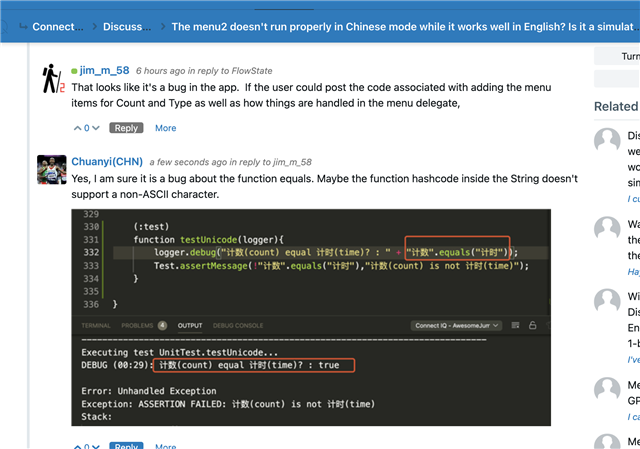
    Later , I try to write a unit test.

    (:test)
    function testUnicode(logger){
    logger.debug("计数(count) equal 计时(time)? : " + "计数".equals("计时"));
    Test.assertMessage(!"计数".equals("计时"),"计数(count) is not 计时(time)");
    }

    The output is 

    /resized-image/__size/640x480/__key/communityserver-discussions-components-files/12/pastedimage1616779169517v1.png

    I think the function equals has a bug when comparing non-ASCII characters.

    Perhaps the function hashcode‘s fault?