Has anybody seen this and (hopefully) resolved it?

Just started happening today after, literally, months of trouble-free use.
Happens on any and all attempts to debug in simulator using the debug button.
Grrr. Etc.
G
Has anybody seen this and (hopefully) resolved it?

Just started happening today after, literally, months of trouble-free use.
Happens on any and all attempts to debug in simulator using the debug button.
Grrr. Etc.
G
AHAH!
I see CIQ has updated the plugin for Eclipse.
Will try that first.
Have you modified anything having to do with devices? It might have not been an issue until you restarted eclipse.
Nope. Touched nothing.
Have you tried just rebooting your machine? Check the task manager to see if something is running when it shouldn't be?
Yep, done both of those.
I initially suspected Java might have done an update and broken a config somewhere, but looks like that is still valid.
[insert joke about how eclipse is already broken]
Sorry for the obvious questions, but have you tried:
1) Creating a new CIQ project from scratch and debugging that?
2) Reinstalling Java? https://adoptopenjdk.net/
3) Running Eclipse from a new/different workspace? (Plugin settings are stored in the workspace)
4) Installing Eclipse from scratch (in a different folder) (and running it from a new workspace)
3 - not always. With the eclipse installer and windows, the "bundle pools" setting makes a difference.

The default is on.
from stack overflow:
"You can choose ‘bundle pool‘, to share Eclipse plugins between installations. This means that if you install another package, all the common bits will be shared."
Well:
1) I am basing my advice on the experience of another user who was having problems until they ran Eclipse in a different workspace
2) It can't hurt to try running eclipse in a new workspace, and I mentioned that plugin settings are stored in the workspace as a rationale for why this might work.
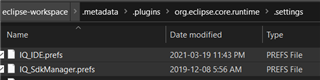
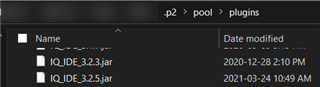
3) I think the bundle pool stores plugin downloads/binaries/metadata and not settings, after looking at both my bundle pool directory (%USERPROFILE%\.p2) and my eclipse workspace .metadata folder
4) I have bundle pools enabled too, yet my eclipse workspace still has a .metadata/.plugins folder full of plugin settings. I also previously created a second workspace to troubleshoot something and it also has its own .metadata folder.
The CIQ IDE and SDK Manager preferences are right there:


I wonder how it's possible for each workspace to have its own IQ_IDE.prefs file considering the plugin itself only exists once in the bundle pool folder?

Note that the stackoverflow article says nothing about plugin settings. It also says "all the common bits are shared". Not everything.
We can infer that "plugin settings" are not among the common bits.
Otherwise how would eclipse support multiple workspaces properly?
"Oomph's underlying infrastructure supports bundle pooling for all aspects of the installation (and, optionally, even of the target platform), i.e., when installing multiple products using Oomph or when provisioning multiple target platforms, the installations and target platforms can share all the common bundles and will download each bundle only once. This dramatically reduces disk space as well as speeding up installation and target platform provisioning time. Of course one can disable bundle pooling to produce an installation exactly like you get with an unzipped package download. You can also see there is a dialog to manage the bundle pools."
Do you really believe that the intent is for multiple installations or target platforms to share common plugin settings?
Well, I had to uninstall and reinstall Eclipse... but I got it working again.