vivoactive 3 number font can't display spaces?

Hi.

I have an issue where FONT_NUMBER_HOT or any available system number font on Vivoactive 3 and 3 music can't display a space, but produces a square instead. Is there a solution to this other than using a custom font? 
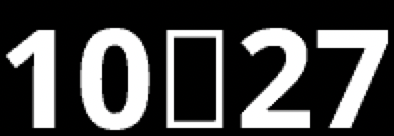
Thank you in advance!

  • Yeah, I think Edge devices don't have spaces for number fonts either.

    One of the Garmin Connect IQ appendices used to list the supported number font chars for each device, but they removed that info IIRC. Even when they had it, it was tough to determine which devices supported spaces for number fonts without looking at the HTML source... (As a space would be at the beginning of a list of printable chars, like "0123456789:/.+%#", but it wouldn't even be rendered....)

    If you can spare the code, you could always substitute spaces with a placeholder char like ":", "." or "0" with the same color as the background (or with a transparent foreground).

  • Looks like this is for a time.  What you can do is just display hours and minutes as two separate draws with a gap between them.

    TEXT_JUSTIFY_RIGHT for the hours, TEXT_JUSTIFY_LEFT for the minutes, with a change in the "x" to  size the gap.

  • if you use something like getTextWidthInPixels(":",font), you can vary the size of the gap based on the font and device. And getTextWidthInPixels can also be used if you want to do centering based on the current values.

  • Thanks, Jim. I'm only drawing text in the always-on mode, because I have to move things around the screen to prevent burn-in, but in regular mode I'm simply setting text on a layout label. I have layouts that use % instead of px and I also pre-calculate density-independent pixels for some things to have them render proportionally on every screen resolution - this way I don't have to dynamically calculate positions of elements on each draw. Although this seems to have a memory disadvantage, based on my testing, this technique provides huge battery savings, because no calculations are done at run-time. (again, this is anecdotal evidence, but it comes from a lot of users and my personal tests)

    To resolve the issue above I think the best solution (in my case) would be to simply insert a space character of a different font, or, like suggested, to put a "." there and color it transparent :)