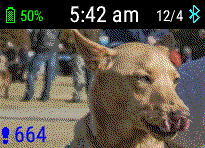
Hello, i want to use basic png graphics. where can i read what parameters a png image should have in order to be well visible and not blurred?
en.wikipedia.org/.../List_of_color_palettes
Thank...
Hello, i want to use basic png graphics. where can i read what parameters a png image should have in order to be well visible and not blurred?
en.wikipedia.org/.../List_of_color_palettes
Thank...
You want to try to use colors in a png that are available on a f5 - there are 64. When the png is complied, it will try to map things into those 64 colors. Other devices are 8 or 16 colors, and then things like a venu have many more colors, but the more colors, the larger the bitmap, and the more memory used by your app.
See https://developer.garmin.com/connect-iq/core-topics/resources/ under bitmaps, to see how you define the color pallet.
When you are defining the bitmap use this for black and white. It results in a much smaller bitmap.:
<color>FFFFFF</color>
<color>000000</color>Again, how does it look on a real device.,
I did this watchf ace years ago for the original vivoactive (16 color device).

The picture looks much better on the actual device
I use PantShop myself, and sometimes InkScape. Create a png with only black and white and see how that works.
Hello please how can i set the default desktop background to white? I created a png image that has a transparent area and I have to have a white background below this area.
Thank you