IQ Simulator Behaviour

Former Member
Former Member

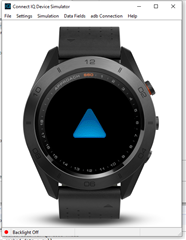
I've notice that when i launch an app on the IQ simulator for the Approach S60 and then i press the back button the device goes in a kind of restart screen while i was expecting that when i close and app the simulator would go on the home screen.

I tried reading through the documentation but i couldn't find anithing about what should be the correct behaviour.


Does anibody now if that it the supposed behaviour ?

Also is the simulator suppose to work like a real device or is simple configured to only start the app we want to test ?

I've also notice the same behaviour and other simulated devices, is it suppose to work on this way on all devices or there are any exceptions ?
   

Top Replies

All Replies

  • What you are seeing is normal. When an app exits, the device you last run on will stay with the blue triangle until you run a new app on that watch or another watch when the device will change.

    The simulator is just for testing an app so other watch functions are not available. And things like settings are handled outside of the simulated watch. Once you start an app, the behaviour is supposed to be the same as that you would see on a watch, although some things are a little different, like switching to glance view for widgets or going triggering watch face settings.

  • Yes, there are things in the sim that are different, and an example is, when you run a widget, it will keep running forever in the sim, but on a real watch, after a timeout (30sec to 2 mins based on the device), you are returned to the watch face.  When testing a watch face, it will stay in hi power until you change to low power by using "settings>Low Power", where on a device, it will drop out of low power based on a gesture, and only stay out of low power for about 10 seconds.