How can I delegate the application settings file in prg so that I can set the watchface values in the phone?
See the ObectStore sample in the SDK. It shows both using the object store as well as properties/settings
File properties/settings I have, but I don't know how to call them on my phone so I can see the settings button there...in prg.file
<properties>

	<property id="AppVersion" type="string">2.4.3</property>
     <property id="keyOW" type="string"></property>
	<property id="gLocationLat" type="string"></property>
	<property id="gLocationLng" type="string"></property>
</properties>


<strings>

	<string id="AppName">test</string>
	<string id="AppVersionTitle">App Version</string>
    <string id="keyOW">API key for weather</string>
	<string id="gLocationLat">Lat</string>
	<string id="gLocationLng">Lon</string>
</string>


<settings>

	<setting propertyKey="@Properties.AppVersion" title="@Strings.AppVersionTitle">
		<settingConfig type="alphaNumeric" readonly="true"/>
	</setting>
    <setting propertyKey="@Properties.keyOW" title="@Strings.keyOW">
		<settingConfig type="alphaNumeric" />
	</setting>
	<setting propertyKey="@Properties.Theme" title="@Strings.ThemeTitle">
		<settingConfig type="list">
			<listEntry value="0">@Strings.ThemeBlueDark</listEntry>
			<listEntry value="13">@Strings.ThemeDaygloOrangeLight</listEntry>
		</settingConfig>
	</setting>
You can test them with the App Settings editor in Eclipse.
On a real devices, the app must be in the store to do it from a phone. See the New Developer FAQ:
https://forums.garmin.com/developer/connect-iq/w/wiki/4/new-developer-faq
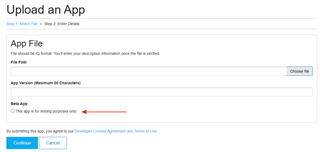
Thank you, when I upload WatchFace to the store, can only I download it? Or will it be seen for other users?
When you upload it, check the box indicating it's a beta app, and only you can download it.
Thank you :-)
can somehow try the simulator - phone settings?
I didn't find anything on the FAQ
In eclipse, under Connect IQ, is "App Settings Editor" where you can test app settings with the sim.
They're already testing, thanks