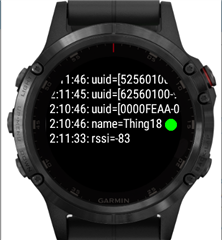
I am a beginner with developing apps using the CIQ SDK and also new to developing with BLE but I am trying to create a simple app that will scan surrounding devices and output them to the LOGS txt file using System.print. I am currently not able to find any new scans. I have ensured that the scan state is scanning, but my onScanResults function is not being called. What could be a reason for why the onScanResults is not being called? My phone is right next to the watch and is discoverable and the watch I am using is the Garmin fenix 6, which is BLE enabled. I have inserted my code below, any help would be much appreciated!
using Toybox.WatchUi;
using Toybox.System;
using Toybox.BluetoothLowEnergy as Ble;

var resultOfScan = [];
var count = 0;

function changeText(inputVal) {
	action_string = inputVal;
	WatchUi.requestUpdate();
}

function printScan(arrayScan) {
	if (arrayScan.size() == 0){
		System.println("No scans");
	} else {
		for (var i = 0; i < arrayScan.size(); i++) {
			System.println(arrayScan[i]);
		}
	}
}

class NewProjectAppDelegate extends WatchUi.BehaviorDelegate {
	var test = null;
	function initialize() {
		BehaviorDelegate.initialize();
		test = new Handler();
		Ble.setDelegate(test);
	}

    function onKey(keyEvent) {
    	if (keyEvent.getKey() == 5) {
    		count++;
    		if (count > 1){
    			System.exit();
    		}
    		System.println("ESC triggered");
    		printScan(resultOfScan);
    		test.stopScan();
    	} else if (keyEvent.getKey() == 7) {
    		changeText("Attempting scan...");
        	System.println("Menu triggered");
    		test.startScan();
    		count = 0;
    	} else {
    		count = 0;
    	}

        return true;
    }
}

class Handler extends Ble.BleDelegate {
    function initialize() {
        BleDelegate.initialize();
    }

    function onScanResults(scanResults) {
    	System.println("Scans!");
    	changeText("Scans found...");
    	for(var result = scanResults.next(); result != null; result = scanResults.next()){
    		resultOfScan.add(result);
    	}
    }

    function startScan() {
    	Ble.setScanState(Ble.SCAN_STATE_SCANNING);
    }

    function stopScan() {
    	Ble.setScanState(Ble.SCAN_STATE_OFF);
    }

    function onScanStateChange(scanState, status) {
    	System.println(scanState);
    }
}