Crash Recovery Logic Flow

There are some internal variables I maintain in my data fields that are lost in the rare instance when my Garmin resets mid activity. Or when I use the Edge Feature where you can stop an activity, hold the power button, and POWER OFF the device... then power it back up and continue the Activity where you left off. That last use case seems like a bug.... Garmin should save the memory state, but they don't.

Anyway, this is the best way I've found to code a reliable "Crash Recovery" to restore those interval variables so your CIQ application's state is maintained across crashes and Power Off / Restart cycles.

Garmin does restore many native metrics across a crash, like distance, total ascent, etc. But they don't maintain YOUR variables (of course).

For example, say you are maintaining something simple like the Lap Count (increments every time the lap button is pressed). And you'd like that counter to be accurate after a crash. This seems to be the best way to handle this... Your app's lap counter will restart at 0, even if, say, you were on lap #6. So, when your app's counter says 3, you are really at 9. And to handle a 2nd crash, you need to continue to save the current working value (eg: 9). So to generate the accurate working value, you need to add the Crash Recovery Value to the "change" in the current value.
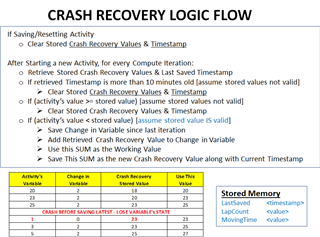
  • You want to be careful about how you are saving things, especially if you're using Storage and doing it every second (in compute()) and do things like store everything with a single key (maybe as an array), as file system read/writes are expensive.

    Also, maybe I'm missing it, but "resume later" is probably the most common thing for this, and the 10 minutes could be far too short for that.

  • Hmmm. Let me think about the 10 mins. My initial thought and experience is that there are three use cases.... 1. You glance down and your Garmin has turned itself off mid activity. Rare. But you hit power on and it resumes. Generally you’ll notice well within 10 mins. 2. Garmin crashes and auto restarts within a minute mid activity. 3. You notice the Garmin has hung. So you hold the power button for 5 secs or so to force a reboot. It restarts within a minute. In all those cases a 10 min watchdog timer seems valid. In the case of PowerOff and later after lunch you want to continue.... yeah good catch! I should increase the time stamp sanity check to a few hours.

  • And you also then have the case where you don't resume after using resume later, but start a new activity...

  • That case is covered.... So if you've powered an EDGE device off during an activity... you'll resume back into that activity. In order to start a NEW activity, you will need to STOP and SAVE or DISCARD the existing one. And my logic flow suggests on that action, you clear the stored values. Or, say you've stopped for lunch, powered off your existing activity. And don't actually keep going. The next day you want to start another workout. That will exceed the timestamp sanity check, so old values will be cleared. I'm sure there are corner cases where this will break... But it should be a LOT better than the existing behavior where your variables are all lost. Thanks Jim.