I'm adding support for round/semiround devices, I've profiled the various combos. This might help some of you. It turns out this is pretty easy to do without messing with monkey files and separate MC files for different devices.
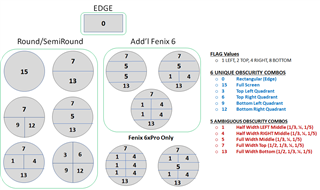
For example, if you get obscurity = 5, there are a variety of possibilities. For example. If the height is approx 1/3 of width, you know you are in a 3 field situation and the inner rectangular width is equal to 2.0 * SQRT(0.33 - 0.33^2). However, if height = approx 1/4 of width, you are on a Fenix 6 and the inner rectangular width is 2.0 * SQRT(0.25 - 0.25^2).
You can do this kind of logic for really any of these positions. In general, the width for an inner rectangle is based on where the field is on the overall watchface. If it is, say, 40% down from the top of the screen, then the width of the inner rectangle is: 2.0 * SQRT(0.4 - 0.4^2) for a full width field, or half that for a half width field.
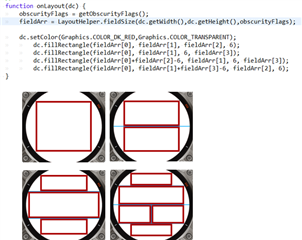
Here are two examples for obscurity flags of 5 and 7. Both of these flags are ambiguous - until you compare the height to the width. Then you have disambiguated them and can tell exactly where the edge are for an inner rectangle of space to use for placing objects and text.

Here is the general table. The ambiguous flag combos can be a variety of ratios of width (eg: flag = 7 can have a height equal to 50%, 33%, 25% or 20% of width).