NEW Edge 1030 Simulator Rendering Bug

You may recall the bug I mentioned a couple weeks ago. The Edge 1030 in the simulator, displayed a nav bar at the bottom that obscured part of the screen that wasn't there on the device.

That was fixed apparently in SDK 3.1.5 or 3.1.6. However, NOW there is another bug. When the layout is one field, my data field's text is properly centered vertically. When the layout has more than one field, the simulator skews the text off center. On a real device, it continues to do the right thing and shows it centered.
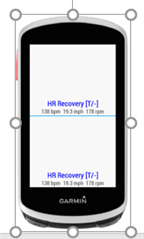
  • I changed the location of the Data Field width and height variable updates from onLayout to onUpdate and now it works in the simulator again.

  • -

    Are you saying that the text in the image is supposed to appear at the center of the field? Can you post some pseudocode that shows what you're doing and maybe some screenshots showing what you expect versus what you see?

  • I fixed my code. I had always set my data field height and width variables in the onLayout() function. And in the past, that worked in both real devices and the simulator, even when I changed the layout in the simulator while the data field was running. All of a sudden in the latest SDK update, this broke and those variables kept the original height and width even if, for example, I changed the simulator layout from 1 to 2 fields. I simply changed my code so I set height and width in onUpdate() instead and now the variables are updated properly in the simulator. So, maybe the behavior of the simulator is now correct and my code was bad but accidentally worked?

  • Ahhh.. Yes, this is a bug with DataFields in the simulator. Your original code was correct.

    The onLayout method is supposed to get called for every field in the simulated view, but it is only getting called for the first one. This issue should affect all devices in the simulator, but it will be most noticeable if you're using a configuration where some fields have different size/obscurity than the others.

    We've already got a fix for this one, but it won't make it out until the next release.