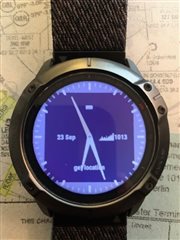
watch face did not refreash correctly when return from widget.

here is the watch face https://apps.garmin.com/en-US/apps/258bebdf-7ab2-4875-95b3-c5c7718df451

Some users reported that the watch face did not refresh correctly when returning from a widget. The API documents said that these three functions are to be called when loading a watch face.

onLayout() → onShow() → onUpdate()

The watch looks good in the simulator, but I don't know how to simulate this case.

I'll add some photos later when I got the feedback's consent.

  • Are you trying do so something like only refresh part of the screen in onUpdate()?  In onUpdate(), you always want to do the full screen.

  • Thanks for your reply, I really did like this.

  • When you go from a widget back to the watchface, it should be exactly the same as starting the watchface from scratch. Even uninitialized variables all get set to null I believe, so there shouldn't be anything random in it that I can think of ...

  • The problem is that the arithmetic is so complex, I refresh the full screen only once when loading the watch face. otherwise, the code executed too long.

    It works well most of the time unless returning from a widget with a sliding animation. How can I know if the animation finished in onUpdate()?

  • You can't.  You need to refresh the entire WF when onUpdate() is called.  Like I said, it's not just moving in the widget loop, it's things like when a notification is displayed.  This has come up a number of times over the last few years.

  • You may want to pre-calculate things, and make those values available by using Jungles. 

    In my general watchfaces, I calculate as much as I can in onLayout(), and that's used in onUpdate(), with onUpdate() only doing things that aren't static.

  • The problem is that the devices do not have enough memory. It cannot even create a none-palette bitmapbuffer with the size of the screen for devices with the resolution of 280*280. I'll try to solve the problem by Interval full-screen-refresh in "onUpdate".

  • With 240x240 devices having the same amount of memory as a 280x280 one, yes, that can be a problem, and it's been brought up in a few threads here, but you sill want to do a full screen update with onUpdate(), because otherwise, things could end up "funky", be it only for a minute or two.

    The other thing to consider with the devices with a larger display is the power budget if you are using onPartialUpdate().  You can have a delegate in a watchface that is used when you exceed the avg power budget of 30ms per call over a minute, and when that occurs, onPartialUpdate() is no longer called.  On the larger displays, that's more likely than on the 240x240 displays, so something you should check,  In "view watchface diagnostics", you can get an idea of where you are at, and with an analog WF, the peaks will likely occur at 12 and 6 (the most rows are involved). (updating 140 rows vs 120 can act differently)

    The reason I mention this, is with the larger displays, an option could be not to do anything in onPartialUpdate(), and only draw seconds if onExitSleep was called for the 10 seconds after a gesture. (the typical fallback if the power budget has been exceeded)