How do I stop showing this notification for every course I open?
I really do not need to see it everytime. Just once is enough.
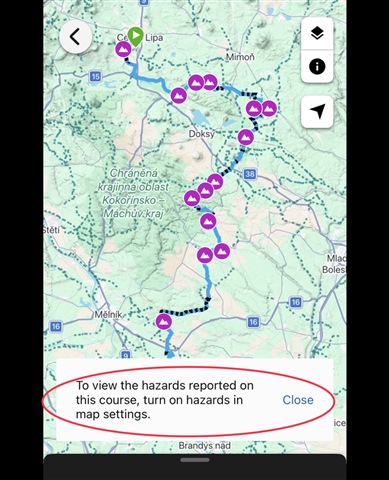
How do I stop showing this notification for every course I open?
I really do not need to see it everytime. Just once is enough.

This is actually functioning as designed since there are hazards on that route. When I opened your course link provided the pop up you have showing in your screenshot does go away automatically in Connect…
I also find this annoying but used to just click the x and get rid of it but now the x is not responding which means I cannot access the three dots which offer the different options such as copy. Anyone…
OK - here's a description of the problem with Hazards on the web version of Garmin Connect course viewer which the developers can hopefully understand and fix.
If Hazards are NOT selected in Map Settings…
I do not get any warning when opening the course in multiple browsers, or with the app. I guess you use one of the newer Edge computers. If so, then have a look not only on the layer settings on the Course…
so what device settings do you mean that might be related?
A Garmin Device. Most likely an Edge biking computer, since AFAIK only those support Hazards, although I do not exclude the feature was added to some recent watch models too.
This is actually functioning as designed since there are hazards on that route. When I opened your course link provided the pop up you have showing in your screenshot does go away automatically in Connect Web, however, since you have hazards disabled it is always going to show any time you open a course that has hazards to let you know you will need to enable that feature again to view them on that course.
OK, thanks... but I still find it very annoying - if I disable route hazards intentionally, I really do not need to be warned there are hazards again and again
I also find this annoying but used to just click the x and get rid of it but now the x is not responding which means I cannot access the three dots which offer the different options such as copy. Anyone any thoughts please?
I was wondering where the three dots went!
I found if you enable the Hazards, then reload the page, the warning message goes away and the three dots are visible.
That doesn't seem right - i'm using the web version and whatever i do i can't get rid of the dialog 'To view the hazards reported on this course, turn on hazards in map settings'. The 'x' at the end of the dialog simply doesn't work. The dialog box continually obscures some useful information at the bottom of the map screen. The hazards feature in itself is pretty useless - we have so many potholes on UK roads someone flagging a pothole on Connect is more of a distraction than any help.
OK - here's a description of the problem with Hazards on the web version of Garmin Connect course viewer which the developers can hopefully understand and fix.
If Hazards are NOT selected in Map Settings the nag prompt "To view the hazards reported on this course, turn on hazards in map settings." is displayed at the bottom of the screen. The 'X' button cannot be used to remove the prompt from display.
If Hazards are then selected in Map Settings red hazard symbols appear across the map (as expected) but the nag prompt is NOT removed and the 'X' button still doesn't work.
If the page is refreshed (or a different course opened) then the nag prompt "To view hazards..." does disappear.
It is then possible to use map settings to remove the hazards from the map.
If the page is refreshed (or a different course opened) then the nag prompt "To view hazards..." comes back again and the whole sorry saga starts once more.
Garmin - SP
I can confirm it is not possible to get rid of Hazard warning message in web Connect anymore, X button or whole banner doesn't close, so it is permanently overlaping height profile
Hi,
I feel your pain, as I see the same behaviour in two up-to-date browsers, Chrome and Edge, on Win11.
Clicking the 'x' on the right does not get rid of it.
I have to resize the window to see the controls underneath.
I hope it's resolved soon.