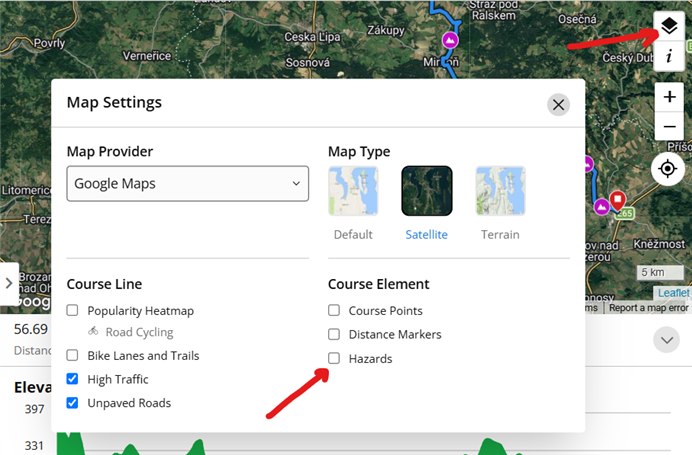
How do I stop showing this notification for every course I open?
I really do not need to see it everytime. Just once is enough.
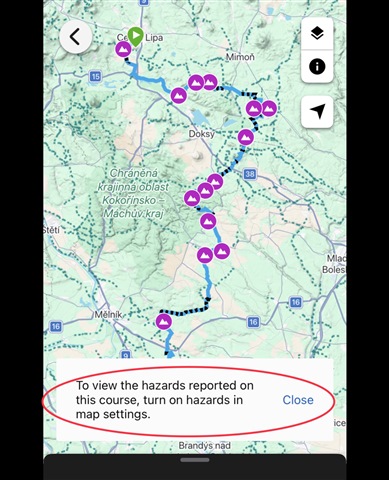
How do I stop showing this notification for every course I open?
I really do not need to see it everytime. Just once is enough.

This is actually functioning as designed since there are hazards on that route. When I opened your course link provided the pop up you have showing in your screenshot does go away automatically in Connect…
I do not get any warning when opening the course in multiple browsers, or with the app. I guess you use one of the newer Edge computers. If so, then have a look not only on the layer settings on the Course…
Hi there, Are you viewing this notification in Garmin Connect app or Garmin Connect web version? As well as can you please provide the software version of the device and the model that you are viewing this error on?
Hi there, I'm viewing this both in mobile Connect app (5.29.0.9, iOS, iPhone 15) and web version (no matter which browser or OS).
It looks like you enabled the Hazards option in the Course Layers settings. Disable it, and you'll get no warning. At least I don't get any, when loading courses in the same area:

no, it is disabled permanently
Could you post a link to the course showing the warning?
it is not just one, it is every course I open
but here you go - connect.garmin.com/.../480061117
I do not get any warning when opening the course in multiple browsers, or with the app. I guess you use one of the newer Edge computers. If so, then have a look not only on the layer settings on the Course map in Connect, but also directly on your Edge, and try disabling the Hazards there too: Using Community Generated Road Hazards | Garmin Customer Support
you probably didn't read my previous comments... I'm getting that message everywhere - mobile app and every browser on every system - chrome, safari, mac os, win
Of course I've read your post, but I do not get the warning anywhere at all. Which means it comes either from the Layers settings, or because of your device settings. Did you check both of it?
as I said before, hazards in layer settings is off... and I'm using iPhone, mac and also windows PC computer... so what device settings do you mean that might be related?