I print copies of my activities for my walking log. Just recently, the print has started to include the menu sidebars, which it didn't before (see before and after examples attached). Is there any way I can exclude these?After.pdfbefore.pdf
In fact, I am no more able to print the pages cleanly without the side menu (and without hacking the HTML code), too, so I guess it just took a few days later till the change on the web propagated to my…
I found a way to print that its working for me. Open the activity, go to the gear and click to trim it. Dont do any changes and click cancel. Automatically it will return you to the activity. Now try to…
indeed! Another way, is clicking the pencil icon (Edit), and then either Save (without any change) or Cancel, and the page then prints correctly too.
Try a different browser. I just tested it with Chrome and Edge (on Win 11), and they both print just the main frame, without the menu.
Thanks Trux. My default browser is Safari on Mac. I've just tried with my secondary browser (Firefox) but it's still printing the headers and menu as well as the main frame.
Exactly the same result I'm afraid
You are afraid before trying or after it? It works as expected in my Chrome.
I have downloaded Chrome and opened Garmin Connect using it. Same result. Maybe it's because I am on Mac rather than a Windows pc
Do you get the same result when printing from a browser on your phone, instead of the Mac?
I've tried with both iPad and iPhone but then it only prints part of the information and the text overlapsiPhone print.pdf
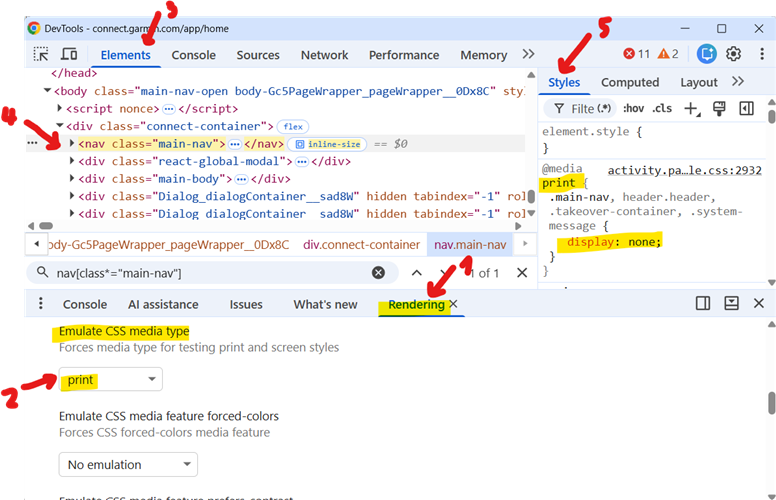
There is also a way you can find out whether there is a problem in the HTML of the page, or rather in your browser or computer (or perhaps some plugin / anti-spam filter, etc):

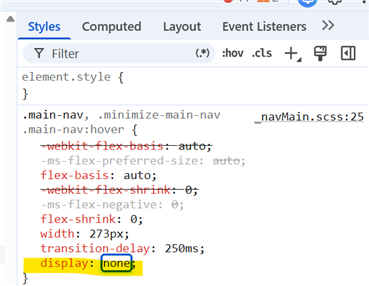
Alternatively, and simpler, if you do not want to mess with analyzing the CSS, you can just disable the navigation container manually before printing:
Open the DevTools as in #1 above and go directly to #5 (do not bother about the rendering options). On the right side, under Styles, add the line "display:none". It removes the navigation bar.

As for the overlapping when printing from the phone or ipad, that could be possibly fixed by adjusting the scaling or zoom factor of the page.
I got the same problem with my runs, I usually do a print/save to share with Claude but for the last two days rather than 4 pages it just prints the visible page on the browser, I have tried on multiple browsers and messed about with the print settings but can't resolve it. Can only think that Garmin have made a change which has inadvertently messed up printing activities on the web. I don't have a solution but I do have the same problem.