Just finished a run like I always do but no GPS was logged.

Like the title says on my 965 I started a run like I always do and selected a course to run.

I saw where I was during the course but in my saved activity I don't see a map. 

Since it's winter I have been logging two treadmill exercises but I did choose the 'Treadmill' profile for that.

When editing the activity I also can't add the coordinates manually.

I have been looking at: https://support.garmin.com/en-US/?faq=ebPOlI4buWAZDXIqCG44w8 which mentions an Indoor-marker but I don't see anything related to that or GPS on/off in that profile (I do see a hole bunch of incomprehensible options like 3d distance)

Any ideas?

Top Replies

All Replies

  • Also, this afternoon I walked the dog and logged a Walk-activity. This was also logged without a map. Did I disabled this globally somewhere? (happy I'm seeing this during a regular 5km traning run and not a longer distance though.)

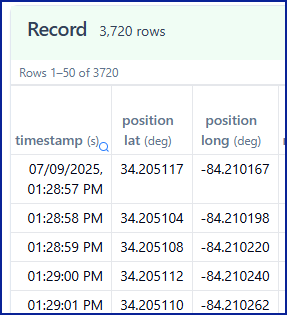
  • To see if the watch is recording GPS data correctly, you can upload the actual FIT file from your watch to FIT File Viewer.

    This will show you if there’s positional data in the activity. Once uploaded, check the “Record” section; it should list many rows with position latitude and longitude.

  • Thanks for your response. Ok, I'm seeing 47 rows at GPS event. Record is showing me no position (lat lon) columns though.

    It would be great if I can add the map to this 'lost' activity. But what I would rather like to know is how this happened and what I can do to make sure this doesn't happen again.

  • I'm seeing 47 rows at GPS event.

    You won't see positional lat/lon under GPS event. That data would be under "Record," as in my screenshot. I'm just trying to confirm whether or not your activities actually contain records of GPS data. Then we can see what can be done to prevent it in the future.

    If there is no GPS data, without knowing what actually happened, I can only guess. Sometimes when starting a course, it is common to forget to start the activity. 

    Select Run > Navigate > Courses > Select the course > Do Course > Then press the start/stop button to start recording the activity. Otherwise, nothing gets recorded.

  • That is exactly what I did. Start, run profile, at the waiting for gps screen I selected navigation and then the course. 

    During the run I saw my position on the map.

    But I would expect that gps is always logged during a run activity. Even without navigation. 

  • If you can attach the activity fit file to this thread, we might be able to see what is happening.

    • Zip the file, then in your reply go to Insert >> Image/video/file >> Upload >> browse for the file >> OK.
    • Or, you can upload the FIT file to a trusted file-sharing service like OneDrive, Google Drive, or Dropbox, set it to public, and share the link in your post.

    If you've already gone through the support document - Why Do I Not See a Map of My Activity in Garmin Connect?

    You aren't starting a non-GPS activity profile, such as treadmill, indoor running, etc.

    Satellites are not turned off for running - Forerunner 965 Watch Owner's Manual - Satellite Settings

    Satellite Settings - You can change the satellite settings to customize the satellite systems used for each activity.

    Hold Menu symbol, select Activities & Apps, select an activity, select the activity settings, and select Satellites Off. Disables satellite systems for the activity.

    You've waited for GPS before starting your activity. Waited for the bar to turn green. Then you pressed start.

    If nothing works, consider contacting Product Support through their website at https://support.garmin.com, and use the phone or chat options for quicker help.