Running Power settings with Stryd

Recently I started to run with a Stryd. What is the best setup in the watch for Running Power > Source (currently it's on the default: Smart) and in the User Profile > Power Zones > Running? Current (default) setting: based on TP%, but the threshold power is (automatically) set by Garmin to 333W, while Stryd tells me after a few runs that my CP is 227W.

I see a big difference in the Power recorded by Garmin vs Stryd. I found this thread:

 Garmin 965 & Stryd 

(why does Garmin lock threads that are still relevant?)

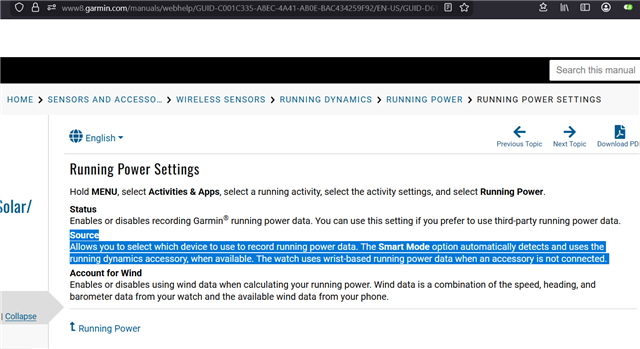
So I am surprised that today, 3 years later there seems to be this Smart setting, but it doesn't seem to work. I couldn't find the relevant documentation on what Smart Runnings Power Source means, but it sounds like it should be smart enough to know to use the Stryd.

BTW just for completeness my Stryd is connected as per the recommendation in the Stryd website: FP-ANT_ID, Speed: always, Distance: always. The "rest" of the discoverable sensors broadcasted by Stryd were connected once and are disabled. I have the Stryd Power Zones datafield installed in the Run activity.

Top Replies

  • Speed: always, Distance: always.

    My 2 cents: this is probably a mistake.

    Outdoors, you probably want speed and distance to use GPS. At the most, I would set to Speed to Always and Distance…

All Replies

  • So I am surprised that today, 3 years later there seems to be this Smart setting, but it doesn't seem to work. I couldn't find the relevant documentation on what Smart Runnings Power Source means, but it sounds like it should be smart enough to know to use the Stryd.

    As mentioned in other threads several times (including CIQ forum threads which you may have read or even commented on), Garmin will never use 3rd party sensors such as Stryd as a source for Garmin running power, despite persistent misinfo / misunderstanding to the contrary. 

    The 3 options for (native) running power source in an activity are Smart (default), Accessory Only, and Wrist Only:

    - Wrist Only: self-explanatory

    - Accessory Only: this refers to a Garmin accessory (like HRM-RUN and newer chest straps or RD-Pod)

    - Smart: uses Garmin accessory if available, wrist otherwise

    Actually, imo the best choice for Garmin running power settings when you use Stryd is to disable Garmin running power completely, which I believe is what Stryd support suggests.

    The reason for disabling Garmin running power is that if you keep it enabled, you will get 2 streams of power data in your FIT file:

    1) true native power [from Garmin running power]

    2) non-native ("CIQ native num") power [from Stryd Zones]

    1) won't be a problem for the Stryd phone app / Stryd power center as they will naturally just look at Stryd power. 2) won't be a problem for native Garmin running power features, as they will just ignore non-native power.

    However, if you sync with Strava and you care about Strava using power from Stryd, your only choice is to disable Garmin native running power because Strava will always prioritize native power over non-native power.

    If you want to use native Garmin running power features regardless, then ofc you will have to leave Garmin running power enabled. Just keep in mind that Garmin running power will never use the power data from your Stryd, and Strava will prefer Garmin running power to Stryd running power.

  • I couldn't find the relevant documentation on what Smart Runnings Power Source means

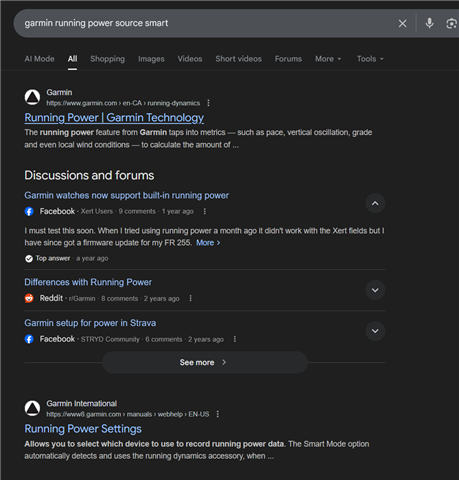
    https://www.google.com/search?q=garmin+running+power+source+smart

    Running Power Settings links to the Fenix 7 manual:

    www8.garmin.com/.../GUID-D61C06FD-E988-411F-B569-5F771778C373.html

    You could have also found the same documentation in the manual for your own FR965 device:

    www8.garmin.com/.../GUID-43E96D5A-4921-4273-BB90-3FE808D4A1F4-homepage.html

    I searched the FR965 manual for "running power smart" and got the same page as above (but for FR965):

    https://www8.garmin.com/manuals/webhelp/GUID-0221611A-992D-495E-8DED-1DD448F7A066/EN-US/GUID-D74FC870-3A94-4376-81D5-C9484545EAD9.html?scroll=GUID-D61C06FD-E988-411F-B569-5F771778C373 

  • TL;DR

    1) Garmin running power does not know or care about 3rd party sensors like Stryd [*]

    2) Stryd ecosystem (Stryd app / powercentre) doesn't know or care about Garmin running power

    3) Some 3rd-party apps/sites like Strava will prefer Garmin power over 3rd-party power like Stryd, when processing activity FIT files

    The recommendation from Stryd itself is to disable native Garmin running power when using Stryd, although this isn't strictly necessary unless you care about 3).

    [*] the loophole here is that the newest Stryd - Stryd 5.0 - also presents itself as an RD-Pod. In this case, it seems that Stryd could potentially be used as a "source", but Garmin would still be calculating Garmin running power from the sensor's running dynamics data, as opposed to using Stryd power itself.

    (Garmin's HRM and RD-Pod sensors don't calculate power themselves, but the running dynamics data they send to the watch is used to calculate Garmin power on the watch itself. This should be made abundantly clear by the fact that the super old HRM-RUN can be used for Garmin native running power, although it existed long before native Garmin running power even existed, and it never required a firmware update to be used as a source afaik.)

    The point is that Garmin's running power feature will never use a Stryd (or other 3rd party) sensor as a source for the power data itself.

  • Speed: always, Distance: always.

    My 2 cents: this is probably a mistake.

    Outdoors, you probably want speed and distance to use GPS. At the most, I would set to Speed to Always and Distance to Indoor. That way when you use your Stryd outdoors, your current/instant speed/pace would come from Stryd, but your distance and *average* speed/pace metrics would come from GPS.

    Otherwise I think you will be unhappy with your distance and activity/lap pace metrics when you run outdoors.

  • but it sounds like it should be smart enough to know to use the Stryd.

    I realize you're being cheeky here, but I think you're probably savvy enough to realize that "Smart" is just marketing-speak for "Auto", to make the option sound more exciting than it really is.

    So I am surprised that today, 3 years later there seems to be this Smart setting, but it doesn't seem to work. I couldn't find the relevant documentation on what Smart Runnings Power Source means, but it sounds like it should be smart enough to know to use the Stryd.

    "I don't know what this setting is or how this feature actually works, but it sure seems broken to me!"

    Btw the thread you linked to is pretty clear that Stryd was not a source of Garmin native running power at the time, and 3 years later nothing has changed in that regard.

    Not sure why that surprises you, unless you just got really excited by an option named "Smart" and assumed that it magically does everything you were hoping for.

    Also, Stryd support has this to say:

    https://help.stryd.com/en/articles/6879626-disable-garmin-s-native-power-value-recording-stryd-zones-data-field

    Garmin power is distinct and separate from Stryd's power. They are not comparable and are not relatable to one another.

    If there was a way for Stryd users to use Stryd as a source for Garmin power, they probably would have said something, since so many ppl obviously wish for this to happen.

  • re: RD-POD: I have a Next gen (4.0) Stryd and it also broadcasts RD-POD on ANT. Interesting however why does Stryd recommend to disable it on the watch's sensor settings, and only enable the Foot POD. Maybe I'll try what happens when I enable it (though not sure where to look to see the difference)

    re: Distance: always: Hmmm, I haven't yet tried Stryd on the track, only indoors and on the streets nearby. I don't know of course what's the diffrence in the distance measured compared to the GPS.

    However there's an even more interesting question then: if Stryd calibrates itself to me by comparing an outdoors activity's distance to what it calculated, then having dome my outdoors runs with Distance: Always, then it means that it haven't calibrated itself at all?

    BTW I was very satisfied with how it performed indoors run on the threadmill. The distance difference between the watch and the threadmill (on a 10k run) was much smaller than before, and changing the cadence while keeping the threadmill at a constant speed haven't changed the pace on the watch.

  • I think there is an important caveat with Garmin Running Power: it depends on accurate pace data. In the absence of GPS data, Garmin's power readings are inaccurate. It can use Stryd pace (Foot Pod) data to obtain more accurate and stable power numbers. Stryd can also act as an RD-pod. What I'm unsure about is if an external RD-pod supply that data type works as "native" numbers. We know that Stryd does not have the capability to provide native running power figures, but what about RD data?

    Looking at the website, lets refer to Running Economy and Running Power.

    Running Economy is interesting, "Key inputs for the metric include heart rate, speed and running dynamics such as stride length, ground contract time, vertical oscillation and step speed loss."

    For Running Power, the website states "The running power feature from Garmin taps into metrics — such as pace, vertical oscillation, grade and even local wind conditions — to calculate the amount of power you’re applying to the ground as you run."

  • From the Stryd website:

    For Single Stryd Users and Stryd Duo Users

    • Add each of the following 2 sensors: (FP-ANTID) and (RD Pod-ANTID).

  • Interesting! I found the page you referred: https://help.stryd.com/en/articles/8594075-stryd-zones-data-fields-and-garmin-watch-setup-with-stryd-and-stryd-duo 

    I wonder why it recommends to disable auto lap though. Especially in track run, wouldn't it make sense to leave it on position based auto lap?