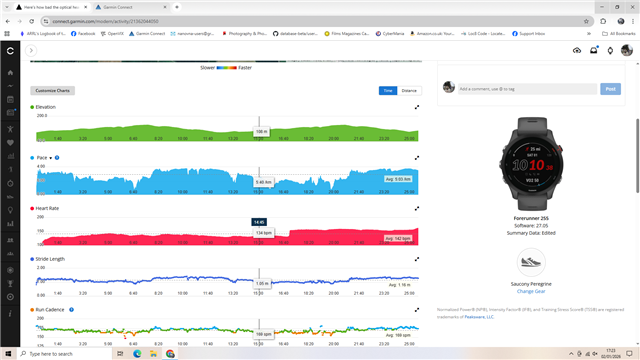
Here's how bad the optical heart rate is on the FR265

There are a lot of posts on this forum of users experiencing erratic and/or unreliable heart rate readings from the optical heart rate sensor on the FR265. I am one of those users. I previously had a FR45 and do not recall any major HR inaccuracies from the OHR sensor on that watch. When I upgraded to the FR265 (or what I thought was an upgrade), I was shocked and puzzled that the heart rate reading was all over the place -- usually it was too low (based on what I know by feel) and often jumped up by 10, 15 or more beats from one reading to the next. The "solution," if you want to call it that, was to wear a chest strap. (FWIW, I tried multiple wrist positions and strap tightnesses with no improvement.) But again, I didn't seem have this issue with my FR45, at least not to this degree, so what is going on with the FR265?

I decided to conduct an experiment to see just how bad it is. I also have an Edge 830 that I use for cycling. So I brought my Edge 830 to the gym for a recent strength workout. I wore my chest strap and connected it to my Edge. My FR265 was on my wrist with the optical sensor reading my heart rate. I started activities on both devices simultaneously. After the workout, I downloaded the .csv data into Excel and plotted both sets of HR on the same chart.

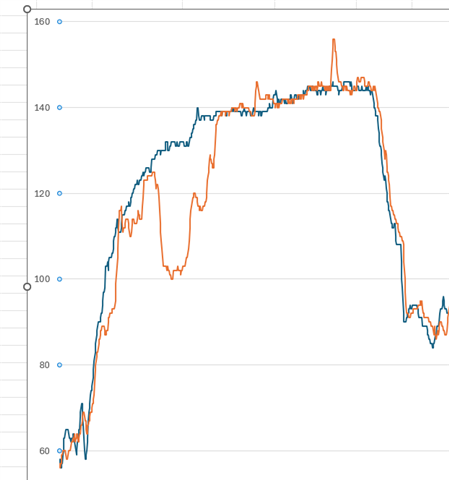
Here are the results. The blue line is my heart rate as recorded by the Edge with a chest strap. The orange line is the FR265 with optical heart rate. The workout started with a casual 10-minute steady 7-MPH jog on the treadmill. The peaks that follow are my sets of lifts. 
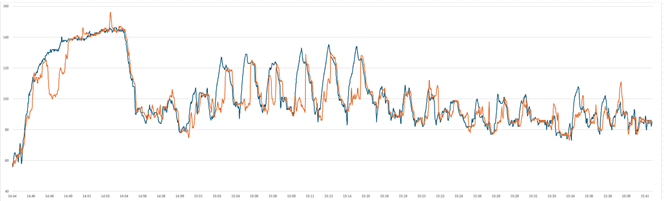
Note the gap between the Edge and the FR265 -- especially during my treadmill warm-up. What is going on here?? The FR265 was jumping up and down randomly. I have no idea what that random spike is.
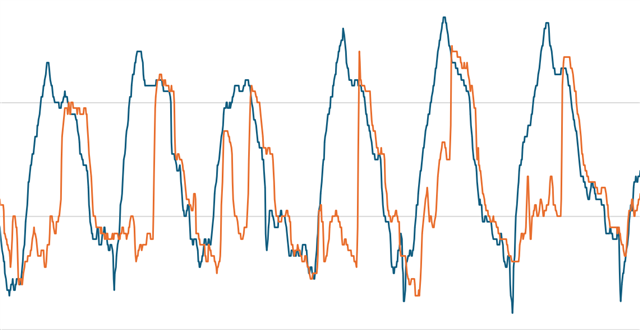
Here is my HR during some of the lift sets. Again, the FR265 HR was all over the place and the gap between the two is huge.
Some stats:

Greatest jump from previous reading: Edge: 6 BPM. FR265: 18 BPM. (How can my HR jump 18 BPM within one second? I had 13 readings where it jumped seven or more BPM within one second.)

Average difference between the two devices: 6.27 BPM

Greatest difference between the two devices: 38 BPM

Percentage of readings with more than 10 BPM difference: 20.1%

What this boils down to is that the OHR sensor on the FR265 cannot be trusted and is, in effect, worthless. The question therefore is what, if anything, Garmin is going to do anything about this. Considering the FR265 is no longer a "current model" on Garmin's website and has been superceded by the FR570 as the mid-tier running watch, I'd say the answer to that question is "nothing."

  • Unless something has changed the only exception that allows loading older firmware is if you are a Beta tester. In the event that you are unhappy with the Beta you can revert to the latest release, but Garmin does not officially support otherwise, like revert back to the release you were using (if it was not the latest release), that is to the best of my knowledge.

    Now I'm not saying you can't hack an older release in, it's kind of similar to stopping a release from actually doing an update. Even though I had updates turned off, if I used Garmin Connect (hooking the watch up to a PC and using Garmin Connect on the PC) the watch would download an update anyway and when I disconnected from the USB cable, the watch would ask if I wanted to update now, or later. I'd say later, shutdown Garmin Connect, hook back up to the USB cable, browse the watch, copy then delete the update file from the watch. So I have a few older versions squirreled away, but not many, just as a result of stopping an update.

    I had found instructions to restore an older version

    install an empty "force.tmp" file to the Garmin folder, along with the gupdate.gsp file for the software you want to revert to.
    Then unplug and install. Your watch will backdate to whatever version you loaded. Backdating software will revert your watch to default settings.

    The problem is having the older version of the firmware to install. The watch doesn't allow for export of the current version, of at least there is no obvious way that I've found.

    So if you know a place where Garmin (or someone else) has archived the firmware versions, or happen to know a way to force the watch to export the current version, then I'm all ears.

  • I rolled back the OS version in my 745 back when the 745 was having elevation issues.  The trouble was two fold 1) I had to locate the older version of the OS which was damn near impossible. Garmin does not keep old OS's kicking around. Luckily I had a beta .zip file saved on my local hard drive.  And 2) whenever I sync'd the 745, GC realized I was running an older OS and kept wanting to install the new OS.  I continually had to say "no' when prompted.

    Eventually I messed up and said yes and then I had to roll the OS back again.  A major pain. Eventually I gave up, updated the OS, and lived with the messed up elevation readings until buying the 245.  After which Garmin did fix the elevation issue in the 745!

    That said I really do like the 245.  The watch display is great.  The watch has all of the features I like and want.  Plus the watch plays nicely with my Edge 1050 for recovery times and all that jazz.  I just wish the optical heart rate was a bit more inline with the heart rate I get when I wear a heart rate strap.

  • You find the stable versions attached to the first post about the beta cycle. Just look in the beta forum...

  • Well that's what it generally says but that is just the last live version of the most current cycle which is always available. I clicked on a few links to see if I could find older software but I was blocked from exploring them, likely because I'm not a member of the Beta Program. Then there was this little disclaimer;

    https://forums.garmin.com/beta-program/w/beta-wiki/145/how-to-return-to-live-software

    NOTE: Fitness devices such as the Edge, Forerunner, and Vivoactive series are unable to be backdated at this time. 

    BTW the sanity of being a participant in the Beta Program without the ability to backdate is in my opinion akin to the guy who's supposed to  test the shark Bite Suit in Bill Engall's Here's Your Sign comedy routine.

    "Alright Jimmy, you got that shark suit on, it looks good... They want You to jump
    Into this pool of sharks, and you tell us if it hurts when they bite You."
    "Well allright....hold my sign, I don't wanna loose it”  Here's your sign.

  • But you can backdate if you have the older firmware.  I've done it on my 255.

  • I've no doubt backdating can be done, even if in some cases and for some features it might lead to undesirable consequences. My view is that if the features an individual needs works best in a non current software version, Garmin should support that backdating, officially. Who cares if it negatively impacts a feature that isn't cared about. But it would have to be at the users risk that some current fixes (for inconsequential features) wouldn't be available. To that end if Gramin doesn't already do it the HR processing should be in it's own little software module and all the features that need HR draw from the output of that module. Change the firmware processing for the Optical HR, keep the module output connections the same and then it shouldn't (theoretically) be an issue. Just load in the HR processing module that best suits your needs and good to go; because it sure doesn't look like Garmin can get it to a one size suits all. The Optical HR issues have been going on for generations of watches. 

  •  Thank you for the feedback! Garmin chest strap HRMs can naturally give greater accuracy in activities with lots of motion, so it's expected that you may see some discrepancies between the data from your HRM and your Forerunner 265. Based on the screenshot you've provided, the data looks very similar and is well within the acceptable range. That brief dip in heart rate at the beginning could be explained by the fit of your watch and/or the wrist flexing movements of your strength workout at that time. However, if you have other examples you can provide that show a distinct difference throughout the activity or a more sudden spike/drop in HR data, we'd be glad to examine those and provide assistance.

          It seems that all of you are experiencing a separate concern with your watches (an instant spike or drop of heart rate while recording activities), and we'd like to troubleshoot this with you. To start, please follow the steps outlined here. If the issue persists afterward, please leave a comment on this thread so we can continue assisting.

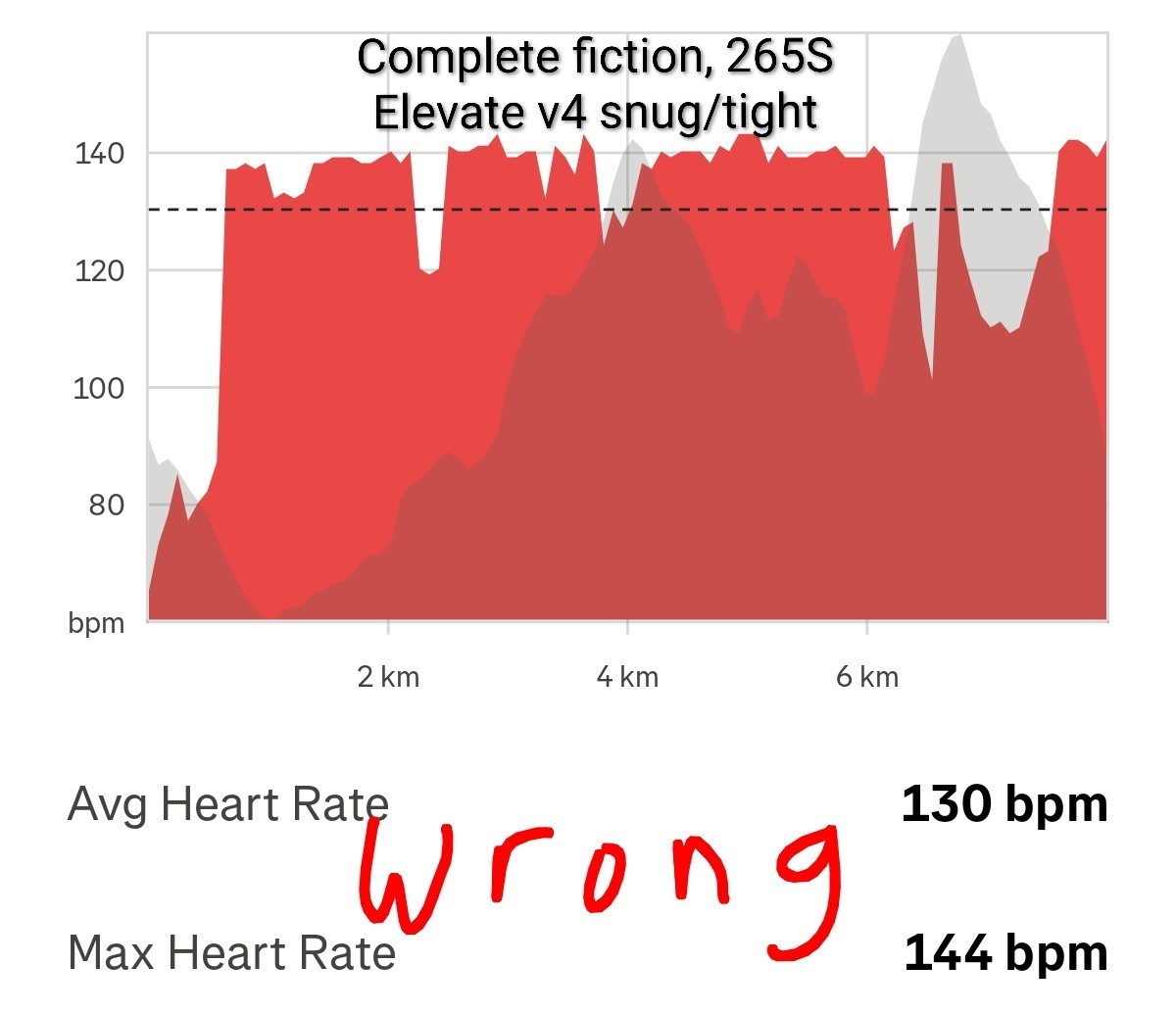
  • Its not a spike - its totally unreliable full stop. here is a graph from a trail run last saturday - the hr should have quickly gone into the 160s after a minute or two.  All of the log is rubbish - even after 17 minutes its not reliable.

  • heres another one from a marathon (Berlin at 27 degrees so temperarure should not be an issue)

    https://connect.garmin.com/modern/activity/20454647504

    the forum wont alllow me upload another image

  • Thank you  .  On the link you shared, one recommendation was to reboot the watch weekly.  Is that as simple as powering the watch down, waiting five minutes or so, and then turning the watch back on?