HRM600 intensity minutes counted wrong

Somewhere in May 2025 I started using a FR970 together with a HRM600. After a while I noticed al lot of intensity minutes during easy runs. I started a post about this issue, and had a (long) conversation with Garmin Support. It was/is under the attention of Garmin. But until now there is no follow up.

I'm using the Connect app on an iPhone 16 Pro

The post I started:

 https://forums.garmin.com/sports-fitness/running-multisport/f/accessories-sensors/416513/activity-minutes-off-when-running-using-hrm600  and forums.garmin.com/.../weird-intensity-minutes

In the mean time I changed from a FR970 to a Fenix 8 pro, and still have the same issue. I even had a second HRM600 as a replacement for the difficulty to remove the pod. So it can't be a hardware issue.

When running easy only in Z1, I got a of vigorous minutes. it seemed like zone 1 heartrates where added to vigorous. When I did a mixed run and run in multiple zones, the light minutes where calculated correct. But again way to much vigotous minutes, as my easy warm-up heartrates (zone 1) are added to the zone 3 heartrates. Wierd thing was that when I finnished my run and saved it, and immediately looked in the Connect app the IM's where correct, but checking again after 5 minutes, they where wrong again.

I thought I solved this by removing the HRM from the Connect app, and only had it connected to my FR. This seemed to be a work around to solve the issue. But not anymore. Looking back at my runs, the issue started again at the beginning of October while still using the FR970. But only for a short period. The HRM still wasn't connected (as far as I know) to the Connect app, and only to the FR.

Now using the Fenix I see the same.  Some runs are ok, but others are off.

So there still, or again, seems to be an intermittent issue with the IM's. Maybe a true-up issue?

As I see no other complaints, I'm wondering if more people have this issue

  • Could you post the following three screenshots?

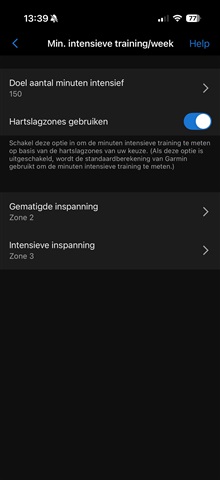
    1. Settings of Intensity Minutes (device settings » Health & Wellness » Weekly Intensity Minutes)
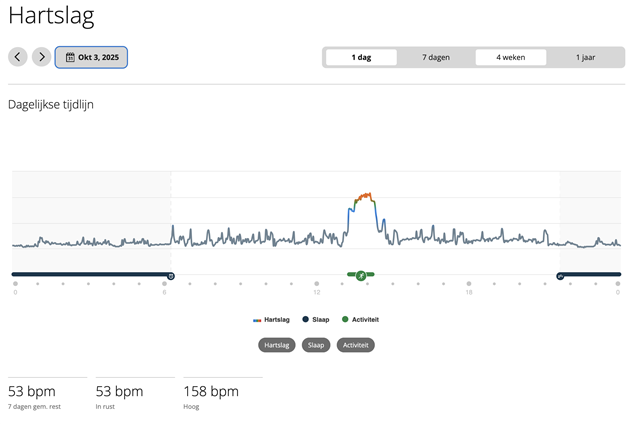
    2. The all-day HR page from Connect web (not from the phone app !!!) for one of the concerned days (i.e. https://connect.garmin.com/app/heart-rate/2026-02-18 if there was a problem today)
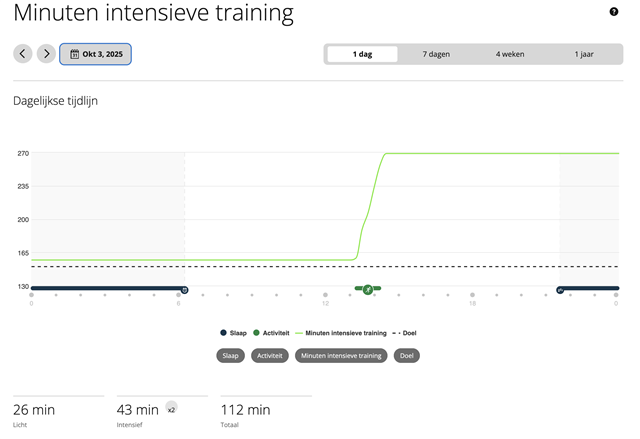
    3. The IM page from Connect web (not the app!) for the same day (i.e. https://connect.garmin.com/app/intensity-minutes/2026-02-18/0 )

    And also links to all activities from the concerned day.

  • Hi Trux

    I've checked the settings of my weekly IM. They are set Zone 2 for light, and from Zone 3 for vigorous. My zones are calculated with Karvonen method, and set in "sports heartrate" for running.

    Point is that is doesn't happen with every run, but only for some weeks, and than they are correct again. Again for a few weeks. I've checked al lot of my runs, and noticed that in October the issue started again. Unfortunately I didn't noticed it, because I didn't pay a lot of attention, thinking it was solved by removing the HRM from the Connect app.

    From November the calcutation was ok again, until half December. From January '26 the calculation was good again. But that lasted for only 2 weeks for the calculation to go wrong again.

    I can go on, but without changing anything to my settings and hardware, there is something wrong somewhere in the calculation of IM's. What I see is that Z1 haertrates are interpreted as Z3 heartrates. Like I said: Running ONLY in Z1, I sometimes see the amout of minutes calculated double for vigourous.

    See also some screenshots in my earlier posts from the links in my original question.

  • I made some screenshots from my run on October 3rd 2025:

    From the Connect app:

    IM's from the web:

    Heartrate from the web:

    And the IM's settig in Connect app

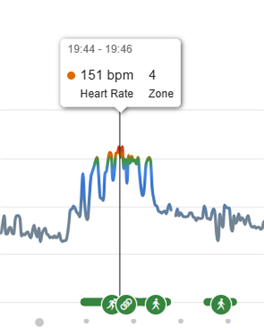
  • What is suspicious, and a possible culprit, is the all-day HR. The coloring of the chart corresponds to the HR Zones (i.e. red is HR Zone 5). You can see the exact HRZ info in the mouse-over tooltip  - see the example below from my own data:

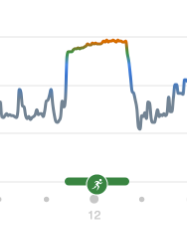
    .. and the chart section of the all-day HR during your Run activity below, shows that you've spent a significant time in the upper HR Zones (you can verify the exact HR Zones distribution on the curve, with the mouse pointer):

    So to me it looks like, the HRM 600 either uses the General HR Zone table, while the watch uses the Running HRZ table (yes, there are four different HRZ tables in the device settings » User Profile), or perhaps it even just uses a default table (since the tables are in device settings, and not in the common Connect settings » User Profile).

    In any case, I recommend checking all the HR Zone tables, and setting them all identically. Make then another test, and see whether it helps. If not, reach out to the Support, and make sure they understand that the all-day HR graph shows different zones than the activity. You can also send them a link to this thread.

  • Trux

    Thanks for your quick reply.

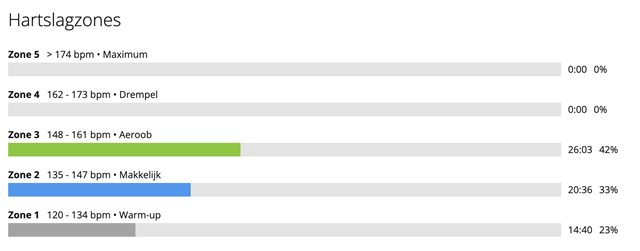
    During this run I had a mix of zones. 20 mins in Z2 and 26 in Z3. So the amount of IM's should have been 72 min (20 plus 2 times 26) and not 112.

    You might be correct, but it remains weird that it doesn't happen with every run. And when I look in Connect app at the run details, I asume the minutes in the zones (like the first screenshot) are used to calculate the IM's. Sometimes the amount of vigorous minutes equals the Z1 HR's

    But I will give it a try.

  •  

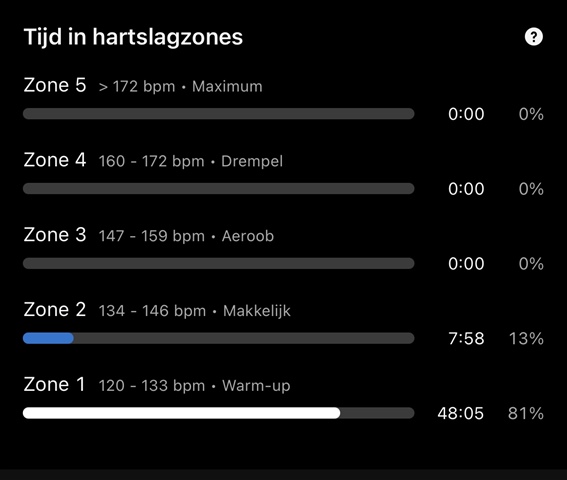
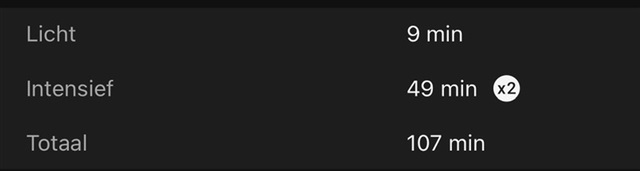
    After changing the settings for the default heartrates, I did a trainingsrun. This run was mainly in zone 1 and a few minutes in Z2. No Z3 or vigorous minutes at all. In the screenshots you will see that my Z1 heartrates are calculated as Z3 for vigorous minutes. This is a clear example of the issue.

    Time n zones:

    IM's:

    As you can see, the amount of vigorous minutes equals the Z1 minutes.