This discussion has been locked.
You can no longer post new replies to this discussion. If you have a question you can start a new discussion

I can't obtain satellites after downloading the latest firmware last week (October 2025). Ay ideas?

I get the triangle with a question mark inside when trying to connect to satellites. Anyone out there help or suggest how I can rectify this please

  • what kind of latest firmware? it has no new firmware since years :) 

  • To be honest I don't know. I last used my 1030 plus in July. I plugged it in and it automatically updated. 

  • probably that was a timezone update , not? what is the firmware numbers in the System-About-Copyright submenu ? (6.75 or 6.81? and what is the GPS firmware number? )

  • The firmware/software update keeps saying it is installed and then it it says it's updating firmware. The clock on the data page then changes to the new time (Hour went back 2am Sunday morning and then jumps to a hour ahead? Version 6.75 is showing on Garmin connect. I have turned the unit off and back on again but it still do not work.

  • pls check the Menu- System-About-Copyright and what is the GPS firmware number
    And under it, the EPO is "CURRENT" or "MISSING"? 

  • Hi Luke79. I have just looked and it says EPO missing. Thanks John

  • that is problem because without that file the Edge needs 10-15mins outside to build up this database from the sat signals. try to update it with Garmin Express on PC/Mac, (The GC mobile app should update it too via BT or via wifi , probably the file is corrupted on the unit, then you need to plug it on PC, search the remoteSW folder and delete the CPE.BIN (and any other files there), and re-sync. after a good sync the EPO must be "Current" and should be locked the sats and position.

  • Thank you Luke. I have left it outside for an hour with no Luke. I have tried updating it on my MacBook Pro. Will now try what you have suggested. I am not the most IT orientated but will try to work my way through it. Thanks again. John

  • could you check the GPS firmware number also? if that is 0.00 , then that is also a problem because the GNSS chipset is not working , so we need to fix that also 

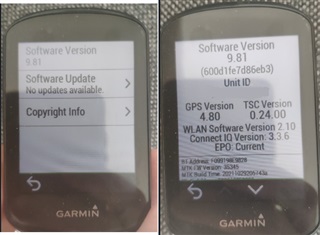
    it is a 830 but i assume the 1030plus is similar, go in the copyrighty menu and you will have this screen on the right

  • Thanks again Luke, yes firmware number showing 0.00. I get the same screens as you. Do you think a factory reset would fix it? I am not sure how I will navigate my way around fixing that myself.