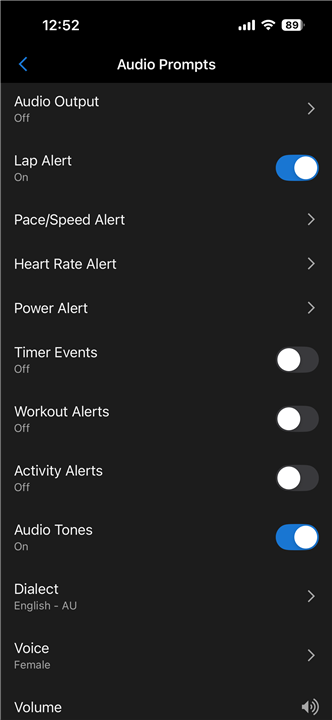
I'm getting a voice prompt for navigation turns on my iPhone, and I don't know how to turn if off!

Grateful for any help you can offer. 

I am using an Epix 2 pro 51mm (v17.23). 

In my settings, all audio prompts are set to off. When I am running a course, I get voice notifications on my iPhone for upcoming turns. I only want the vibrate/turn symbol on my watch, and not a voice speaking to me.

Thanks!

  • When I turn off all audio prompts, I get the message "Finish line in XXX meters" when navigating a course. I have turn off the "turn-by-turn" alarms in "Settings -> Navigation -> Alarms" and all audio prompts under "Settings -> Audio Prompts" (we chatted about that directly).

  • +1 My phone is on SILENT in my pack and I can hear it speaking "Turn left in seventy-five-point-five-six-two-four feet". 

    A year later and Garmin has no response? This is insane.  I contacted Garmin support and was told "this is how it is, and some people like it". Really great answer. 

    There needs to be a simple extra toggle to disable the spoken navigation prompts and keep the beep//vibrate. 

    This is not rocket science and is shameful that this was even introduced in the first place

  • This is still an issue. It seems a simple test to 'do a course' with headphones and walk a route with lots of turns.

    Then just do it by going to Navigation Settings. Alerts. Turn Prompts. 

    Scenario 1. If you wear headphones connected to your phone, and your watch is also connected to your phone, both by bluetooth: (This has not been tested with direct watch to headphone bluetooth, and the phone I used is an iPhone 12)

    Turn prompts on. Your watch vibrates, beeps etc, and you get a voice prompt over your headphones, that interrupts whatever you're listening to. Particularly problematic if you're doing lots of turns. You never hear your music.

    Turn prompts off. You get no notification.

    Scenario 2. If not wearing headphones.

    Turn prompts on. Your watch vibrates, beeps etc. (Obviously, no headphones for making voice prompts)

    Turn prompts off. You get no notification.

    What is for there to be two toggle options. Watchface Turn Prompts - On/Off, and Voice Turn Prompts - On/Off.

    Obviously the latter wouldn't affect scenario 2, as no headphones connected, But in Scenario 1, this option provides relief to everyone who doesn't want turn prompts, and doesn't want to continually turn off bluetooth between watch and phone to try and workaround the issue.

  • In scenario 2 though, with turn prompts on and no headphones, I DO get voice prompts out of my phone speaker.   That's the part I hate.

  • It seems so obvious to us users - not so much to the Garmin engineers who seem to think this is a ‘feature’.  Please please please Garmin, can we please have notification prompts as a separate option to audio voice prompts.

    And whilst you are at it, can you please fix the bug where if you are interested in having voice navigation prompts, that it doesn’t give distances to 3 decimal places.  Thank you,

  • Update September 16, 2025: 

    Our engineers have created a fix for a potential issue, that may allow Navigation Audio prompts sound, while disabled. This has been included with the latest Live SW version 23.18. If you are experiencing this concern, and have not already, install 23.18 using Garmin Express. 

  • Thank you for fixing this. As we have all read over a long number of months now, this was a really badly thought out ‘feature’ so glad it’s finally been identified as an issue and resolved. 

  • That is great. It sounds great. Now... where exactly can this be configured? I only found option to turn on/off navigation prompts completely in the Navigation menu, or to turn off audio prompts completely by setting the Audio Output to Off in Audio Prompts menu. For me the second option should work now as I am not using audio prompts at all. Nonetheless it still seems to be kind of all-or-nothing solution. Either you keep audio prompts on and then you must disable turn-by-turn notifications completely or you must completely disable audio prompts (including pace, power, etc.).

    Or I do not know where to look for the setting to disable navigation audio prompts only. 

  • I found the setting at the top of the Audio Prompts section. I turned audio output to off. I haven’t tested it yet but I assume it still beeps on the device but no longer through the phone. 

    Granted if you want workout verbal update and not navigation ones for example this will cut out all the verbal prompts. 

  • I do have the very same understanding. The first setting on the screen ("Audio Output") seems to configure how ANY audio prompt/alert will be played/routed, and not just navigation prompts. As I have written above: for me it works (not tested it yet). I just find it a bit "funny", that we are not given the option to disable JUST navigation audio prompts independently.