Garmin Forums
Garmin Forums
  • Site
  • User
  • Site
  • Search
  • User
  • Apps & Software
  • Outdoor Recreation
  • Sports & Fitness
  • Pilots
  • Developer
  • Beta Program
  • German Forum
  • More
  • Cancel
inReach
  • Outdoor Recreation
inReach
inReach Messenger In case you are wondering about this device...
    Related

    In case you are wondering about this device...

    twolpert
    twolpert over 3 years ago

    See the sales information here: https://www.garmin.com/en-US/p/793265

    Edited to add: Press release here: https://www.garmin.com/en-US/newsroom/press-release/outdoor/garmin-inreach-messenger-easy-to-use-satellite-communicator-provides-messaging-and-security-when-outside-of-cellular-coverage/

    • Sign in to reply
    • Cancel

    Top Replies

    • ekutter-dnu
      ekutter-dnu over 3 years ago in reply to 9411906 +1

      The keyboard on the Epix 2 is awesome.  Still not as quick as typing on the phone, but still passible for 160 character messages.  The wheel not so much.  And the fact it's always on your wrist.

      I agree…

    All Replies

    • Volker
      0 Volker over 3 years ago

      Many thanks for this surprising news! How great is this! I hope dcr has already tested it and is releasing a review very soon.

      • Cancel
      • Up 0 Down
      • Sign in to reply
      • Verify Answer
      • Cancel
    • Volker
      0 Volker over 3 years ago in reply to Volker

      Dcr hands on details:

      www.dcrainmaker.com/.../garmin-inreach-messenger-satellite-communicator-hands-on-details.html

      • Cancel
      • Up 0 Down
      • Sign in to reply
      • Verify Answer
      • Cancel
    • skyeye
      0 skyeye over 3 years ago

      when I read that the device must be paired with an app in order to be able to send an sos, I had to declare this as useless gadget

      • Cancel
      • Up 0 Down
      • Sign in to reply
      • Verify Answer
      • Cancel
    • Volker
      0 Volker over 3 years ago in reply to skyeye

      You can also sent a SOS without a connected phone/app directly via the messengerWink

      https://www8.garmin.com/manuals/webhelp/GUID-5919E4DF-BE2C-4897-AE03-3BF5B0AD3ACA/EN-US/GUID-F0FE98CC-2639-4E05-9653-D77E97346B89-homepage.html

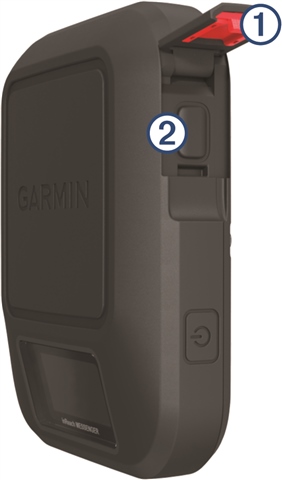
      Initiating an SOS Rescue

      You can initiate an SOS rescue with the device turned on or off if the device has battery power.

      1. Lift the protective cap from the SOS button .

      2. Press and hold the SOS button.
      3. Wait for the SOS countdown.

        The device sends a default message to the emergency response service with details about your location.

      4. Reply to the confirmation message from the emergency response service.

        Your reply lets the emergency response service know that you are capable of interacting with them during the rescue. If you do not reply, the emergency response service will still initiate a rescue.

      For the first 10 minutes of your rescue, an updated location is sent to the emergency response service every minute. To conserve battery power after the first 10 minutes, an updated location is sent every 10 minutes.

      TIP: You can also initiate an SOS rescue and interact with the Garmin® IERCC using the Garmin MessengerTm app. You must have an active satellite subscription to use the SOS feature in the app.
      • Cancel
      • Up 0 Down
      • Sign in to reply
      • Verify Answer
      • Cancel
    • twolpert
      0 twolpert over 3 years ago in reply to skyeye

      At least with regard to sent track points, iR messages, and SOS, the device is fully functional without the app. At least, that's the way I understand it.

      • Cancel
      • Up 0 Down
      • Sign in to reply
      • Verify Answer
      • Cancel
    • atlas_cached
      0 atlas_cached over 3 years ago in reply to skyeye

      This is false, where did you read this?

      • Cancel
      • Up 0 Down
      • Sign in to reply
      • Verify Answer
      • Cancel
    • 9411906
      0 9411906 over 3 years ago in reply to atlas_cached

      Just like on the Mini/2, you can do everything from the small screen and 3-button interface. You can also do the supported subset from an inReach compatible watch.

      Compared to the Mini/2 it seems to have the same inReach features (and the Messenger app - which is great). It has much more limited mapping and tracking features though, basically limited to TracBack. No mapping/course/activity. It doesn't have a (real) compass either.

      • Cancel
      • Up 0 Down
      • Sign in to reply
      • Verify Answer
      • Cancel
    • 9411906
      0 9411906 over 3 years ago

      BTW, Messenger is recognized by the latest version of Express. Nothing special to see there, but it works and you can browse the (fairly empty) file system.

      • Cancel
      • Up 0 Down
      • Sign in to reply
      • Verify Answer
      • Cancel
    • Volker
      0 Volker over 3 years ago in reply to 9411906

      What is your kind of use for the messenger? If you are going out for a hike etc, I assume you have a wearable/handheld/paper map with you for navigation/orientation or are you using only your phone with an outdoor app? Thanks

      • Cancel
      • Up 0 Down
      • Sign in to reply
      • Verify Answer
      • Cancel
    • 9411906
      0 9411906 over 3 years ago in reply to Volker

      Mostly 1-day or 2-day hikes / camping and other activities (snowshoeing, kayaking) outside of cell phone range. I am also using it while driving in the boonies to said activities. For that, the new seamless Messenger app is a big deal as it's common to go in and out of cell phone coverage.

      I actually switched my primary nav device from my phone (66i as backup) to an Epix 2. Now, phone is backup / big screen and I rarely pull it out.

      So I am switching from (cell phone + 66i) => (Epix 2 + Messenger + cell phone). Still on the fence on Messenger vs. Mini 2, but Messenger is it for now. The nav capabilities of the Mini 2 are not useful for me (already have 2 nav devices), so it's more of a form factor and mounting question.

      • Cancel
      • Up 0 Down
      • Sign in to reply
      • Verify Answer
      • Cancel
    >
    Copyright © 1996-2025 Garmin Ltd. or its subsidiaries
    • Site Map
    • Terms of Use
    • Privacy
    • Security