GPSMAP H1 – Distance to Destination does not decrease correctly (Software 13.07)

I have noticed an issue with the Distance to Destination data field on my GPSMAP H1 running software version 13.07.

During two separate walking activities, one started via Komoot Connect IQ and the other via Garmin Explore iOS, both with routing disabled, the displayed distance remained approximately equal to the original route length. It fluctuated slightly but never decreased significantly as I progressed along the route.

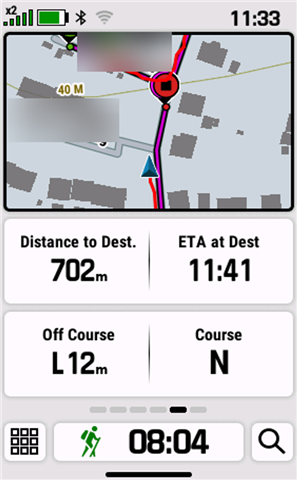
Even when approaching the destination (second test, walk around the block), the field still showed 702 m, although the destination marker was clearly visible nearby on the map (see attached screenshot).

The issue occurred with both navigation methods, so it does not seem to be specific to Komoot.

Has anyone else experienced this behaviour?
  • This is one of the few features that works for me so please don't jinx it, I have enough bugs to cope with!

    Looking at your display though, I notice your display shows your Off Course as 12m. One of the bugs I have is that this data doesn't show unless I am more than 20m off course. You replied to my post about this "Off Course" Data Field - Does It Work For You?

    What I have found with the H1 (and previous GPSMAP devices), is that once I am off course enough for the device to pop up the "Off Course" warning (20m seems the default for the H1), the Distance to Destination doesn't update, until you are back "On Course". This behaviour makes sense. I have also noticed that once I get that popup the "Off Course" data field displays data until I am less than 20m off course, I get the "On Course" popup, and the data disappears again from the "Off Course" data field.

    I am intrigued that you have a working Off Course data field but don't get the Distance to Destination updated. It's like your device has a much lower default for "Off Course" and so the field displays correctly but it thinks it is always "Off Course", so doesn't update the "Distance to Destination". I haven't found any way to change the default of 20m but I wonder if you have changed it to something much lower and that is why you are seeing the problem with updating "Distance to Destination" because your H1 constantly thinks it is "Off Course".

  • Following Phoenix's comments about the Off Course field only displaying a value beyond approximately 20 m, and Distance to Destination apparently not updating while the device considers itself Off Course, I performed several additional tests.

    First, I repeated my original test on the same loop, using the same navigation method, but changed the Advanced Settings:

    • Course Transition: Auto → Distance

    • Distance units: Meters

    • Distance Radius: 20 meters

    Initially, the Off Course field remained blank. The first value I noticed was at 33 m. I may have missed the 20 m threshold because I was not watching the field continuously. The displayed distance then continued to increase, while Distance to Destination showed the same incorrect behaviour as in my previous tests.

    I also considered whether the fact that this was a loop could be relevant, since the start and destination are very close to each other. At the beginning of the activity, the device actually announced “Destination reached”.

    However, after further testing, I can now rule out several potential causes. The results are consistent regardless of:

    • Whether routing is enabled or disabled

    • The Advanced Settings used, including Course Transition and Distance Radius

    • Whether the course comes from Komoot or Garmin Explore

    • Whether the course is a point-to-point route (A to B) or a loop

    In all these scenarios, both Distance to Destination and Off Course display nonsensical values.

    The only scenario in which both fields display reasonable values is when I start navigation directly on the H1 by selecting a point on the map, with routing enabled.

    So, while Phoenix's observation about the relationship between the Off Course status and Distance to Destination may explain part of the behaviour, my tests suggest that the issue is not limited to the Off Course threshold or to a particular Advanced Setting.

    The common factor appears to be course-based navigation itself. Direct navigation to a map point works correctly, whereas navigation along an imported or planned course does not, regardless of whether routing is enabled.

    Has anyone else been able to reproduce this distinction?

  • the problems with my H1 became so severe that I had no choice but to perform a factory reset.

    After the reset, I ran several tests. I encountered issues with round-trip courses, possibly because the destination point was displayed immediately.

    When navigating from A to B without routing enabled, the data fields worked correctly. Distance to Destination decreased as expected. Off Course remained blank until I deviated more than 20 metres from the planned course. Once I returned to the course, the field correctly became blank again.

    I then started a new activity using the same course, this time with routing enabled. Again, Off Course correctly remained blank until the deviation exceeded 20 metres. However, the deviation continued to increase to approximately 70 metres before recalculation started. At that point, the faulty rerouting behaviour began (see my separate report on recalculating). The device displayed off-course values of just a few metres, which kept changing as the device repeatedly recalculated the route.

    I consider this issue resolved for now.

    Unfortunately, the factory reset did not fix the other issues I recently reported or confirmed.

  • For round trip courses I find it works best to have some distance between the start and finish points. If they are too close the device indeed gets confused on start and finish. Which is a shame because my Edge never had issues with this, and neither the Wahoo ELEMNT ACE I use now.