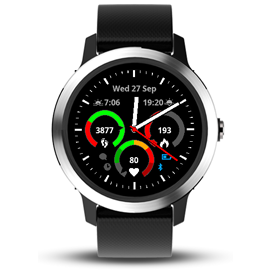
Watchface: Germon 3

Former Member
Former Member
Watchface with gauges.

Link to ConnectIQ store.


Please post any questions, bug reports or feature requests in this thread.

Known bugs
  • Heartratezones not shown on fenix 5x. Bug is registered with Garmin
  • Seconds hand not properly showing. Bug is reported to Garmin
Features planned in coming releases
  • Show seconds all the time
    This will require a major rewrite of the code to improve memory usage and computing time

Q & A

What is the meaning of the different gauge colors?

There are different types of gauges:
  • Progress gauge (used for steps, floors, calories, intensity minutes, distance)
    The progress gauge works with a moving target. It will calculate e.g. how many steps you should have at this point of time if you want to reach your goal. As long as you are below that moving tartet, the pointer will be in the red area. As soon as you are above that target, the pointer will be in the green area. If you already have achieved your goal, the pointer will also be in the green area and the dark green area will show, how far you are already above your goal.
    The progress gauge also takes your configured sleeping times into account. So the Watchface e.g. does not expect you to have already taken a quarter of your daily goal steps if it is still 6 o'clock in the morning and you just woke up.
    May sound a bit complicated, but just have a watch over the day and you will get how it works.
  • Heart rate gauge
    Shows your different heart rate zones as configured in your profile. The gray area is even below your first heart rate zone.
  • Static gauge (used for elevation)
    Just shows a gray gauge, as there is no target and no proper scale - proposals on how to improve on this welcome!
  • Temperature gauge
    Shows different colors in 10?C steps, everthing left of green is sub-zero.
    Keep it mind that you have your watch on your wrist - so the measured temperature will mostly vary from real environment temperature.
  • Weight gauge
    The colors indicate deviation from your configured target weight. +/- 4% is green, +/- 12% is yellow and +/-20% is red.
    Using it really only makes sense if you have some other service synching your weight to your Garmin account, like e.g. Withings/Nokia.
I do not get any sunset/sunrise times. It only show "0:00". Why is that?

That one is easy to fix. Just go outside and start any activity that does GPS tracking, wait for a lock on GPS. Then you can stop the activity. You do not even need to save it. Your sunrise/sunset times should be fine now. The story behind it: the watchface is not allowed to acquire GPS position itself. So instead it asks the device for the last known position and uses that one. If the device does not return any position you will see the "0:00". Remember to start a GPS activity when travelling to get the local sunrise/sunset times! community.garmin.com/.../1258618.png
  • Former Member
    Former Member
    Hi,
    Heres a link to a screengrab.
    https://c1.staticflickr.com/5/4497/3...4690a11f_o.png
    While you're looking at it, could I submit a feature request... Can there be an option to remove (set to None) the gauges maybe just the bottom one.

    Steve


    Hey Steve,

    I eventually got my own vivoactive and finally became user of my own watchface :-) I tried it out several days now but did not notice anything strange going on regarding the pointer in the heartrate gauge. Is this still happening for you or has it "accidentially" be fixed by my previous bug fixes?
  • Former Member
    Former Member
    Quick update ... I did a manual sync of the time with GPS and now I get the sunet and sunrise on the watchface !


    I added it to the Q & A. That was one of the most asked questions on my previous watch face :-)
  • Former Member
    Former Member
    You can request whatever you want. Doesn't mean I have to implement it. :-) But I will put it on my feature request list, but it won't be implemented soon, as it would require quite some restructuring of the code as it currently is working with static colors.


    No worries ;-) Ta
  • Hey Steve,

    I eventually got my own vivoactive and finally became user of my own watchface :-) I tried it out several days now but did not notice anything strange going on regarding the pointer in the heartrate gauge. Is this still happening for you or has it "accidentially" be fixed by my previous bug fixes?


    :D Seems to be stable now :D Keep up the great work :D Love the face :D
  • Former Member
    Former Member
    Hello,

    I just updated to the newest watch face version: V1.6.3 on my Vivoactive 3 and I notice the gauge function has changed. Before the update, the gauges were red if I was below my target goal and only turned green when I was on track of my goal or ahead of it. However, now the gauges are both red and green, even if I am behind my goal. Did this come with the update or is it a bug? I really liked that the gauges would only turn green if I was on track to complete my goal(s). Any feedback would be great, thanks!

    Check out the image for a clear view of what I mean. Both the steps and my weekly active minutes are below the red marker and yet the green is filled, where as before, it would be gray/black.

    Edit: I've just uploaded a new image after going to the gym. As you can see, my weekly active minutes are just under the red marker and yet there is still green after the red. It seems like a bug, any feedback would be great!
  • Hi there. I just started using your watch face and have a question about the heart rate. There seems to be a lag between what the watch shows vis a vis the heart rate widget. Can you explain how the two interact. Secondly, for info purposes, would I save some battery power by disabling the second hand. Since it’s only on for about 10 seconds, it really isn’t much use for timing anything.

    Thanks.

    Jonathan
  • Former Member
    Former Member
    Hello! Love the watch face. However I have an issue I cant resolve. I have my left data field set to digital time and the right data field set to temp. The digital time seems to be about 12 hour off and the temp is off by about 33 degrees. How can I adjust this?
  • Former Member
    Former Member
    I have a feature request. It would be great if I could move the Move Bar to the right side of the face. Or even wrap it around the entire face. Something to make the Move Bar more prominent. I wear the watch on my left wrist and when wearing long sleeves, it is slightly more difficult to view the move bar as it gets covered by my sleeve. Just a thought.
  • Could someone please so kind and explaine me the Move Bar function? I can see grey (?) fields between 7 and 11 o'clock. But what is the meaning?
  • Former Member
    Former Member
    Could someone please so kind and explaine me the Move Bar function? I can see grey (?) fields between 7 and 11 o'clock. But what is the meaning?


    Biggest grey bar at bottom left is the first hour. That turns red after and hour of minimal movement. Each of the other 4 grey bars (smaller) are the 15 minute increments of the second hour. They turn red in succession in 15 minute increments.