Smart Bike Lights (Data Field) / Bike Lights Control (Widget)

I've made two open source CIQ applications to control ANT+ lights:

- Smart Bike Lights (data field): https://apps.garmin.com/en-US/apps/0d9fd828-c932-4470-9c37-fd2828881888 

      Configurator: https://maca88.github.io/SmartBikeLights/ 

- Bike Lights Control (widget): https://apps.garmin.com/en-US/apps/fa3c2332-76e3-4ba1-8528-32a0fd617ab1 

     Configurator: https://maca88.github.io/BikeLightsControl/ 
Smart Bike Lights features:
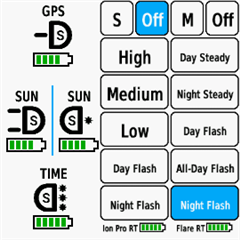
- Automatic light control (Smart mode) based on the configured filters (sunset, sunlight, speed, ...)
- Manual light control (only for Edge devices with a touch screen or devices with CIQ 3.2 and more than 32KB memory)
- Records lights modes that are displayed in Garmin Connect

Bike Lights Control features:
- Manual light control (available to all devices)

Both applications can be installed on the same device, which can be useful for low end devices (e.g. Edge 520) where "Bike Lights Control" can be used to change light modes manually and "Smart Bike Lights" for automatic light control.

Currently registered ANT+ lights:
- Bontrager Ion Pro RT
- Bontrager Ion 200 RT
- Bontrager Flare RT
- Garmin Varia RTL500
- Garmin Varia RTL510
- Garmin Varia RTL515
- Garmin Varia HL500
- Garmin Varia UT800

in case your ANT+ light is not on the list you can help by doing the following:

1. Install Bike Lights Control
2. Pair your bike light with your Garmin device
3. Open the widget:
- Edge with a touch screen: post which numbers are displayed on the buttons and what mode each button represents when pressed
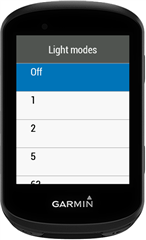
- Other devices: Select the "Light modes" menu and post which numbers are displayed in the menu and what mode each menu item represents when selected

Example for Bontrager Ion Pro RT:
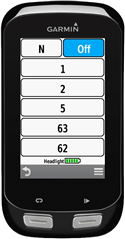

1 -> High steady beam
2 -> Medium steady beam
5 -> Low steady beam
63 -> Day flash
62 -> Night flash

There are some features that could be possible to add in the future, but would require Garmin to add them to the CIQ api. In case you are interested in any of the below features, consider upvoting their feature request thread:

1. Control lights based on the ambient light sensor available on some devices:
https://forums.garmin.com/developer/connect-iq/i/bug-reports/ambient-light-sensor-api-access 

Known issues:

1. Unable to use Tempe Visualizer or TyreWiz Data Field alongside Smart Bike Lights:
https://forums.garmin.com/developer/connect-iq/i/bug-reports/lightnetworklistener-onbikelightupdate-not-called-when-certain-data-fields-are-installed

  • I have other apps running( HMs DIY;Clean Multifield, Edge Mapfield ), but they haven't interfered with your app so far. Whenever I test my Varia 515 or 715 with my configuration, everything works as expected with your app. Only the new Varia 820 doesn't work.

  • The 820 radar light connects to EDGE via both Bluetooth and ANT+. You can try using only ANT+ mode; the video explains how to do so, but some functions may not be available.

    https://www.dcrainmaker.com/2026/02/garmi-varia-rearvue-radar-820-in-depth-review.html

  • Hi Maca,

    Thank you for your reply.

    The issue is that on the Data Screen, there is no option to select a "Connect IQ" data field. The only available options are "Custom Data," "HR Zone Guide," "Stamina," etc.

    However, I have the Data Field installed via Garmin Connect IQ, and I have also set up its configuration through the website configurator. I haven't installed any other Data Fields. What should I check next? :-)

  • Some of the standard data screens on watches limit what you can display & don't allow ciq data fields. You would need to add a custom data screen with a 1 data field layout then add the smart bike lights data field to it

  • Fixed Thumbsup Forerunner 955 + Varia RTL515 

    Hello, thanks for the support.

    I made two mistakes:

    1. No network – incorrect pairing of the Varia RTL515. I needed to use Varia a long press to enter pairing mode; after that, I got a connection for both Radar & Lights.

    2. No Data Field "IQ Smart Bike Lights" – I expected the new data field to appear by itself, but I had to add it manually as described.

    I am very happy and grateful for the perfect work on this "product"!

  • I had this all working and nowhave no network on data screen with only Smart Bike Lights on it. I can select the settings. My other version of smart bike lights is working with the congested lights. It’s just smart bike light 2 with the varia light that is showing as no network. 

    this is with Bontrager ion 200 and RT with Varia 515 on edge 840. Thanks

  • With the new Varia Rearvue 820, the light no longer turns on when a vehicle approaches. Can anyone tell me what is wrong?Setup:

    Garmin Edge 1040 SW 30.18

    Garmin Rearvue 820 SW 6.34

    Smart Bike Light SW 0.31.1

    Config:

    ###0,73535488::1:#3,3!Nacht:1:4:0:0Es0,r0!KFZ:1:4:0:0I[300]0!:1:0:0:0D=1##3,2:RearView:0:16777215:4!1,:-1!2,Ein:4,Aus:0#0::#0:1#123!:123!#0#0#B3843##24#0#0


    It works flawlessly with my old Garmin Varia 516.

    Config:

    ###0,4096::1:#3,3!NACHT:1:4:0:0Es0,r0!KFZ:1:4:0:0I[300]0!:1:0:0:0D=1##3,2:Varia 516 DE:0:16777215:4!1,:-1!2,Ein:4,Aus:0#0::#0:1#123!:123!#0#0#B3843##8#0#0

    Thanks a lot

  • Make sure that the light is paired, most likely now you have only the radar paired. In order to pair Varia 515, you need to press and hold the power button for around three seconds until pink light starts flashing (pairing mode). Then you need to pair it by selecting Sensors -> "Search all" option in the menu. 

  • As  mentioned above, you need to pair the light by using ANT+ instead of Bluetooth. It seems like that Rearvue 820 is paired with Bluetooth by default, which does enable you to use the new radar features (vehicle size, position). As for now, the only option for Smart Bike Lights to work is to pair the light with ANT+. Until Garmin will do something about it, you will have to choose between using Smart Bike Lights or new radar features.

  • Hi,

    I am using a Garmin Edge 1050 with a Ravemen FR300 (ANT+) and a Garmin Varia RTL 515.

    I want a very basic setup, just to control my lights. To do this, I configured an Individual Light Network, as this is the only way to use the FR300.

    On my data screen, I can see and control both lights. However, every time I power off the FR300, the screen goes black, and I can no longer control the RTL 515.

    What could be causing this?

    Thanks in advance!

    ____
    Here is my configuration: 

    #0,88092688::1:#1,1!:1:0:0:0D=1#0,73535488::1:#1,1!:1:0:0:0D=1##6,5:Varia 515:0:16777215:-1!2,:-1,Off:0!1,Solid:4!1,Peloton:5!1,Day Flash:7!1,Night Flash:6#1:7393!1:722877!0#1:1#13!:13!#16755200#0#B4440#16#3#0#0