Problem with partial upd .. function, please help.

Hello.

I'm sorry to start another thread for OnPartialUpdate.

I know there is a lot on the forum, but I have not found a solution and an example that would solve my problem.

I will try to describe here what I need to call regularly via this function.

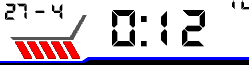
I have five slashes that I created in the font maker.

These slashes appear to me instead of seconds, ie 1 slash = first second.

It is like
"Knight Rider Car" reads slashes from left to right in seconds. Wink

The problem is that when I do dc.setClip at the bottom of the screen for slash size, width, height, I get to total time fast.


I would ask someone who could help me with this feature.

The best example of how to proceed.


Here's what I'm trying to do in OnPartialUpdate.

I do dcClearClip in OnUpdate...

Thank you
function onPartialUpdate(dc){
		sleepMode = true;


		dc.setClip(20, 175, 25, 20);
        dc.setColor(Graphics.COLOR_BLUE, Graphics.COLOR_TRANSPARENT);
        dc.drawText(20, 175, $.fontIcon_seconds, $.ICON_SECONDS, Gfx.TEXT_JUSTIFY_CENTER);


        }
         }

  • I would just ask you to do functions that will repeat if, else if. drawing from right to left is not a problem, I only change x, or center, left, right

    I still have a question, is it better to use a font because of memory, or do you prefer dc.fillPolygon - slash?

  • everything depends on free memory/peak etc use memory monitor  and sim

    and remember that some group of devices has different limit

    if you have memory is simple to use font

  • Thank you for answer. One last question, please email me what the if function for loading seconds should look like?

    function onPartialUpdate(dc)
    {

    var s = SYS.getClockTime().sec % something;
    dc.setClip(seconds_x [s,0], 175, 26, 20);
    dc.setColor(
    SYS.getClockTime().sec % 2 ? Graphics.COLOR_BLUE : Graphics.COLOR_RED,
    Graphics.COLOR_TRANSPARENT);
    dc.drawText(seconds_x [s,1], 175, $.fontIcon_seconds, $.ICON_SECONDS, Gfx.TEXT_JUSTIFY_CENTER);
    }

    if

    dc.setClip(seconds_x [s,0], 180, 26, 20);

    dc.drawText(seconds_x [s,1], 180, $.fontIcon_seconds, $.ICON_SECONDS, Gfx.TEXT_JUSTIFY_CENTER);

    }

     }

    ???

  • everything depends on algorithm, I give you the example how to choose colours from seconds

    const mColors

    [

    Graphics.COLOR_BLUE,// colour for second 0,2,4,..

    Graphics.COLOR_RED  // colour for second 1,3,5,..

    ];

    function onPartialUpdate(dc)
    {

    dc.setClip(20, 175, 26, 20);
    dc.setColor(
      mColors[SYS.getClockTime().sec % 2], ///sec %2 is rest of integer dividing per 2
      Graphics.COLOR_TRANSPARENT);
    dc.drawText(333, 175, $.fontIcon_seconds, $.ICON_SECONDS, Gfx.TEXT_JUSTIFY_CENTER);
    }

  • Thank you very much for your help, I probably already know how to do it, but it will be very difficult for me.Grimacing

    so do i have to do a dc.setClip on each slash?

  • I haven't tested it...

    const mColors

    [

    Graphics.COLOR_BLUE,// colour for second 0,2,4,..

    Graphics.COLOR_RED  // colour for second 1,3,5,..

    ];

    const mPositionTextX_ClipX
    [
    //fill it drawX, clipX
    [...,...],
    [...,...],
    [...,...],
    [...,...],
    [...,...],
    ];

    function onPartialUpdate(dc)
    {


    if(sec % 6)
    {
        //drawing only for 1..5 second
        var
        sec  = SYS.getClockTime().sec,
        pos = (sec  % 6)  - 1;
        
        dc.setColor(
            mColors[(sec / 10) %2],
            -1);
        dc.setClip(mPositionTextX_ClipX[pos][1], 175, 26, 20);
        dc.drawText(mPositionTextX_ClipX[pos][0], 175, $.fontIcon_seconds, $.ICON_SECONDS, 1);
    }

    }

  • so I repeat the if function and change only the parameters?

  • i don't know what you mean, fill mPositionTextX_ClipX and test it

    BTW. probably nobody will use this feature due to battery saving so don't get tired too much.

    My onPartial lasts 675 micro seconds (and i have option in settings to off it) see in profiler how is in your case.

  • thank you for the warning, it is made up so that it always runs save mode according to user settings. Or I'll change it so that the slash reads in 5 seconds.

  • Hello, so I modified your code and when I want to run Low Power Mode in SIM, I get this error?

    Error: Symbol Not Found Error
    Details: Could not find symbol 'sec'

    please help

    using Toybox.WatchUi as Ui;
    using Toybox.Graphics as Gfx;
    using Toybox.System as Sys;
    using Toybox.Application as App;
    using Toybox.Time as clock;
    using Toybox.Time;
    using Toybox.Time.Gregorian;
    using Toybox.Lang as Lang;
    using Toybox.Math;


    const mColors = [
    
    Gfx.COLOR_BLUE,// colour for second 0,2,4,..
    
    Gfx.COLOR_RED  // colour for second 1,3,5,..
    
    ];
    
    const mPositionTextX_ClipX = [
    //fill it drawX, clipX
    [26,32],
    //[...,...],
    //[...,...],
    //[...,...],
    //[...,...],
    
    
    ];


    class RetrroDigiWatchView extends Ui.WatchFace {


       function initialize() {
            foregroundColor = Gfx.COLOR_WHITE;
            backgroundColor = Gfx.COLOR_BLACK;
            WatchFace.initialize();
           
        }


       function onLayout(dc) {
            setLayout(Rez.Layouts.WatchFace(dc));
            watchHeight = dc.getHeight();
    		watchWidth = dc.getWidth();
            App.getApp().checkPendingWebRequests();
        
        }
    
       
       function onShow() {
        	$.loadResources();
        }
    
      
        function onUpdate(dc) {
        	if(dc has :setAntiAlias) {
    			dc.setAntiAlias(true);
    		dc.clearClip();
    		}


            View.onUpdate(dc);
             
        	drawSeconds(dc);


        }
       		  
           function onPartialUpdate(dc)
        {
    
    
        if(sec % 6)
        {
        //drawing only for 1..5 second
        
        
        var
        sec  = Sys.getClockTime().sec,
        pos = (sec  % 6)  - 1;
        
        dc.setColor(
            mColors[(sec / 10) %2],
            -1);
        dc.setClip(mPositionTextX_ClipX[pos][1], 175, 26, 20);
        dc.drawText(mPositionTextX_ClipX[pos][0], 175, $.fontIcon_seconds, $.ICON_SECONDS, Gfx.TEXT_JUSTIFY_CENTER, 1);
       }
        }
