behaviorDelegate and Vivoactive4

Hi all,

I surely miss something but don't find what...

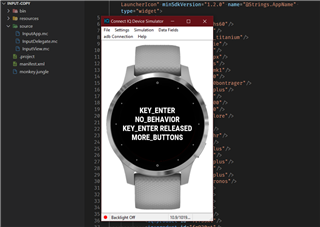
I try to understand what function of a behaviorDelegate is called when I push the upper button of a vivoactive4. So I overload all functions of inputDelegate and behaviorDelegate and put a println.
But when I start the simulator and push the button : nothing in the log !!... Same for holding pressure on screen.

class APICallDelegate extends WatchUi.BehaviorDelegate {

    function initialize() {
        BehaviorDelegate.initialize();
    }

    function onKey(evt) {
        var key = evt.getKey();
        System.println("Evt = " + evt + ", key=" + key);      // e.g. CLICK_TYPE_TAP = 0
        return true;
    }

    function onTap(clickEvent) {
		System.println("arg1");
		if (Application.Properties.getValue("TapLaunch") || selected_action == null) {
			self.onKey(new Toybox.WatchUi.KeyEvent(KEY_ENTER, PRESS_TYPE_ACTION));
		}
        return true;
    }

function onNextMode() {
		System.println("arg3");
		return false;
	}
function onNextPage() {
		System.println("arg4");
		return false;
	}
function onPreviousMode() {
		System.println("arg5");
		return false;
	}
function onPreviousPage() {
		System.println("arg6");
		return false;
	}
function onSelect() {
		System.println("arg7");
		return false;
	}

function onKeyPressed(keyEvent) {
		System.println("arg8");
		return false;
	}
function onKeyReleased(keyEvent) {
		System.println("arg9");
		return false;
	}
function onRelease(clickEvent) {
		System.println("arg10");
		return false;
	}
function onSelectable(selectableEvent) {
		System.println("arg11");
		return false;
	}
function onSwipe(swipeEvent) {
		System.println("arg12");
		return false;
	}


	function onHold(clickEvent) {
		System.println("arg20");
		self.onMenu();

        return true;
	}
	
	function onMenu() {
		System.println("arg21");
        ...

        return true;
    }

	function onBack() {
		System.println("arg22");
    	System.exit();
    }

  • Arf, I removed Eclipse totally (files, workspace, .p2, .eclipse ...) and removed all files of SDK, then do a fresh install of all tools...
    Same result, upper button still no work... I give up ! I will not resinstall the system Sweat smile

    But good news, I had a feedback from a user that have a VivoActive4, the widget work as espected in real life (upper button work as KEY_ENTER on the initial view).

  • Cool, glad to hear it works!

    So this probably won't help. but could you try using physical keyboard shortcut ENTER for the device's KEY_ENTER in the sim?

    Here's all the shortcuts I know, in case it helps:

    ENTER/RETURN = Start button (KEY_ENTER)

    ESC = Back

    UP/DOWN = Up/Down (note that this will *not* translate into swipes for touchscreen devices that lack physical up/down buttons, although depending on how your code is written, they may work anyway -- i.e. if your code also accepts those physical buttons for touchscreen devices. I consider this to be a bug since the watch doesn't have those physical buttons but ¯\_(ツ)_/¯)

  • Thanks, I didn't know about these shortcuts. I tried and the result is ... the same !!! (KEY_ENTER is triggered only on the sub-view).

    But why jim doesn't facing the same issue ?!?

    I will try from my Debian, if the result is the same, I will open a bug report.

  • , if you have some time to waste ;o)  If you can load the "input" example from SDK, change to widget in the Manifest, and add vivoactive4 in the manifest, then launch. When you push the upper button it normaly change the first line to KEY_ENTER.

  • Yep, it works for VA4S, VA4 and even for VA3 (which as I argued before, it really shouldn't, IMO).

  • Yes, a short press of the button on a va3 triggers KEY_ENTER, in both the sim and on the real device.

  • Yep, it works for VA4S, VA4 and even for VA3 (which as I argued before, it really shouldn't, IMO).

    Yes, a short press of the button on a va3 triggers KEY_ENTER, in both the sim and on the real device.

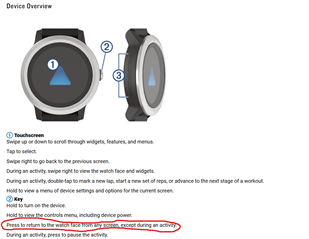
    We're talking about a widget here, and VA3 widgets can't detect KEY_ENTER on a real device because KEY_ENTER is used to return to the watchface when you're not in an activity (*), hence my comment that it shouldn't be detected in the sim for VA3. But as we all know "the sim is not an emulator".

    (*) It literally says so in the manual. I also had user complaints when I tried to detect KEY_ENTER in a VA3 widget, bc it obviously didn't work IRL (although ofc it worked in the sim).

    (Sure, maybe a VA3 widget actually does "detect" KEY_ENTER on a real device -- but whether it does or it doesn't, for practical purposes it doesn't matter because the widget will exit immediately at that point. Which is something the sim doesn't model.)

    Plus the problem Rodolphe is having is that the sim is NOT detecting KEY_ENTER (for VA4).

    Thanks for your input tho.

    www8.garmin.com/.../GUID-F76E3DE8-D6F8-4C7E-A361-3DBC4D8A7607.html

  • The solution is to use onSelect, which is a screen tap on a va3 and other touch devices.

  • The solution is to use onSelect, which is a screen tap on a va3 and other touch devices.

    I realize that, but once again that's missing the point. The point is that the simulator gives you the impression that KEY_ENTER would work in a VA3 widget, but it doesn't. And the only way to find out is to read the VA3 manual, to try it with a real VA3 (sorry, I don't own one) or to get complaints from VA3 users.

    It's tangential to this discussion, but my use case was to implement a stopwatch widget for VA3 which would allow the user to press the physical button to start/stop the timer. Pretty amazing that I was able to do that with literally every other watch than the VA3, including all other Garmin touchscreen watches (which all have more than 1 button).

  • You guys are bounding around so much in here it is impossible to tell what is going on.

    As I said above, the initial view delegate in a widget app should not get up/down/back key events and it should not get swipe events either. If the device has a button that is associated with the ON_SELECT behavior, that button press should be directed to the delegate. If the device uses a touch screen tap for the ON_SELECT behavior, then a tap event should get passed to the delegate.

    You should expect similar behavior for the ON_MENU behavior. i.e., devices should forward the menu input to the initial view delegate (e.g., hold the up/menu button on a fenix6 or press and hold the screen on a vivoactive4). Anything else would be a bug.

    It appears to me that the issue you are seeing is related to the Glance View option. If you launch the widget on a device that has glance view support and you toggle Settings > Glance View to OFF, you should see the expected behavior... At the initial widget view with a vivoactive4, the top right button and swipe left do nothing, while the bottom-right button and swipe up/down/right will leave the widget loop (exit the widget).

    If you repeat this and turn the Glance View option ON and test with the vivoactive4, you will see the bug... all inputs are passed through to the initial view.

    I haven't tested on a physical vivoactive4, but it *should* behave in a manner consistent with the simulator when the Glance View setting is OFF.